# flex_seed_scheme 5.0.1
A more flexible and powerful version of Flutter's ColorScheme.fromSeed. Use multiple seed colors, custom chroma and tone mapping.
## Installing
```
export PUB_HOSTED_URL=https://pub.mirror.p-hatan.com
flutter pub add flex_seed_scheme
```
Published: 2026-08-30T21:01:25.561877Z
Expected archive SHA-256: 08f9ee11f9a08c2dee76d0a07ea824c8a09ea4db9456e32ac4f6dfb34d28392c
Available in cache; verification: upstream_checksum
## Direct dependencies
- collection: ^1.19.1
- cupertino_ui: ^1.0.0
- flutter: map[sdk:flutter]
- material_ui: ^1.0.0
- meta: ^1.18.0
## Package README (untrusted upstream documentation)
[](https://pub.dev/packages/flex_seed_scheme) [](https://codecov.io/gh/rydmike/flex_seed_scheme) [](https://opensource.org/licenses/BSD-3-Clause)
# FlexSeedScheme (FSS)
A more flexible and powerful version of Flutter's `ColorScheme.fromSeed`. Use this package instead of `ColorScheme.fromSeed` and get around its limitations. The replacement `SeedColorScheme.fromSeeds` has the following additional capabilities:
* You can use separate seed key colors for all palettes the `ColorScheme` is based on, to customize the seed generated tonal palettes for primary, secondary, tertiary as well as error, neutral and neutral variant colors used by the `ColorScheme`.
* Change and customize the chromacity (colorfulness) used in the seed strategy for tonal palette generation in the Google HCT (Hue-Chroma-Tone) color space.
* Customize tonal palette tones to `ColorScheme` color mappings.
* Remove color tint from all generated surface colors and make them monochrome.
* Make monochrome seed colors, like black, white and greys, produce the expected greyscale palettes with `respectMonochromeSeed`, instead of the cyan and red hues that plain `ColorScheme.fromSeed` gives you.
* Use the Material-3 design `ColorScheme` variants like `fidelity`, `content` and `monochrome` that arrived in Flutter SDK v3.22.2, with the twist that you can also use multiple seed colors with them.
## Getting Started
Add the `flex_seed_scheme` package to `pubspec.yaml`:
`dart pub add flex_seed_scheme` or `flutter pub add flex_seed_scheme`
### Version 5.0.0
FlexSeedScheme 5.0.0 requires Flutter 3.47.0 and Dart 3.13.0 or later. It brings full support for the SDK decoupled `material_ui` and `cupertino_ui` packages. It contains no breaking or new APIs.
Produced `ColorScheme` results are the same as in version 4, with one intentional bug fix exception: the `FlexTones.surfaceTintTone` mapping is now actually applied to the produced `ColorScheme.surfaceTint` color, as was always intended. Previously `surfaceTint` was always assigned the same color as the produced `primary` color. This changes the produced `surfaceTint` color of the built-in `ultraContrast`, `candyPop` and `chroma` configurations, as well as of custom `FlexTones` that define a `surfaceTintTone` differing from their `primaryTone`. Since the surface tint color is only used as a low-opacity elevation overlay, the visual impact of this fix is minimal.
### Demo Web Application
You can try a web version of the package example and demo app [**here**](https://rydmike.com/flexseedscheme/demo-v5).
## Usage
Import the package to use it:
```dart
import 'package:flex_seed_scheme/flex_seed_scheme.dart';
```
Define seed key colors that will be used to compute your seed generated `ColorScheme`.
```dart
// Define your seed colors.
const Color primarySeedColor = Color(0xFF6750A4);
const Color secondarySeedColor = Color(0xFF3871BB);
const Color tertiarySeedColor = Color(0xFF6CA450);
```
With **FlexSeedScheme** you make a seed generated `ColorScheme` using `SeedColorScheme.fromSeeds`. It works like `ColorScheme.fromSeed`, but instead of only accepting a single seed color, it can use **six key colors** as seed colors. One for each main color (primary, secondary and tertiary) group in `ColorScheme`, plus separate ones for the error color and for the neutral and neutral variant palettes.
You can even customize the seed generated `error` color, typically there is no need to do so, but if your primary color is of a red hue, that conflicts with the error color, then adjusting the error color is a possibility.
You can also use custom key colors to seed generate the neutral and neutral variant palettes, that are used to define all the surface colors in `ColorScheme`. We recommend sticking to the default that uses primary key color's hue with very low chroma.
Chroma limits that differ from Material-3 defaults for tonal palette generation, can also be
defined. Additionally, tone mapping, that defines which tone is used by a `ColorScheme` color, can be customized. Both are done via `FlexTones` passed in to `tones`.
Typically, you would use the same key colors and tones setup to produce the `ColorScheme` for light and dark theme mode. This guarantees that the light and dark theme use identical generated tonal palettes, and only vary based on which tones are used for what color in light and dark mode. This results in matching light and dark theme colors. This is just the norm though, feel free to experiment.
```dart
// Make a light ColorScheme from the seeds.
final ColorScheme schemeLight = SeedColorScheme.fromSeeds(
brightness: Brightness.light,
// Primary key color is required, like seed color in ColorScheme.fromSeed.
primaryKey: primarySeedColor,
// You can add optional key colors as seeds for secondary and tertiary colors.
secondaryKey: secondarySeedColor,
tertiaryKey: tertiarySeedColor,
// Tone chroma config and tone mapping is optional, if you do not add it
// you get the config matching Flutter's Material 3 ColorScheme.fromSeed.
tones: FlexTones.vivid(Brightness.light),
);
// Make a dark ColorScheme from the same seed colors.
final ColorScheme schemeDark = SeedColorScheme.fromSeeds(
brightness: Brightness.dark,
primaryKey: primarySeedColor,
secondaryKey: secondarySeedColor,
tertiaryKey: tertiarySeedColor,
tones: FlexTones.vivid(Brightness.dark),
);
```
### Separate Key Colors to Seed Each Main Color Group
You can use separate key colors as seeds to generate the primary, secondary and tertiary tonal palettes. If no key color for `secondaryKey` and/or `tertiaryKey` are provided, they use `primaryKey` color as their seed color value.
If you only specify `primaryKey` color as seed, and no custom `tones` configuration, an identical `ColorScheme` to `ColorScheme.fromSeed` is produced.
The default chroma limits in the HCT color space used for seed generated colors for secondary and tertiary colors in `ColorScheme.fromSeed` have quite low chroma values. This makes the colors muted or pastel like. This is most obvious with secondary colors. This is by design in the standard Material-3 color palette. You can tune this behavior by passing in a custom `FlexTones` configuration to `tones`. There are pre-made configurations you can use, above `FlexTones.vivid` was used. It is also easy to make custom configurations. Look in source code for `FlexTones` and use the pre-made definitions as inspiration for your own configs.
Using the above configuration, the following core palettes are generated, in order from top to bottom:
* Primary tonal palette
* Secondary tonal palette
* Tertiary tonal palette
* Error tonal palette
* Neutral tonal palette
* Neutral variant tonal palette
 The color tones in the above palettes are then mapped to `ColorScheme` colors. Mapping is different for light and dark theme mode to create a color scheme with suitable contrast. With the example `FlexTones.vivid` setup used in `tones`, the light `ColorScheme` is mapped as shown below:
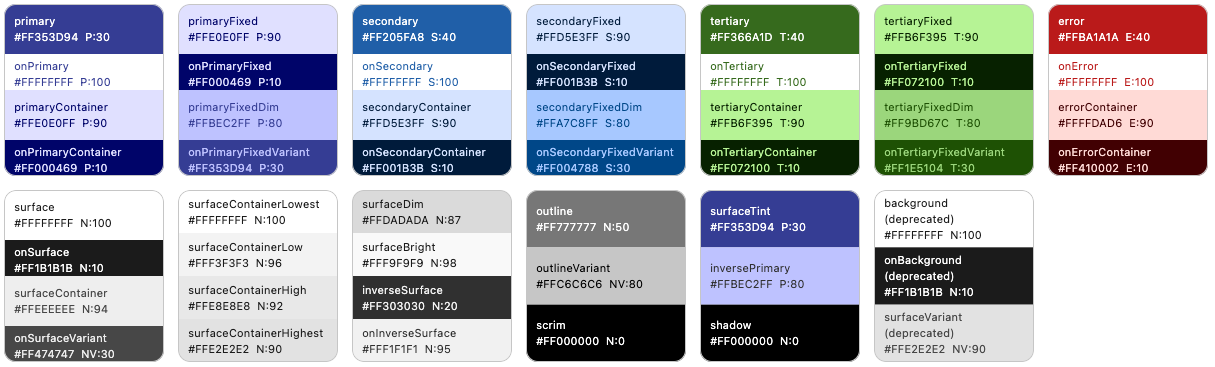 And the dark `ColorScheme` becomes:
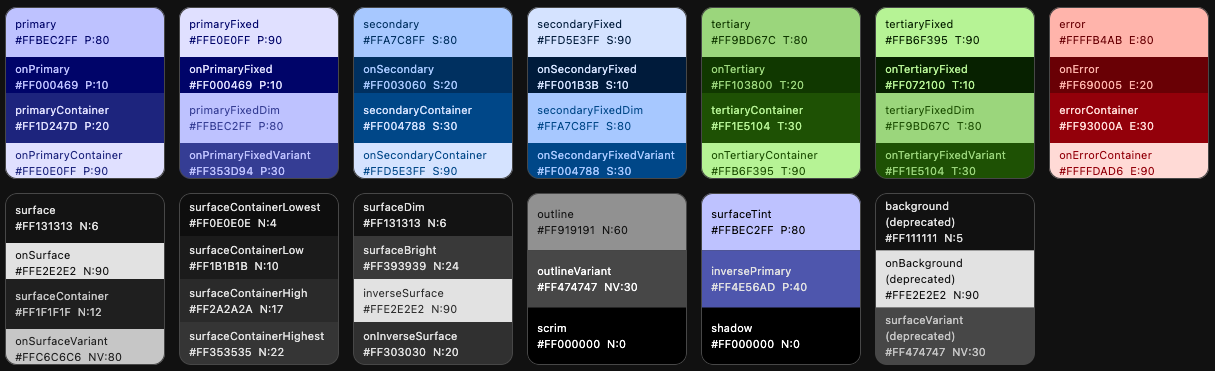 We can, for example, see that in light mode, the primary tone 30, is assigned to `ColorScheme.primary` color and tone 90 to `primaryContainer`. In dark mode they get tones 80 and 20. Similar assignments are repeated for secondary, tertiary, error colors and all the surface and background colors. It is this mapping that `FlexTones` gives you control over.
### Dynamic Scheme Variants
If you want to use the same scheme seed generation variants `DynamicSchemeVariant`, that Flutter SDK introduced to `ColorScheme.fromSeed` in version 3.22.2 and later, then use `SeedColorScheme.fromSeeds` with the `variant` property of enum type `FlexSchemeVariant`.
If the variant `FlexSchemeVariant` style is one that is also provided by Flutter SDK, it has `FlexSchemeVariant` property `isFlutterScheme` set to true.
The `FlexSchemeVariant` also includes the predefined `FlexTones` based variants. You can use the `variant` option as a way to select a `ColorScheme` seed generation variant that is based on either the SDK `dynamicSchemeVariant` styles introduced in Flutter 3.22.2, or on the FlexSeedScheme predefined FlexTones `tones` based seed generation options.
Starting with FlexSeedScheme version 3.0.0, when using `SeedColorScheme.fromSeeds` with a `variant` that is based on MCU and Flutter SDK `DynamicSchemeVariant`, you can use all the same seed keys as with `FlexTones` based schemes using the `tones` property. You are no longer limited to using only your primary or main brand color as seed color, even when using the Flutter SDK `DynamicSchemeVariant` based variants. In versions before 3.0.0 of FlexSeedScheme, you could only use a single seed color with the `dynamicSchemeVariant` based variants. FSS uses a custom fork of MCU to enable this feature.
```dart
// Make a light ColorScheme from seeds using variant style fidelity.
// This is a variant that is available in Flutter SDK stable 3.22.2 or later.
final ColorScheme schemeLight = SeedColorScheme.fromSeeds(
brightness: Brightness.light,
primaryKey: primarySeedColor,
secondaryKey: secondarySeedColor,
tertiaryKey: tertiarySeedColor,
variant: FlexSchemeVariant.fidelity,
);
// Make a dark ColorScheme from seeds using variant style fidelity.
final ColorScheme schemeDark = SeedColorScheme.fromSeeds(
brightness: Brightness.dark,
primaryKey: primarySeedColor,
secondaryKey: secondarySeedColor,
tertiaryKey: tertiarySeedColor,
variant: FlexSchemeVariant.fidelity,
);
```
## Define ThemeData
In your `MaterialApp` you define your light and dark mode themes using the seed
generated `ColorScheme`s just as you would with any other `ColorScheme`. For example:
```dart
@override
Widget build(BuildContext context) {
return MaterialApp(
debugShowCheckedModeBanner: false,
title: 'SeedColorScheme.fromSeeds Demo',
themeMode: ThemeMode.system,
theme: ThemeData(colorScheme: schemeLight),
darkTheme: ThemeData(colorScheme: schemeDark),
home: HomePage(),
);
}
```
## Override Color Values
All colors in the seed produced `ColorScheme` can be overridden by providing each color property in `SeedColorScheme.fromSeeds` a given override color value. This feature is equivalent to the one that exists in `ColorScheme.fromSeed`.
This is typically used to assign a given color value to `primary` color, which is often used as the brand color. When the brand color is used as `primaryKey` seed color, it typically does not end up as the `primary` color in the seed generated `ColorScheme`. Having a given brand color as `primary` color is often desired. To get the seed color as your `primary` brand color, assign the color used as `primaryKey` to `primary` color as well.
```dart
// Make a light ColorScheme from the seeds.
final ColorScheme schemeLight = SeedColorScheme.fromSeeds(
brightness: Brightness.light,
// Use a "brand" seed color as primary color in the result.
primary: primarySeedColor,
primaryKey: primarySeedColor,
// Additional brand colors used as seed keys.
secondaryKey: secondarySeedColor,
tertiaryKey: tertiarySeedColor,
tones: FlexTones.vivid(Brightness.light),
);
```
This strategy works well for the light mode `ColorScheme`, since the prominent brand color a company has defined is typically intended to be printed on white paper. If you have secondary brand colors that are to be used, using them as seeds for `secondaryKey` and `tertiaryKey` will work too. How well they will fit and match the Material 3 color system, if assigned to `secondary` and `tertiary` directly as colors in `SeedColorScheme.fromSeeds`, will vary depending on what colors they are.
If your brand color(s) for light mode are light, so that they require dark text for good contrast, instead of light or white text, you will also have to override the contrast colors for them if you overrode them by giving the seed colors to `primary`, `secondary` and `tertiary`. You then have to manually also assign suitable contrast colors to `onPrimary`, `onSecondary` and `onTertiary`.
Companies rarely have brand colors suited for good contrast in dark theme mode. In that case prefer only using the same light mode brand colors as key colors to seed the dark mode `ColorScheme`. If they do have dark mode specifications, and the colors are of same hue as light mode, consider still using the light mode colors as the seed source, and only applying the appropriate dark mode colors to `primary`, `secondary` and `tertiary` as needed.
If there is a spec that calls for completely different main colors in dark mode, with different hues, then seeding from them in dark mode and also setting `primary`, `secondary` and `tertiary` to these color values is appropriate.
## ColorScheme Generation Strategy
In the above example, we used a predefined tone mapping and chroma setup `ColorScheme` generation strategy called `FlexTones.vivid`. There are currently **twelve** predefined `FlexTones` configurations available:
* `FlexTones.material`, default and same as Flutter SDK M3 setup in Flutter 3.22.0 and later.
* `FlexTones.material3Legacy`, same as Flutter SDK M3 default setup in Flutter before 3.22.0.
* `FlexTones.soft`, softer and earthier tones than M3 FlexTones.material.
* `FlexTones.vivid`, more vivid colors, uses chroma as defined by each given key color.
* `FlexTones.vividSurfaces`, like `vivid`, but with more color tint in surfaces and backgrounds.
* `FlexTones.highContrast`, can be used for more color-accessible themes.
* `FlexTones.ultraContrast`, for a very high-contrast theme version.
* `FlexTones.jolly`, for a more "jolly" and colorful theme.
* `FlexTones.vividBackground`, like `vividSurfaces`, but with less tint in surface color and a slightly darker surface color than default in dark mode.
* `FlexTones.oneHue`, a balanced chromatic setup. It is called oneHue because when only primary color is used as seed, it does not rotate its hue value to make a computed hue for tertiary tonal palettes, but uses the same hue. This makes it possible to make seed-generated color schemes from a single color. In such themes, all colors are based on the same hue, but using different chroma and tones.
* `FlexTones.candyPop`, A high contrast color scheme, useful for accessible themes, with colors that pop like candy. Keeps the background and surface white in light mode, and only a slight tint in dark mode. Neutrals have very low chroma.
* `FlexTones.chroma`, use it to create a color scheme that follows chroma of each used seed color. Useful for manual control of pop or low chromacity. It uses low surface tint and neutrals with medium chroma.
You can also define custom tones mapping and chroma limitation setups with `FlexTones`. Prefer using the `FlexTones.light` and `FlexTones.dark` constructors as base for custom definitions. By using them, you only need to override system defaults that you want to change.
```dart
// Example definition of light custom tones config.
const FlexTones myLightTones = FlexTones.light(
primaryTone: 30, // Default is 40.
onPrimaryTone: 96, // Default is 100
onSecondaryTone: 96, // Default is 100
onTertiaryTone: 96, // Default is 100
onErrorTone: 96, // Default is 100
primaryMinChroma: 55, // Default is null, min 48 is then used.
secondaryChroma: 25, // Default is null, chroma from seed is then used.
tertiaryChroma: 40, // Default is null, chroma from seed is then used.
neutralChroma: 5, // Default is 6, avoid very high values in light mode.
neutralVariantChroma: 10, // Default is 8
paletteType: FlexPaletteType.extended, // Extended is also the default.
);
// Example definition of dark custom tones config.
const FlexTones myDarkTones = FlexTones.dark(
primaryTone: 70, // Default is 80.
onPrimaryTone: 6, // Default is 20
onSecondaryTone: 6, // Default is 20
onTertiaryTone: 6, // Default is 20
onErrorTone: 6, // Default is 20
primaryMinChroma: 55, // Default is null, min 48 is then used.
secondaryChroma: 25, // Default is null, chroma from seed is then used.
tertiaryChroma: 40, // Default is null, chroma from seed is then used.
neutralChroma: 7, // Default is 6, you can go higher in dark mode than light.
neutralVariantChroma: 14, // Default is 8
paletteType: FlexPaletteType.extended, // Extended is also the default.
);
```
## Extended Palette
The extended palette type is the default, it contains 30 tones. It is the palette type to use with the current Material-3 color system. The `common` tones option is provided for backwards compatibility with older Flutter versions and older FSS versions.
By using `paletteType` with value `FlexPaletteType.extended`, you can create seed generated `ColorScheme`s that use and access the color tones that exist in the late 2022 revised `ColorScheme` for surface colors, and even more colors for **fixed** and **fixedDim** main colors that arrived in the Material-3 design during the later half of 2023.
The `ColorScheme` colors that use these tones are available in Flutter 3.22 and later. For more information and the latest updates, see [Material-3 color-roles](https://m3.material.io/styles/color/the-color-system/color-roles) specification.
The updated Material-3 color system adds tones `[4, 6, 12, 17, 22, 24]`, they are used for new dark mode surfaces in revised Material-3 dark surface colors. Likewise, the added tones `[87, 92, 94, 96, 98]` are for light mode surfaces in the updated Material-3 color system. The default `paletteType` value `FlexPaletteType.extended` supports the tones in the updated specification and also adds six more custom tones `[2, 5, 65, 75, 84, 97]`. It produces the following 30 tones `[0, 2, 4, 5, 6, 10, 12, 17, 20, 22, 24, 30, 40, 50, 60, 65, 70, 75, 80, 84, 87, 90, 92, 94, 95, 96, 97, 98, 99, 100]`.
To use the older, simpler tones setup you can still use `FlexPaletteType.common`. It produces the legacy M3 tones with its own two additions `[5]` and `[98]`, resulting in 15 tones `[0, 5, 10, 20, 30, 40, 50, 60, 70, 80, 90, 95, 98, 99, 100]`. Flutter versions before 3.22 did not use any of the extended tones in their standard `ColorScheme`.
The two palette types differ only in which tones they include. In FSS versions before 2.0.0, the `FlexPaletteType.common` type also limited the chroma of high tones, greater than or equal to 90, to a maximum chroma of 40, as the original, pre Flutter 3.22, Material-3 tonal palette computation did. This limit was removed in FSS 2.0.0 to match the updated Material-3 color system in Flutter 3.22 and later. It increases the fidelity of high tones when seed colors with high chromacity are used. Any remaining chroma reduction in high tones comes from the HCT color space gamut itself.
## Accessibility
You can use `FlexTones` to create a seed generated `ColorScheme`, that is based on same colors as the standard theme's light and dark scheme colors, but uses a chroma configuration and tone mapping setup that increases contrast further from standard light and dark theme setup.
There are two high contrast `FlexTones` configuration pre-made for this. They are called `FlexTones.highContrast`, a colorful high-contrast version, and `FlexTones.ultraContrast`, a less colorful version, a more dark on light in light theme mode, and light on dark in dark mode.
The `FlexTones.candyPop` also creates high contrast theme, with colors that are vibrant and pop, it can also be used for high contrast themes. Depending on seed color input values and its chroma value, `FlexTones.chroma` can also be very vibrant and high contrast. It can also be monochromatic, i.e., gray-scale if input seed colors have chroma value zero.
```dart
// Make a high contrast light ColorScheme from the seeds.
final ColorScheme schemeLightHc = SeedColorScheme.fromSeeds(
brightness: Brightness.light,
primaryKey: primarySeedColor,
secondaryKey: secondarySeedColor,
tertiaryKey: tertiarySeedColor,
tones: FlexTones.highContrast(Brightness.light),
);
// Make a ultra contrast dark ColorScheme from the seeds.
final ColorScheme schemeDarkHc = SeedColorScheme.fromSeeds(
brightness: Brightness.dark,
primaryKey: primarySeedColor,
secondaryKey: secondarySeedColor,
tertiaryKey: tertiarySeedColor,
tones: FlexTones.ultraContrast(Brightness.dark),
);
```
If you define equivalent `ThemeData` based on those schemes as your standard `MaterialApp`, `theme` and `darkTheme` definitions, but assign them to `highContrastTheme` and `highContrastDarkTheme`, you get more accessible themed colors that are based on the same colors but with higher contrast, that are activated when users select high-contrast theme in device accessibility system settings. Changing to accessibility theme based on device system setting automatically, by using theme data defined on `MaterialApp` properties `highContrastTheme` and `highContrastDarkTheme`, is only supported on **iOS** devices in the current version of Flutter SDK. For other platforms, you need to use a user setting and toggle themes based on it.
```dart
// Define accessibility high contrast versions using same color base.
highContrastTheme: ThemeData(colorScheme: schemeLightHc),
highContrastDarkTheme: ThemeData(colorScheme: schemeDarkHc),
```
> [!NOTE]
> Since current versions of Android have system settings for contrast selection and also since Material-3 design spec supports three contrast levels, it is expected that Flutter will add support for this in the future. FSS already supports creating schemes with different contrasts, but there is no easy way in Flutter SDK yet to use such high contrast themes based on system settings. If you create high contrast themes with FSS, you will still have to use in-app settings to allow users to select them in your Android builds.
### Contrast Level
When using a `variant` that is based on the equivalent Flutter SDK `DynamicSchemeVariant`, indicated by that it has its `FlexSchemeVariant` property `isFlutterScheme` set to true, you can also provide a `contrastLevel` for the seed generation.
The `contrastLevel` parameter is used to indicate the contrast level between color pairs, such as `primary` and `onPrimary`. The value 0.0 is the default normal contrast; -1.0 is the lowest; 1.0 is the highest. From **Material Design guideline**, the medium and high contrast, correspond to 0.5 and 1.0 respectively. The `contrastLevel` is used to adjust the contrast between the main color and its on color pair. The `contrastLevel` must be from -1.0 to 1.0.
```dart
// Make a light high contrast ColorScheme from seeds using variant style fidelity.
final ColorScheme schemeLight = SeedColorScheme.fromSeeds(
brightness: Brightness.light,
primaryKey: primarySeedColor,
variant: FlexSchemeVariant.fidelity,
contrastLevel: 1.0,
);
// Make a dark high contrast ColorScheme from seeds using variant style fidelity.
final ColorScheme schemeDark = SeedColorScheme.fromSeeds(
brightness: Brightness.dark,
primaryKey: primarySeedColor,
variant: FlexSchemeVariant.fidelity,
contrastLevel: 1.0,
);
```
The contrast level provides a quick way to vary the contrast, but it can only be used with the `DynamicSchemeVariant` based variants, not with the `FlexTones` based variants. However, with `tones` based `FlexTones` scheme generation, you can create custom tones with even more flexibility in seed generation to make schemes with higher or less contrast. Two pre-configured high contrast tones exist for this purpose `FlexTones.highContrast` and `FlexTones.ultraContrast`. You can use them as they are, or as examples of how to make your custom versions.
### Black and White Contrast
Another way to modify `FlexTones` configurations for contrast and accessibility, is by forcing all **main** contrasting on colors and all surfaces on colors to only use black and white contrasting colors. If we do not use the Material-3 guide's colored contrasting color mappings, we can improve color accessibility and contrast on any `FlexTones` configuration with a few simple modifiers.
> [!NOTE]
> If you use the `variant` property to make your seed generated `ColorScheme`, you cannot use the below presented `tones` modifiers, as they are modifiers used on the input `FlexTones` configurations provided in `tones`. In the package main example app you can find a demonstration of how to use `tones` as input for `FlexTones` based variants, and `variant` being effective only when using variants that are Flutter SDK and MCU based.
#### FlexTones Modifiers `onMainsUseBW()` and `onSurfacesUseBW()`
We can use black and white contrasting colors with the `FlexTones` modifying methods `onMainsUseBW()`, for main on colors and with `onSurfacesUseBW()` for the surface on colors. These modifiers automatically make their corresponding contrasting colors black or white, depending on if the corresponding main color is light or dark.
The main colors are:
* `primary`, `primaryContainer`
* `secondary`, `secondaryContainer`
* `tertiary`, `tertiaryContainer`
* `error`, `errorContainer`
The on colors made black or white by `onMainsUseBW()` are:
* `onPrimary`, `onPrimaryContainer`
* `onPrimaryFixed`, `onPrimaryFixedVariant`
* `onSecondary`, `onSecondaryContainer`
* `onSecondaryFixed`, `onSecondaryFixedVariant`
* `onTertiary`, `onTertiaryContainer`
* `onTertiaryFixed`, `onTertiaryFixedVariant`
* `onError`, `onErrorContainer`
The surface on colors made black or white by `onSurfacesUseBW()` are:
* `onSurface`
* `onSurfaceVariant`
* `onInverseSurface`
Here is a usage example, using both these modifiers. You can use them individually too, and you don't have to use them in both light and dark mode.
```dart
// Make a Material 3 seeded light ColorScheme,
// but with always black and white contrasting onColors.
final ColorScheme schemeLightOnBW = SeedColorScheme.fromSeeds(
brightness: Brightness.light,
primaryKey: primarySeedColor,
secondaryKey: secondarySeedColor,
tertiaryKey: tertiarySeedColor,
tones: FlexTones.material(Brightness.light)
.onMainsUseBW()
.onSurfacesUseBW(),
);
// Make a Vivid dark ColorScheme,
// but with always black and white contrasting onColors.
final ColorScheme schemeDarkOnBW = SeedColorScheme.fromSeeds(
brightness: Brightness.dark,
primaryKey: primarySeedColor,
secondaryKey: secondarySeedColor,
tertiaryKey: tertiarySeedColor,
tones: FlexTones.vivid(Brightness.dark)
.onMainsUseBW()
.onSurfacesUseBW(),
);
```
> [!NOTE]
> When it comes to `FlexTones` modifiers, if they impact the same colors, their order matters. The last one applied will be the one that is used for conflicting value changes.
#### FlexTones Modifier `surfacesUseBW()`
Another simple `FlexTones` modifier is `surfacesUseBW()`. This modifier will make the `surface` color plain white in light mode and full black in dark mode.
```dart
// Make a Material 3 seeded light ColorScheme, but with always
// black and white contrasting onColors and ensure that
// the surface color is always white.
final ColorScheme schemeLightOnBW = SeedColorScheme.fromSeeds(
brightness: Brightness.light,
primaryKey: primarySeedColor,
secondaryKey: secondarySeedColor,
tertiaryKey: tertiarySeedColor,
tones: FlexTones.material(Brightness.light)
.onMainsUseBW()
.onSurfacesUseBW()
.surfacesUseBW(), // Make light surface white
);
```
#### FlexTones Modifier `monochromeSurfaces()`
A `FlexTones` modifier available in FSS version 3.0.0 and later. It can be applied to any predefined or custom `FlexTones` to make all the surface colors monochrome and use pure greyscale for the neutral and neutral variant tonal palettes. Surface colors will then have no color tint from their own key color or from the primary seed key color. For those tired of tinted surface colors in Material-3, this is a useful helper.
The surface colors made monochrome by `monochromeSurfaces()` are:
* `surface`, `onSurface`, `surfaceContainer`, `onSurfaceVariant`
* `surfaceContainerHighest`, `surfaceContainerHigh`, `surfaceContainerLow`, `surfaceContainerLowest`
* `surfaceDim`,`surfaceBright`, `inverseSurface`, `onInverseSurface`
* `outline`, `outlineVariant`
```dart
// Make a vivid Material 3 seeded light ColorScheme, where all surface colors
// are monochrome with no tint in them, they are based on pure greyscale values.
final ColorScheme schemeLight = SeedColorScheme.fromSeeds(
brightness: Brightness.light,
primaryKey: primarySeedColor,
secondaryKey: secondarySeedColor,
tertiaryKey: tertiarySeedColor,
tones: FlexTones.vivid(Brightness.light).monochromeSurfaces(),
);
```
#### FlexTones Modifier `higherContrastFixed()`
A `FlexTones` modifier available in FSS version 3.2.0 and later. This modifier can be applied to any predefined or custom `FlexTones` to make a returned instance where the tones for the fixed colors `fixed`, `onFixed`, `fixedDim`, `onFixedVariant` are set to 92, 6, 84 and 12, instead Material-3 designs specified 90, 10, 80 and 30.
This gives us an alternative set of fixed colors with more contrast.
```dart
// Make an ultraContrast seeded light ColorScheme, where all fixed colors
// have higher contrast than the standard Material-3 design.
//
// It is here combined `FlexTones.ultraContrast` to make also the fixed and
// fixedDim colors and their on colors have higher contrast too.
final ColorScheme schemeLight = SeedColorScheme.fromSeeds(
brightness: Brightness.light,
primaryKey: primarySeedColor,
secondaryKey: secondarySeedColor,
tertiaryKey: tertiarySeedColor,
tones: FlexTones.ultraContrast(Brightness.light).higherContrastFixed(),
);
```
## Expressive On Container Colors
Starting from **FlexSeedScheme (FSS)** version **4.0.0** the setting `useExpressiveOnContainerColors` defaults to `true` in `SeedColorScheme.fromSeeds` giving you the Material expressive on-colors results for non-surface on-container colors in light theme mode. In FSS version 3.x.x, it still defaulted to `false`, to keep the older higher contrast on-container colors as default.
When `useExpressiveOnContainerColors` is `true`, the seed generated `ColorScheme` results in more color expressive on-container colors in light mode. It changes the light mode color tone for the colors `onPrimaryContainer`, `onSecondaryContainer`, `onTertiaryContainer` and `onErrorContainer` from past **10** to **30**, making them more color expressive. The new color combinations have a bit less contrast. This change arrived with an updated accepted min contrast curve for the on-container colors, `ContrastCurve(3, 4.5, 7, 11)` instead of the earlier `ContrastCurve(4.5, 7, 11, 21)`. Meaning a normal contrast of 4.5 is now accepted, when it was 7 before. In the MCU fork used by FSS, the flag only switches the light mode on-container tone between 30 and 10; the on-container contrast curve always follows the newer MCU 0.12 and later spec.
The expressive on-container colors arrived in the Material-3 spec with MCU version 0.12.0. Flutter stable 3.44 and later use MCU 0.13.0, where the expressive on-container colors are the only option, Flutter offers no opt-out. With FSS 3.0.0 you could already opt in on the new style, and with FSS 4.0.0 it became the default, aligning FSS with the current Flutter and MCU default. Unlike Flutter, FSS still offers the option to opt out of it.
If you need to keep the older higher contrast on-container colors, or must get identical results as you got before version 4.0.0, you can set `useExpressiveOnContainerColors` to `false` in `SeedColorScheme.fromSeeds` for your light mode `ColorScheme` generation.
```dart
// Make a light ColorScheme from seeds using variant style vibrant.
final ColorScheme schemeLight = SeedColorScheme.fromSeeds(
brightness: Brightness.light,
primaryKey: primarySeedColor,
variant: FlexSchemeVariant.vibrant,
useExpressiveOnContainerColors: false, // Opt out of expressive on colors
);
// Make a dark ColorScheme from seeds using variant style vibrant.
final ColorScheme schemeDark = SeedColorScheme.fromSeeds(
brightness: Brightness.dark,
primaryKey: primarySeedColor,
variant: FlexSchemeVariant.vibrant,
);
```
The optional usage of the expressive colors for on-container colors is a customization of MCU features in the forked version included with FSS. We see value in being able to offer both the higher contrast older version and the new more color expressive one.
The variants `fidelity` and `content` have their own algorithm for the on colors that `useExpressiveOnContainerColors` impacts that are already expressive. Thus, the flag does nothing to their on-colors. Likewise `monochrome` is excluded from the expressive on colors feature, as it is intended to be monochrome. However, even for these variants the `useExpressiveOnContainerColors` will change the `onErrorContainer` color, to be more expressive in light mode.
From version 3.4.0 the parameter `useExpressiveOnContainerColors` in `SeedColorScheme.fromSeeds` works with a scheme `variant` regardless of if it has `isFlutterScheme` set to true or false. Meaning it impacts both MCU `DynamicSchemeVariant` and FSS `FlexTones` based scheme variants.
For `FlexTones` based variants, when using a built-in `FlexTones` or even a custom one, it is no longer necessary to use the `FlexTones` modifier `.expressiveOnContainer()` on the used `tones` to get a seeded color scheme with expressive on container tones in light mode.
The `FlexTones` based modifier `.expressiveOnContainer()` is still used, but it is applied internally when the flag `useExpressiveOnContainerColors` is set to true.
The `useExpressiveOnContainerColors` only applies in light mode to on container tones that are equal to **10**, other tones are considered custom on purpose and are not changed. This is in-line with that the MCU `DynamicSchemeVariant`s that did not use tone **30** before as on container color in light mode, like Fidelity, Monochrome and Content, were not affected by this change in MCU 0.12.0. In the same manner, this flag no longer changes `FlexTones` based schemes that have on container tones that are not **10**. This applies to some on container colors in **UltraContrast**, **Candy Pop** and **Chroma** predefined `FlexTones`.
This change makes this flag consistent and applicable to all seed generated schemes, regardless of if it is based on `DynamicSchemeVariant`, built-in `FlexTones` or even custom `FlexTones` configurations.
For **MCU** seed generated schemes, `useExpressiveOnContainerColors` only has any impact when contrast level is at the default value (0), normal contrast.
When using FSS seed generated schemes with `useExpressiveOnContainerColors` set to `true`, the modifier is applied before any `FlexTones` modifiers. Using tone modifiers, like e.g. `onMainsUseBW()` will thus as expected, override this setting and set on container colors to tone 0 or tone 100, depending on the container colors brightness.
### FlexTones Modifier `expressiveOnContainer()`
While no longer needed to be used directly, the `tones` configuration class `FlexTones` can still also use the modifier `expressiveOnContainer()`. It can be applied to any predefined or custom `FlexTones` to make a returned `FlexTones` instance where the tones for light mode on container tones are set to **30** for more color expressive container text and icons on non-surface containers.
This modifier only impacts non-surface on-container tones that are equal to **10** and thus only has any impact on the light theme mode on-container colors. The impacted on container colors are `onPrimaryContainerTone`,`onSecondaryContainerTone`, `onTertiaryContainerTone` and `onErrorContainerTone`.
This feature brings optional light mode expressive on-container colors to any predefined or custom `FlexTones` configuration. This modifier is equivalent to setting `useExpressiveOnContainerColors` to true in `SeedColorScheme.fromSeeds`.
**Usage example:**
```dart
// Make a Material 3 seeded light ColorScheme with the more color
// expressive tone 30 on-container colors.
final ColorScheme schemeLightExpressive = SeedColorScheme.fromSeeds(
brightness: Brightness.light,
primaryKey: primarySeedColor,
secondaryKey: secondarySeedColor,
tertiaryKey: tertiarySeedColor,
tones: FlexTones.material(Brightness.light)
.expressiveOnContainer(),
);
```
Note that combining this modifier with `onMainsUseBW()` is pointless. If `onMainsUseBW()` is applied first, the on-container tones are no longer **10**, so `expressiveOnContainer()` does nothing. If applied after, it overrides the expressive tones with black or white ones.
## Using Monochrome Seed Colors
Since version 3.4.0 the `bool` parameter `respectMonochromeSeed` in `SeedColorScheme.fromSeeds` can be used to make seed generated ColorSchemes that work as expected if a monochrome color is used as seed color input.
When set to `true`, any monochrome RGB input value will result in the creation of a greyscale tonal palette for the palette using the monochrome seed color. An RGB monochrome value is one where Red, Green and Blue values are all equal.
Previously in FSS and in Material Color Utilities (MCU) and thus still as default in Flutter `ColorScheme.fromSeed`, using a monochrome seed color value or white, resulted in a tonal palette with cyan color tones. A black input resulted in red like color tones. This is not very intuitive and not really expected when using monochrome seed colors.
FSS still defaults to setting `respectMonochromeSeed` to `false`, to not break any existing code that may rely on the old behavior. Prefer setting `respectMonochromeSeed` to `true`, to get more logical seed results when using monochrome seed colors or white and black as seed colors.
> **NOTE:** When using `respectMonochromeSeed` with `DynamicSchemeVariant` variants `fidelity` or `content`, for some monochrome input colors they produce `primaryContainer` and `onPrimaryContainer` as well as `tertiaryContainer` and `onTertiaryContainer` color pairs, with low contrast. Consider using some other scheme variants with monochrome seed colors. All others work well with any monochrome seed color.
>
>This is just how the MCU `DynamicScheme`s `SchemeContent` and `SchemeFidelity` are defined in MCU. They also produce fairly low contrast for these color pairs with very dark seed colors. This behavior with MCU's `SchemeContent` and `SchemeFidelity` could be fixed in FlexSeedScheme's internal MCU fork, but we want to keep the result of these schemes consistent with MCU.
**Usage example:**
```dart
// Make a light ColorScheme from seeds using variant style chroma.
final ColorScheme schemeLight = SeedColorScheme.fromSeeds(
brightness: Brightness.light,
respectMonochromeSeed: true,
primaryKey: Colors.black,
variant: FlexSchemeVariant.chroma,
);
// Make a dark ColorScheme from seeds using variant style chroma.
final ColorScheme schemeDark = SeedColorScheme.fromSeeds(
brightness: Brightness.dark,
respectMonochromeSeed: true,
primaryKey: const Color(0xFF555555),
variant: FlexSchemeVariant.chroma,
);
```
## [Example Application](https://rydmike.com/flexseedscheme/demo-v5)
The included example application uses above color seeding and custom tone mapping. You can also choose any of the built-in pre-configured tone mappings as used seeding strategy. When you select a seeding strategy, basic info about it is displayed.
You can try a web version of this example for version 5 of FSS here [**V5 demo**](https://rydmike.com/flexseedscheme/demo-v5). The older demos for versions 1 to 4 of FSS are still available [**V1 demo**](https://rydmike.com/flexseedscheme/demo-v1), [**V2 demo**](https://rydmike.com/flexseedscheme/demo-v2), [**V3 demo**](https://rydmike.com/flexseedscheme/demo-v3), and [**V4 demo**](https://rydmike.com/flexseedscheme/demo-v4).
You can use secondary and tertiary seed colors as additional keys to generate the color schemes. You can also toggle keeping contrasting onColors black & white, or force surface colors to be white in light mode and true black in dark mode. You can change the seed colors with a color picker by tapping on the seed colors. You can also modify the default error seed color.
With the app we can compare results from `SeedColorScheme.fromSeeds`, to using the single seed color based `ColorScheme.fromSeed` seed generated default Material-3 `ColorScheme` available in Flutter.
Both can use a single key color as their primary seed color, but `ColorScheme.fromSeed` can only use it as its single seed color, we cannot use hues from our secondary and tertiary key colors for the seed produced tonal palettes, nor change how its tones are mapped to the generated `ColorScheme`.
With `ColorScheme.fromSeed` we can also not customize the colorfulness (chromacity) of its seed generated secondary and tertiary colors, other than using the predefined `DynamicSchemeVariant`s. With `SeedColorScheme.fromSeeds` we can use both `DynamicSchemeVariant` and `FlexTones` configurations. The tonal palette tones to `ColorScheme` color mappings can be modified with `SeedColorScheme.fromSeeds` and its different mappings in each `FlexTones` seeding strategy. You can create custom `FlexTones` configurations to create your own tonal palettes and mapping of its tones to `ColorScheme` colors.
The seed generated tonal palettes are also displayed in the example application.
## Scheme Generation Strategies
Below some example color schemes made with FlexSeedScheme using `SeedColorScheme.fromSeeds` using different `FlexTones` seed generation strategies.
### Default Material-3 Themes
This example shows the default Material-3 seed-based scheme, using a single primary seed color and the default `ColorScheme.fromSeed` variant `tonalSpot` versus the tones strategy `FlexTones.material`. Both are the same as using Flutter's default `ColorScheme.fromSeed` with its default `dynamicSchemeVariant = DynamicSchemeVariant.tonalSpot`. We also show the same with the `FlexTones.material3Legacy` variant, which is slightly different from the default Material-3 setup in Flutter 3.22.0 and later.
#### Variant `tonalSpot` based - Based on MCU's `DynamicScheme`
Flutter's default seed generation in Flutter 3.22.0 and later.
| Light from single seed - Material 3 default | Dark from single seed - Material 3 default |
| -------------------------------------------------------------------------------------------------------------------------------- | ------------------------------------------------------------------------------------------------------------------------------- |
|
We can, for example, see that in light mode, the primary tone 30, is assigned to `ColorScheme.primary` color and tone 90 to `primaryContainer`. In dark mode they get tones 80 and 20. Similar assignments are repeated for secondary, tertiary, error colors and all the surface and background colors. It is this mapping that `FlexTones` gives you control over.
### Dynamic Scheme Variants
If you want to use the same scheme seed generation variants `DynamicSchemeVariant`, that Flutter SDK introduced to `ColorScheme.fromSeed` in version 3.22.2 and later, then use `SeedColorScheme.fromSeeds` with the `variant` property of enum type `FlexSchemeVariant`.
If the variant `FlexSchemeVariant` style is one that is also provided by Flutter SDK, it has `FlexSchemeVariant` property `isFlutterScheme` set to true.
The `FlexSchemeVariant` also includes the predefined `FlexTones` based variants. You can use the `variant` option as a way to select a `ColorScheme` seed generation variant that is based on either the SDK `dynamicSchemeVariant` styles introduced in Flutter 3.22.2, or on the FlexSeedScheme predefined FlexTones `tones` based seed generation options.
Starting with FlexSeedScheme version 3.0.0, when using `SeedColorScheme.fromSeeds` with a `variant` that is based on MCU and Flutter SDK `DynamicSchemeVariant`, you can use all the same seed keys as with `FlexTones` based schemes using the `tones` property. You are no longer limited to using only your primary or main brand color as seed color, even when using the Flutter SDK `DynamicSchemeVariant` based variants. In versions before 3.0.0 of FlexSeedScheme, you could only use a single seed color with the `dynamicSchemeVariant` based variants. FSS uses a custom fork of MCU to enable this feature.
```dart
// Make a light ColorScheme from seeds using variant style fidelity.
// This is a variant that is available in Flutter SDK stable 3.22.2 or later.
final ColorScheme schemeLight = SeedColorScheme.fromSeeds(
brightness: Brightness.light,
primaryKey: primarySeedColor,
secondaryKey: secondarySeedColor,
tertiaryKey: tertiarySeedColor,
variant: FlexSchemeVariant.fidelity,
);
// Make a dark ColorScheme from seeds using variant style fidelity.
final ColorScheme schemeDark = SeedColorScheme.fromSeeds(
brightness: Brightness.dark,
primaryKey: primarySeedColor,
secondaryKey: secondarySeedColor,
tertiaryKey: tertiarySeedColor,
variant: FlexSchemeVariant.fidelity,
);
```
## Define ThemeData
In your `MaterialApp` you define your light and dark mode themes using the seed
generated `ColorScheme`s just as you would with any other `ColorScheme`. For example:
```dart
@override
Widget build(BuildContext context) {
return MaterialApp(
debugShowCheckedModeBanner: false,
title: 'SeedColorScheme.fromSeeds Demo',
themeMode: ThemeMode.system,
theme: ThemeData(colorScheme: schemeLight),
darkTheme: ThemeData(colorScheme: schemeDark),
home: HomePage(),
);
}
```
## Override Color Values
All colors in the seed produced `ColorScheme` can be overridden by providing each color property in `SeedColorScheme.fromSeeds` a given override color value. This feature is equivalent to the one that exists in `ColorScheme.fromSeed`.
This is typically used to assign a given color value to `primary` color, which is often used as the brand color. When the brand color is used as `primaryKey` seed color, it typically does not end up as the `primary` color in the seed generated `ColorScheme`. Having a given brand color as `primary` color is often desired. To get the seed color as your `primary` brand color, assign the color used as `primaryKey` to `primary` color as well.
```dart
// Make a light ColorScheme from the seeds.
final ColorScheme schemeLight = SeedColorScheme.fromSeeds(
brightness: Brightness.light,
// Use a "brand" seed color as primary color in the result.
primary: primarySeedColor,
primaryKey: primarySeedColor,
// Additional brand colors used as seed keys.
secondaryKey: secondarySeedColor,
tertiaryKey: tertiarySeedColor,
tones: FlexTones.vivid(Brightness.light),
);
```
This strategy works well for the light mode `ColorScheme`, since the prominent brand color a company has defined is typically intended to be printed on white paper. If you have secondary brand colors that are to be used, using them as seeds for `secondaryKey` and `tertiaryKey` will work too. How well they will fit and match the Material 3 color system, if assigned to `secondary` and `tertiary` directly as colors in `SeedColorScheme.fromSeeds`, will vary depending on what colors they are.
If your brand color(s) for light mode are light, so that they require dark text for good contrast, instead of light or white text, you will also have to override the contrast colors for them if you overrode them by giving the seed colors to `primary`, `secondary` and `tertiary`. You then have to manually also assign suitable contrast colors to `onPrimary`, `onSecondary` and `onTertiary`.
Companies rarely have brand colors suited for good contrast in dark theme mode. In that case prefer only using the same light mode brand colors as key colors to seed the dark mode `ColorScheme`. If they do have dark mode specifications, and the colors are of same hue as light mode, consider still using the light mode colors as the seed source, and only applying the appropriate dark mode colors to `primary`, `secondary` and `tertiary` as needed.
If there is a spec that calls for completely different main colors in dark mode, with different hues, then seeding from them in dark mode and also setting `primary`, `secondary` and `tertiary` to these color values is appropriate.
## ColorScheme Generation Strategy
In the above example, we used a predefined tone mapping and chroma setup `ColorScheme` generation strategy called `FlexTones.vivid`. There are currently **twelve** predefined `FlexTones` configurations available:
* `FlexTones.material`, default and same as Flutter SDK M3 setup in Flutter 3.22.0 and later.
* `FlexTones.material3Legacy`, same as Flutter SDK M3 default setup in Flutter before 3.22.0.
* `FlexTones.soft`, softer and earthier tones than M3 FlexTones.material.
* `FlexTones.vivid`, more vivid colors, uses chroma as defined by each given key color.
* `FlexTones.vividSurfaces`, like `vivid`, but with more color tint in surfaces and backgrounds.
* `FlexTones.highContrast`, can be used for more color-accessible themes.
* `FlexTones.ultraContrast`, for a very high-contrast theme version.
* `FlexTones.jolly`, for a more "jolly" and colorful theme.
* `FlexTones.vividBackground`, like `vividSurfaces`, but with less tint in surface color and a slightly darker surface color than default in dark mode.
* `FlexTones.oneHue`, a balanced chromatic setup. It is called oneHue because when only primary color is used as seed, it does not rotate its hue value to make a computed hue for tertiary tonal palettes, but uses the same hue. This makes it possible to make seed-generated color schemes from a single color. In such themes, all colors are based on the same hue, but using different chroma and tones.
* `FlexTones.candyPop`, A high contrast color scheme, useful for accessible themes, with colors that pop like candy. Keeps the background and surface white in light mode, and only a slight tint in dark mode. Neutrals have very low chroma.
* `FlexTones.chroma`, use it to create a color scheme that follows chroma of each used seed color. Useful for manual control of pop or low chromacity. It uses low surface tint and neutrals with medium chroma.
You can also define custom tones mapping and chroma limitation setups with `FlexTones`. Prefer using the `FlexTones.light` and `FlexTones.dark` constructors as base for custom definitions. By using them, you only need to override system defaults that you want to change.
```dart
// Example definition of light custom tones config.
const FlexTones myLightTones = FlexTones.light(
primaryTone: 30, // Default is 40.
onPrimaryTone: 96, // Default is 100
onSecondaryTone: 96, // Default is 100
onTertiaryTone: 96, // Default is 100
onErrorTone: 96, // Default is 100
primaryMinChroma: 55, // Default is null, min 48 is then used.
secondaryChroma: 25, // Default is null, chroma from seed is then used.
tertiaryChroma: 40, // Default is null, chroma from seed is then used.
neutralChroma: 5, // Default is 6, avoid very high values in light mode.
neutralVariantChroma: 10, // Default is 8
paletteType: FlexPaletteType.extended, // Extended is also the default.
);
// Example definition of dark custom tones config.
const FlexTones myDarkTones = FlexTones.dark(
primaryTone: 70, // Default is 80.
onPrimaryTone: 6, // Default is 20
onSecondaryTone: 6, // Default is 20
onTertiaryTone: 6, // Default is 20
onErrorTone: 6, // Default is 20
primaryMinChroma: 55, // Default is null, min 48 is then used.
secondaryChroma: 25, // Default is null, chroma from seed is then used.
tertiaryChroma: 40, // Default is null, chroma from seed is then used.
neutralChroma: 7, // Default is 6, you can go higher in dark mode than light.
neutralVariantChroma: 14, // Default is 8
paletteType: FlexPaletteType.extended, // Extended is also the default.
);
```
## Extended Palette
The extended palette type is the default, it contains 30 tones. It is the palette type to use with the current Material-3 color system. The `common` tones option is provided for backwards compatibility with older Flutter versions and older FSS versions.
By using `paletteType` with value `FlexPaletteType.extended`, you can create seed generated `ColorScheme`s that use and access the color tones that exist in the late 2022 revised `ColorScheme` for surface colors, and even more colors for **fixed** and **fixedDim** main colors that arrived in the Material-3 design during the later half of 2023.
The `ColorScheme` colors that use these tones are available in Flutter 3.22 and later. For more information and the latest updates, see [Material-3 color-roles](https://m3.material.io/styles/color/the-color-system/color-roles) specification.
The updated Material-3 color system adds tones `[4, 6, 12, 17, 22, 24]`, they are used for new dark mode surfaces in revised Material-3 dark surface colors. Likewise, the added tones `[87, 92, 94, 96, 98]` are for light mode surfaces in the updated Material-3 color system. The default `paletteType` value `FlexPaletteType.extended` supports the tones in the updated specification and also adds six more custom tones `[2, 5, 65, 75, 84, 97]`. It produces the following 30 tones `[0, 2, 4, 5, 6, 10, 12, 17, 20, 22, 24, 30, 40, 50, 60, 65, 70, 75, 80, 84, 87, 90, 92, 94, 95, 96, 97, 98, 99, 100]`.
To use the older, simpler tones setup you can still use `FlexPaletteType.common`. It produces the legacy M3 tones with its own two additions `[5]` and `[98]`, resulting in 15 tones `[0, 5, 10, 20, 30, 40, 50, 60, 70, 80, 90, 95, 98, 99, 100]`. Flutter versions before 3.22 did not use any of the extended tones in their standard `ColorScheme`.
The two palette types differ only in which tones they include. In FSS versions before 2.0.0, the `FlexPaletteType.common` type also limited the chroma of high tones, greater than or equal to 90, to a maximum chroma of 40, as the original, pre Flutter 3.22, Material-3 tonal palette computation did. This limit was removed in FSS 2.0.0 to match the updated Material-3 color system in Flutter 3.22 and later. It increases the fidelity of high tones when seed colors with high chromacity are used. Any remaining chroma reduction in high tones comes from the HCT color space gamut itself.
## Accessibility
You can use `FlexTones` to create a seed generated `ColorScheme`, that is based on same colors as the standard theme's light and dark scheme colors, but uses a chroma configuration and tone mapping setup that increases contrast further from standard light and dark theme setup.
There are two high contrast `FlexTones` configuration pre-made for this. They are called `FlexTones.highContrast`, a colorful high-contrast version, and `FlexTones.ultraContrast`, a less colorful version, a more dark on light in light theme mode, and light on dark in dark mode.
The `FlexTones.candyPop` also creates high contrast theme, with colors that are vibrant and pop, it can also be used for high contrast themes. Depending on seed color input values and its chroma value, `FlexTones.chroma` can also be very vibrant and high contrast. It can also be monochromatic, i.e., gray-scale if input seed colors have chroma value zero.
```dart
// Make a high contrast light ColorScheme from the seeds.
final ColorScheme schemeLightHc = SeedColorScheme.fromSeeds(
brightness: Brightness.light,
primaryKey: primarySeedColor,
secondaryKey: secondarySeedColor,
tertiaryKey: tertiarySeedColor,
tones: FlexTones.highContrast(Brightness.light),
);
// Make a ultra contrast dark ColorScheme from the seeds.
final ColorScheme schemeDarkHc = SeedColorScheme.fromSeeds(
brightness: Brightness.dark,
primaryKey: primarySeedColor,
secondaryKey: secondarySeedColor,
tertiaryKey: tertiarySeedColor,
tones: FlexTones.ultraContrast(Brightness.dark),
);
```
If you define equivalent `ThemeData` based on those schemes as your standard `MaterialApp`, `theme` and `darkTheme` definitions, but assign them to `highContrastTheme` and `highContrastDarkTheme`, you get more accessible themed colors that are based on the same colors but with higher contrast, that are activated when users select high-contrast theme in device accessibility system settings. Changing to accessibility theme based on device system setting automatically, by using theme data defined on `MaterialApp` properties `highContrastTheme` and `highContrastDarkTheme`, is only supported on **iOS** devices in the current version of Flutter SDK. For other platforms, you need to use a user setting and toggle themes based on it.
```dart
// Define accessibility high contrast versions using same color base.
highContrastTheme: ThemeData(colorScheme: schemeLightHc),
highContrastDarkTheme: ThemeData(colorScheme: schemeDarkHc),
```
> [!NOTE]
> Since current versions of Android have system settings for contrast selection and also since Material-3 design spec supports three contrast levels, it is expected that Flutter will add support for this in the future. FSS already supports creating schemes with different contrasts, but there is no easy way in Flutter SDK yet to use such high contrast themes based on system settings. If you create high contrast themes with FSS, you will still have to use in-app settings to allow users to select them in your Android builds.
### Contrast Level
When using a `variant` that is based on the equivalent Flutter SDK `DynamicSchemeVariant`, indicated by that it has its `FlexSchemeVariant` property `isFlutterScheme` set to true, you can also provide a `contrastLevel` for the seed generation.
The `contrastLevel` parameter is used to indicate the contrast level between color pairs, such as `primary` and `onPrimary`. The value 0.0 is the default normal contrast; -1.0 is the lowest; 1.0 is the highest. From **Material Design guideline**, the medium and high contrast, correspond to 0.5 and 1.0 respectively. The `contrastLevel` is used to adjust the contrast between the main color and its on color pair. The `contrastLevel` must be from -1.0 to 1.0.
```dart
// Make a light high contrast ColorScheme from seeds using variant style fidelity.
final ColorScheme schemeLight = SeedColorScheme.fromSeeds(
brightness: Brightness.light,
primaryKey: primarySeedColor,
variant: FlexSchemeVariant.fidelity,
contrastLevel: 1.0,
);
// Make a dark high contrast ColorScheme from seeds using variant style fidelity.
final ColorScheme schemeDark = SeedColorScheme.fromSeeds(
brightness: Brightness.dark,
primaryKey: primarySeedColor,
variant: FlexSchemeVariant.fidelity,
contrastLevel: 1.0,
);
```
The contrast level provides a quick way to vary the contrast, but it can only be used with the `DynamicSchemeVariant` based variants, not with the `FlexTones` based variants. However, with `tones` based `FlexTones` scheme generation, you can create custom tones with even more flexibility in seed generation to make schemes with higher or less contrast. Two pre-configured high contrast tones exist for this purpose `FlexTones.highContrast` and `FlexTones.ultraContrast`. You can use them as they are, or as examples of how to make your custom versions.
### Black and White Contrast
Another way to modify `FlexTones` configurations for contrast and accessibility, is by forcing all **main** contrasting on colors and all surfaces on colors to only use black and white contrasting colors. If we do not use the Material-3 guide's colored contrasting color mappings, we can improve color accessibility and contrast on any `FlexTones` configuration with a few simple modifiers.
> [!NOTE]
> If you use the `variant` property to make your seed generated `ColorScheme`, you cannot use the below presented `tones` modifiers, as they are modifiers used on the input `FlexTones` configurations provided in `tones`. In the package main example app you can find a demonstration of how to use `tones` as input for `FlexTones` based variants, and `variant` being effective only when using variants that are Flutter SDK and MCU based.
#### FlexTones Modifiers `onMainsUseBW()` and `onSurfacesUseBW()`
We can use black and white contrasting colors with the `FlexTones` modifying methods `onMainsUseBW()`, for main on colors and with `onSurfacesUseBW()` for the surface on colors. These modifiers automatically make their corresponding contrasting colors black or white, depending on if the corresponding main color is light or dark.
The main colors are:
* `primary`, `primaryContainer`
* `secondary`, `secondaryContainer`
* `tertiary`, `tertiaryContainer`
* `error`, `errorContainer`
The on colors made black or white by `onMainsUseBW()` are:
* `onPrimary`, `onPrimaryContainer`
* `onPrimaryFixed`, `onPrimaryFixedVariant`
* `onSecondary`, `onSecondaryContainer`
* `onSecondaryFixed`, `onSecondaryFixedVariant`
* `onTertiary`, `onTertiaryContainer`
* `onTertiaryFixed`, `onTertiaryFixedVariant`
* `onError`, `onErrorContainer`
The surface on colors made black or white by `onSurfacesUseBW()` are:
* `onSurface`
* `onSurfaceVariant`
* `onInverseSurface`
Here is a usage example, using both these modifiers. You can use them individually too, and you don't have to use them in both light and dark mode.
```dart
// Make a Material 3 seeded light ColorScheme,
// but with always black and white contrasting onColors.
final ColorScheme schemeLightOnBW = SeedColorScheme.fromSeeds(
brightness: Brightness.light,
primaryKey: primarySeedColor,
secondaryKey: secondarySeedColor,
tertiaryKey: tertiarySeedColor,
tones: FlexTones.material(Brightness.light)
.onMainsUseBW()
.onSurfacesUseBW(),
);
// Make a Vivid dark ColorScheme,
// but with always black and white contrasting onColors.
final ColorScheme schemeDarkOnBW = SeedColorScheme.fromSeeds(
brightness: Brightness.dark,
primaryKey: primarySeedColor,
secondaryKey: secondarySeedColor,
tertiaryKey: tertiarySeedColor,
tones: FlexTones.vivid(Brightness.dark)
.onMainsUseBW()
.onSurfacesUseBW(),
);
```
> [!NOTE]
> When it comes to `FlexTones` modifiers, if they impact the same colors, their order matters. The last one applied will be the one that is used for conflicting value changes.
#### FlexTones Modifier `surfacesUseBW()`
Another simple `FlexTones` modifier is `surfacesUseBW()`. This modifier will make the `surface` color plain white in light mode and full black in dark mode.
```dart
// Make a Material 3 seeded light ColorScheme, but with always
// black and white contrasting onColors and ensure that
// the surface color is always white.
final ColorScheme schemeLightOnBW = SeedColorScheme.fromSeeds(
brightness: Brightness.light,
primaryKey: primarySeedColor,
secondaryKey: secondarySeedColor,
tertiaryKey: tertiarySeedColor,
tones: FlexTones.material(Brightness.light)
.onMainsUseBW()
.onSurfacesUseBW()
.surfacesUseBW(), // Make light surface white
);
```
#### FlexTones Modifier `monochromeSurfaces()`
A `FlexTones` modifier available in FSS version 3.0.0 and later. It can be applied to any predefined or custom `FlexTones` to make all the surface colors monochrome and use pure greyscale for the neutral and neutral variant tonal palettes. Surface colors will then have no color tint from their own key color or from the primary seed key color. For those tired of tinted surface colors in Material-3, this is a useful helper.
The surface colors made monochrome by `monochromeSurfaces()` are:
* `surface`, `onSurface`, `surfaceContainer`, `onSurfaceVariant`
* `surfaceContainerHighest`, `surfaceContainerHigh`, `surfaceContainerLow`, `surfaceContainerLowest`
* `surfaceDim`,`surfaceBright`, `inverseSurface`, `onInverseSurface`
* `outline`, `outlineVariant`
```dart
// Make a vivid Material 3 seeded light ColorScheme, where all surface colors
// are monochrome with no tint in them, they are based on pure greyscale values.
final ColorScheme schemeLight = SeedColorScheme.fromSeeds(
brightness: Brightness.light,
primaryKey: primarySeedColor,
secondaryKey: secondarySeedColor,
tertiaryKey: tertiarySeedColor,
tones: FlexTones.vivid(Brightness.light).monochromeSurfaces(),
);
```
#### FlexTones Modifier `higherContrastFixed()`
A `FlexTones` modifier available in FSS version 3.2.0 and later. This modifier can be applied to any predefined or custom `FlexTones` to make a returned instance where the tones for the fixed colors `fixed`, `onFixed`, `fixedDim`, `onFixedVariant` are set to 92, 6, 84 and 12, instead Material-3 designs specified 90, 10, 80 and 30.
This gives us an alternative set of fixed colors with more contrast.
```dart
// Make an ultraContrast seeded light ColorScheme, where all fixed colors
// have higher contrast than the standard Material-3 design.
//
// It is here combined `FlexTones.ultraContrast` to make also the fixed and
// fixedDim colors and their on colors have higher contrast too.
final ColorScheme schemeLight = SeedColorScheme.fromSeeds(
brightness: Brightness.light,
primaryKey: primarySeedColor,
secondaryKey: secondarySeedColor,
tertiaryKey: tertiarySeedColor,
tones: FlexTones.ultraContrast(Brightness.light).higherContrastFixed(),
);
```
## Expressive On Container Colors
Starting from **FlexSeedScheme (FSS)** version **4.0.0** the setting `useExpressiveOnContainerColors` defaults to `true` in `SeedColorScheme.fromSeeds` giving you the Material expressive on-colors results for non-surface on-container colors in light theme mode. In FSS version 3.x.x, it still defaulted to `false`, to keep the older higher contrast on-container colors as default.
When `useExpressiveOnContainerColors` is `true`, the seed generated `ColorScheme` results in more color expressive on-container colors in light mode. It changes the light mode color tone for the colors `onPrimaryContainer`, `onSecondaryContainer`, `onTertiaryContainer` and `onErrorContainer` from past **10** to **30**, making them more color expressive. The new color combinations have a bit less contrast. This change arrived with an updated accepted min contrast curve for the on-container colors, `ContrastCurve(3, 4.5, 7, 11)` instead of the earlier `ContrastCurve(4.5, 7, 11, 21)`. Meaning a normal contrast of 4.5 is now accepted, when it was 7 before. In the MCU fork used by FSS, the flag only switches the light mode on-container tone between 30 and 10; the on-container contrast curve always follows the newer MCU 0.12 and later spec.
The expressive on-container colors arrived in the Material-3 spec with MCU version 0.12.0. Flutter stable 3.44 and later use MCU 0.13.0, where the expressive on-container colors are the only option, Flutter offers no opt-out. With FSS 3.0.0 you could already opt in on the new style, and with FSS 4.0.0 it became the default, aligning FSS with the current Flutter and MCU default. Unlike Flutter, FSS still offers the option to opt out of it.
If you need to keep the older higher contrast on-container colors, or must get identical results as you got before version 4.0.0, you can set `useExpressiveOnContainerColors` to `false` in `SeedColorScheme.fromSeeds` for your light mode `ColorScheme` generation.
```dart
// Make a light ColorScheme from seeds using variant style vibrant.
final ColorScheme schemeLight = SeedColorScheme.fromSeeds(
brightness: Brightness.light,
primaryKey: primarySeedColor,
variant: FlexSchemeVariant.vibrant,
useExpressiveOnContainerColors: false, // Opt out of expressive on colors
);
// Make a dark ColorScheme from seeds using variant style vibrant.
final ColorScheme schemeDark = SeedColorScheme.fromSeeds(
brightness: Brightness.dark,
primaryKey: primarySeedColor,
variant: FlexSchemeVariant.vibrant,
);
```
The optional usage of the expressive colors for on-container colors is a customization of MCU features in the forked version included with FSS. We see value in being able to offer both the higher contrast older version and the new more color expressive one.
The variants `fidelity` and `content` have their own algorithm for the on colors that `useExpressiveOnContainerColors` impacts that are already expressive. Thus, the flag does nothing to their on-colors. Likewise `monochrome` is excluded from the expressive on colors feature, as it is intended to be monochrome. However, even for these variants the `useExpressiveOnContainerColors` will change the `onErrorContainer` color, to be more expressive in light mode.
From version 3.4.0 the parameter `useExpressiveOnContainerColors` in `SeedColorScheme.fromSeeds` works with a scheme `variant` regardless of if it has `isFlutterScheme` set to true or false. Meaning it impacts both MCU `DynamicSchemeVariant` and FSS `FlexTones` based scheme variants.
For `FlexTones` based variants, when using a built-in `FlexTones` or even a custom one, it is no longer necessary to use the `FlexTones` modifier `.expressiveOnContainer()` on the used `tones` to get a seeded color scheme with expressive on container tones in light mode.
The `FlexTones` based modifier `.expressiveOnContainer()` is still used, but it is applied internally when the flag `useExpressiveOnContainerColors` is set to true.
The `useExpressiveOnContainerColors` only applies in light mode to on container tones that are equal to **10**, other tones are considered custom on purpose and are not changed. This is in-line with that the MCU `DynamicSchemeVariant`s that did not use tone **30** before as on container color in light mode, like Fidelity, Monochrome and Content, were not affected by this change in MCU 0.12.0. In the same manner, this flag no longer changes `FlexTones` based schemes that have on container tones that are not **10**. This applies to some on container colors in **UltraContrast**, **Candy Pop** and **Chroma** predefined `FlexTones`.
This change makes this flag consistent and applicable to all seed generated schemes, regardless of if it is based on `DynamicSchemeVariant`, built-in `FlexTones` or even custom `FlexTones` configurations.
For **MCU** seed generated schemes, `useExpressiveOnContainerColors` only has any impact when contrast level is at the default value (0), normal contrast.
When using FSS seed generated schemes with `useExpressiveOnContainerColors` set to `true`, the modifier is applied before any `FlexTones` modifiers. Using tone modifiers, like e.g. `onMainsUseBW()` will thus as expected, override this setting and set on container colors to tone 0 or tone 100, depending on the container colors brightness.
### FlexTones Modifier `expressiveOnContainer()`
While no longer needed to be used directly, the `tones` configuration class `FlexTones` can still also use the modifier `expressiveOnContainer()`. It can be applied to any predefined or custom `FlexTones` to make a returned `FlexTones` instance where the tones for light mode on container tones are set to **30** for more color expressive container text and icons on non-surface containers.
This modifier only impacts non-surface on-container tones that are equal to **10** and thus only has any impact on the light theme mode on-container colors. The impacted on container colors are `onPrimaryContainerTone`,`onSecondaryContainerTone`, `onTertiaryContainerTone` and `onErrorContainerTone`.
This feature brings optional light mode expressive on-container colors to any predefined or custom `FlexTones` configuration. This modifier is equivalent to setting `useExpressiveOnContainerColors` to true in `SeedColorScheme.fromSeeds`.
**Usage example:**
```dart
// Make a Material 3 seeded light ColorScheme with the more color
// expressive tone 30 on-container colors.
final ColorScheme schemeLightExpressive = SeedColorScheme.fromSeeds(
brightness: Brightness.light,
primaryKey: primarySeedColor,
secondaryKey: secondarySeedColor,
tertiaryKey: tertiarySeedColor,
tones: FlexTones.material(Brightness.light)
.expressiveOnContainer(),
);
```
Note that combining this modifier with `onMainsUseBW()` is pointless. If `onMainsUseBW()` is applied first, the on-container tones are no longer **10**, so `expressiveOnContainer()` does nothing. If applied after, it overrides the expressive tones with black or white ones.
## Using Monochrome Seed Colors
Since version 3.4.0 the `bool` parameter `respectMonochromeSeed` in `SeedColorScheme.fromSeeds` can be used to make seed generated ColorSchemes that work as expected if a monochrome color is used as seed color input.
When set to `true`, any monochrome RGB input value will result in the creation of a greyscale tonal palette for the palette using the monochrome seed color. An RGB monochrome value is one where Red, Green and Blue values are all equal.
Previously in FSS and in Material Color Utilities (MCU) and thus still as default in Flutter `ColorScheme.fromSeed`, using a monochrome seed color value or white, resulted in a tonal palette with cyan color tones. A black input resulted in red like color tones. This is not very intuitive and not really expected when using monochrome seed colors.
FSS still defaults to setting `respectMonochromeSeed` to `false`, to not break any existing code that may rely on the old behavior. Prefer setting `respectMonochromeSeed` to `true`, to get more logical seed results when using monochrome seed colors or white and black as seed colors.
> **NOTE:** When using `respectMonochromeSeed` with `DynamicSchemeVariant` variants `fidelity` or `content`, for some monochrome input colors they produce `primaryContainer` and `onPrimaryContainer` as well as `tertiaryContainer` and `onTertiaryContainer` color pairs, with low contrast. Consider using some other scheme variants with monochrome seed colors. All others work well with any monochrome seed color.
>
>This is just how the MCU `DynamicScheme`s `SchemeContent` and `SchemeFidelity` are defined in MCU. They also produce fairly low contrast for these color pairs with very dark seed colors. This behavior with MCU's `SchemeContent` and `SchemeFidelity` could be fixed in FlexSeedScheme's internal MCU fork, but we want to keep the result of these schemes consistent with MCU.
**Usage example:**
```dart
// Make a light ColorScheme from seeds using variant style chroma.
final ColorScheme schemeLight = SeedColorScheme.fromSeeds(
brightness: Brightness.light,
respectMonochromeSeed: true,
primaryKey: Colors.black,
variant: FlexSchemeVariant.chroma,
);
// Make a dark ColorScheme from seeds using variant style chroma.
final ColorScheme schemeDark = SeedColorScheme.fromSeeds(
brightness: Brightness.dark,
respectMonochromeSeed: true,
primaryKey: const Color(0xFF555555),
variant: FlexSchemeVariant.chroma,
);
```
## [Example Application](https://rydmike.com/flexseedscheme/demo-v5)
The included example application uses above color seeding and custom tone mapping. You can also choose any of the built-in pre-configured tone mappings as used seeding strategy. When you select a seeding strategy, basic info about it is displayed.
You can try a web version of this example for version 5 of FSS here [**V5 demo**](https://rydmike.com/flexseedscheme/demo-v5). The older demos for versions 1 to 4 of FSS are still available [**V1 demo**](https://rydmike.com/flexseedscheme/demo-v1), [**V2 demo**](https://rydmike.com/flexseedscheme/demo-v2), [**V3 demo**](https://rydmike.com/flexseedscheme/demo-v3), and [**V4 demo**](https://rydmike.com/flexseedscheme/demo-v4).
You can use secondary and tertiary seed colors as additional keys to generate the color schemes. You can also toggle keeping contrasting onColors black & white, or force surface colors to be white in light mode and true black in dark mode. You can change the seed colors with a color picker by tapping on the seed colors. You can also modify the default error seed color.
With the app we can compare results from `SeedColorScheme.fromSeeds`, to using the single seed color based `ColorScheme.fromSeed` seed generated default Material-3 `ColorScheme` available in Flutter.
Both can use a single key color as their primary seed color, but `ColorScheme.fromSeed` can only use it as its single seed color, we cannot use hues from our secondary and tertiary key colors for the seed produced tonal palettes, nor change how its tones are mapped to the generated `ColorScheme`.
With `ColorScheme.fromSeed` we can also not customize the colorfulness (chromacity) of its seed generated secondary and tertiary colors, other than using the predefined `DynamicSchemeVariant`s. With `SeedColorScheme.fromSeeds` we can use both `DynamicSchemeVariant` and `FlexTones` configurations. The tonal palette tones to `ColorScheme` color mappings can be modified with `SeedColorScheme.fromSeeds` and its different mappings in each `FlexTones` seeding strategy. You can create custom `FlexTones` configurations to create your own tonal palettes and mapping of its tones to `ColorScheme` colors.
The seed generated tonal palettes are also displayed in the example application.
## Scheme Generation Strategies
Below some example color schemes made with FlexSeedScheme using `SeedColorScheme.fromSeeds` using different `FlexTones` seed generation strategies.
### Default Material-3 Themes
This example shows the default Material-3 seed-based scheme, using a single primary seed color and the default `ColorScheme.fromSeed` variant `tonalSpot` versus the tones strategy `FlexTones.material`. Both are the same as using Flutter's default `ColorScheme.fromSeed` with its default `dynamicSchemeVariant = DynamicSchemeVariant.tonalSpot`. We also show the same with the `FlexTones.material3Legacy` variant, which is slightly different from the default Material-3 setup in Flutter 3.22.0 and later.
#### Variant `tonalSpot` based - Based on MCU's `DynamicScheme`
Flutter's default seed generation in Flutter 3.22.0 and later.
| Light from single seed - Material 3 default | Dark from single seed - Material 3 default |
| -------------------------------------------------------------------------------------------------------------------------------- | ------------------------------------------------------------------------------------------------------------------------------- |
| 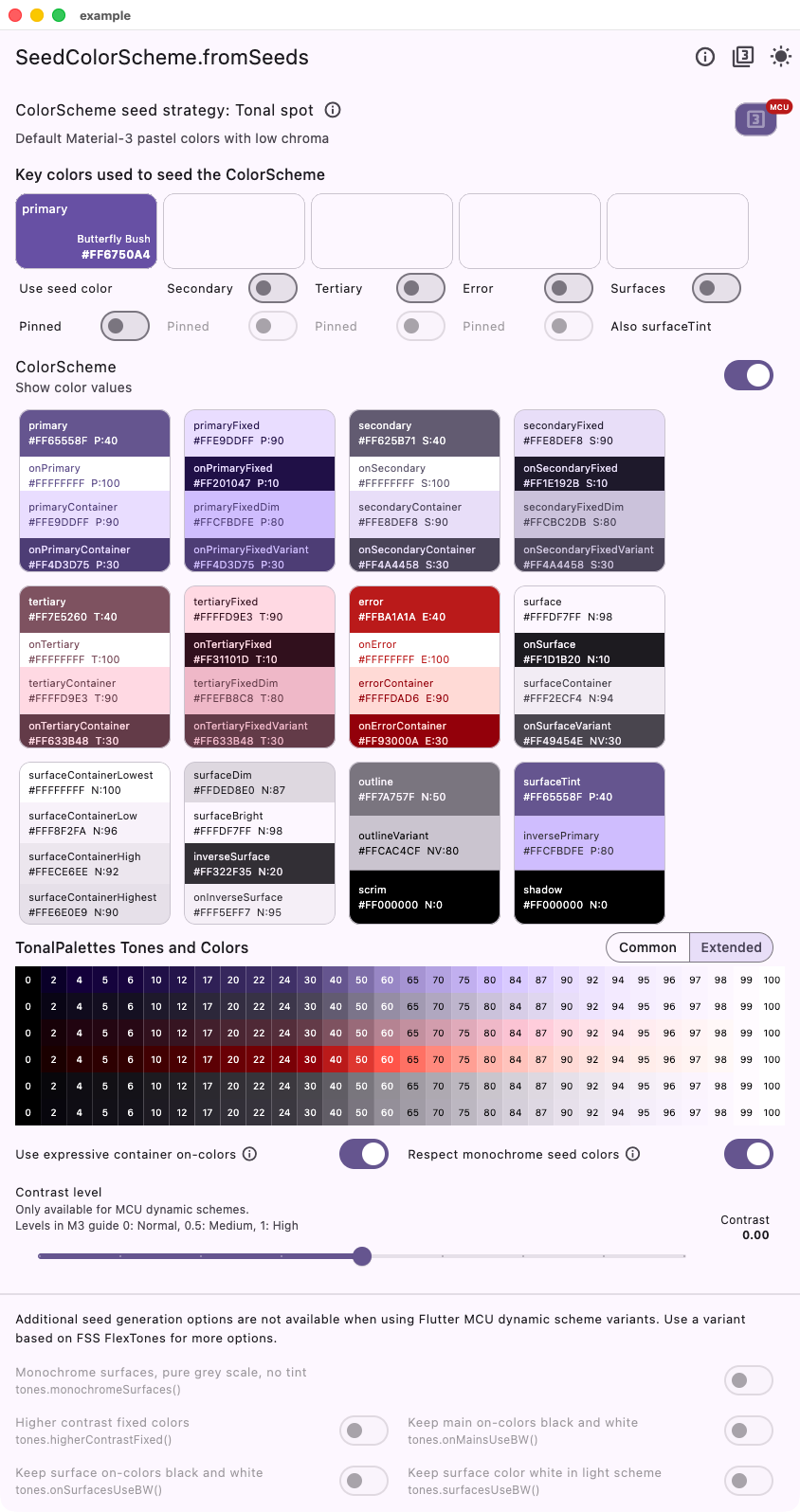 |
| 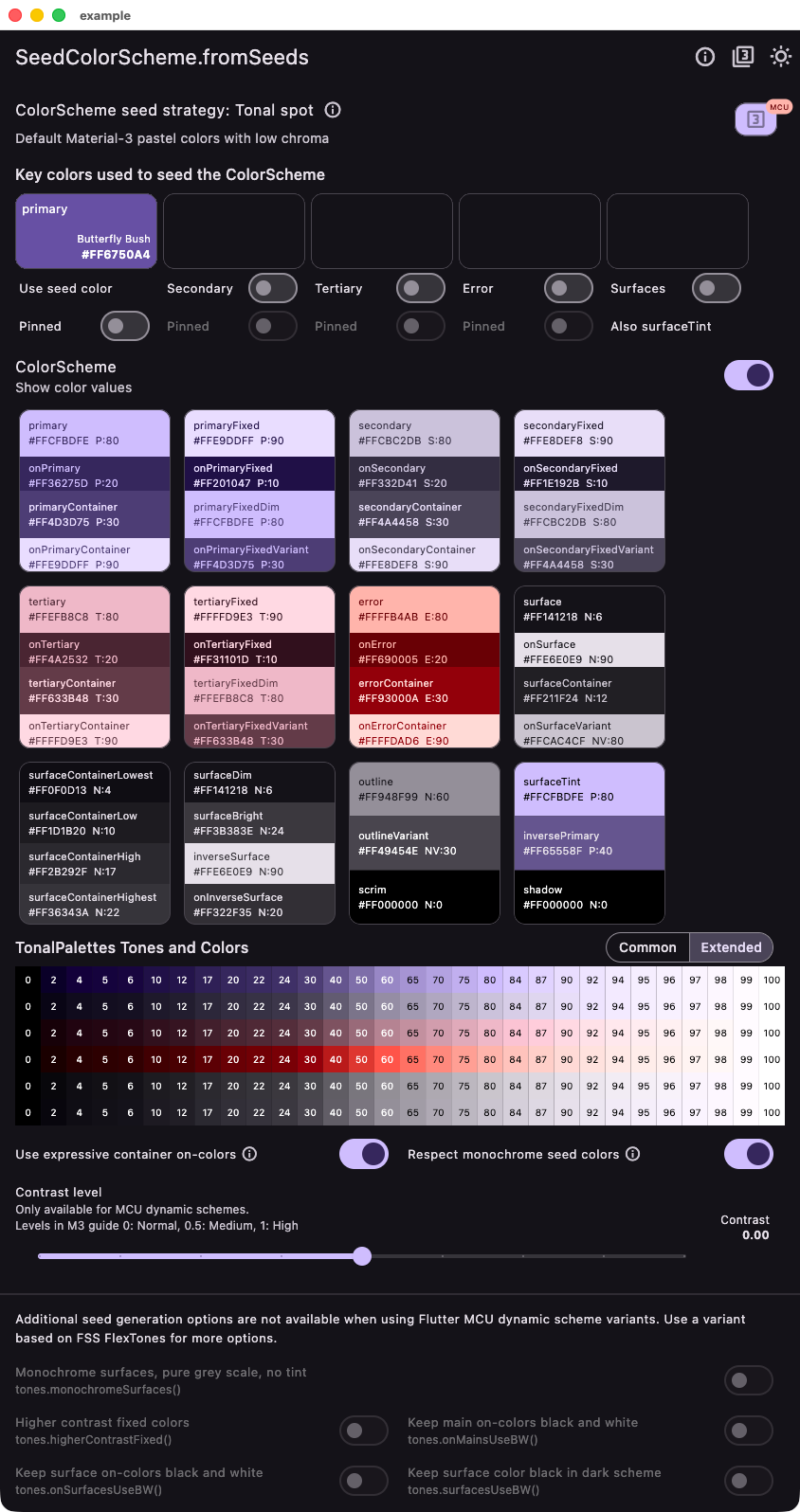 |
#### Variant `material` based - Based on `FlexTones.material`
Replicates the Flutter default using `FlexTones` instead of MCU `DynamicScheme`.
| Light from single seed - Material 3 | Dark from single seed - Material 3 |
| ------------------------------------------------------------------------------------------------------------------------------- | ------------------------------------------------------------------------------------------------------------------------------ |
|
|
#### Variant `material` based - Based on `FlexTones.material`
Replicates the Flutter default using `FlexTones` instead of MCU `DynamicScheme`.
| Light from single seed - Material 3 | Dark from single seed - Material 3 |
| ------------------------------------------------------------------------------------------------------------------------------- | ------------------------------------------------------------------------------------------------------------------------------ |
| 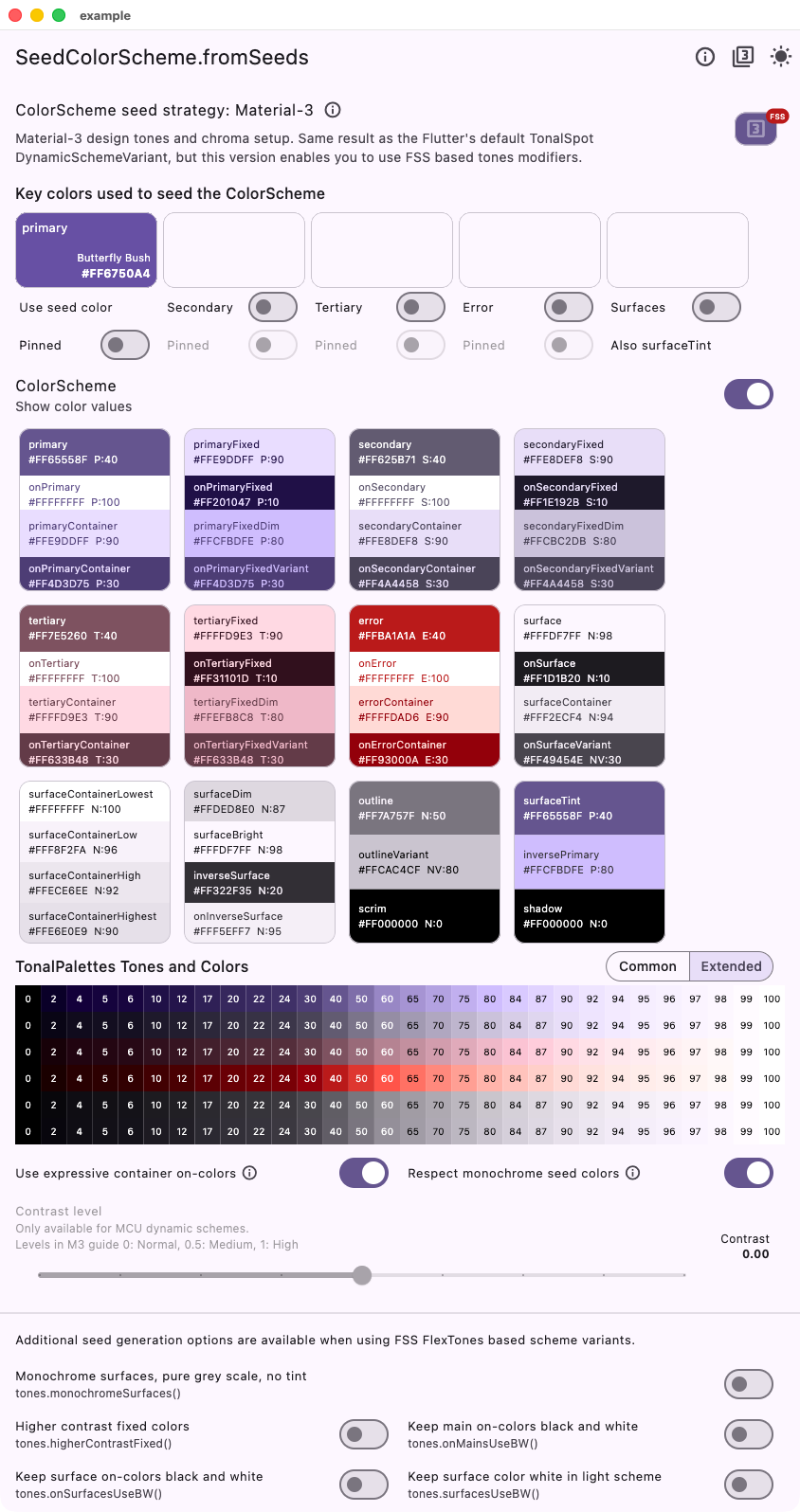 |
| 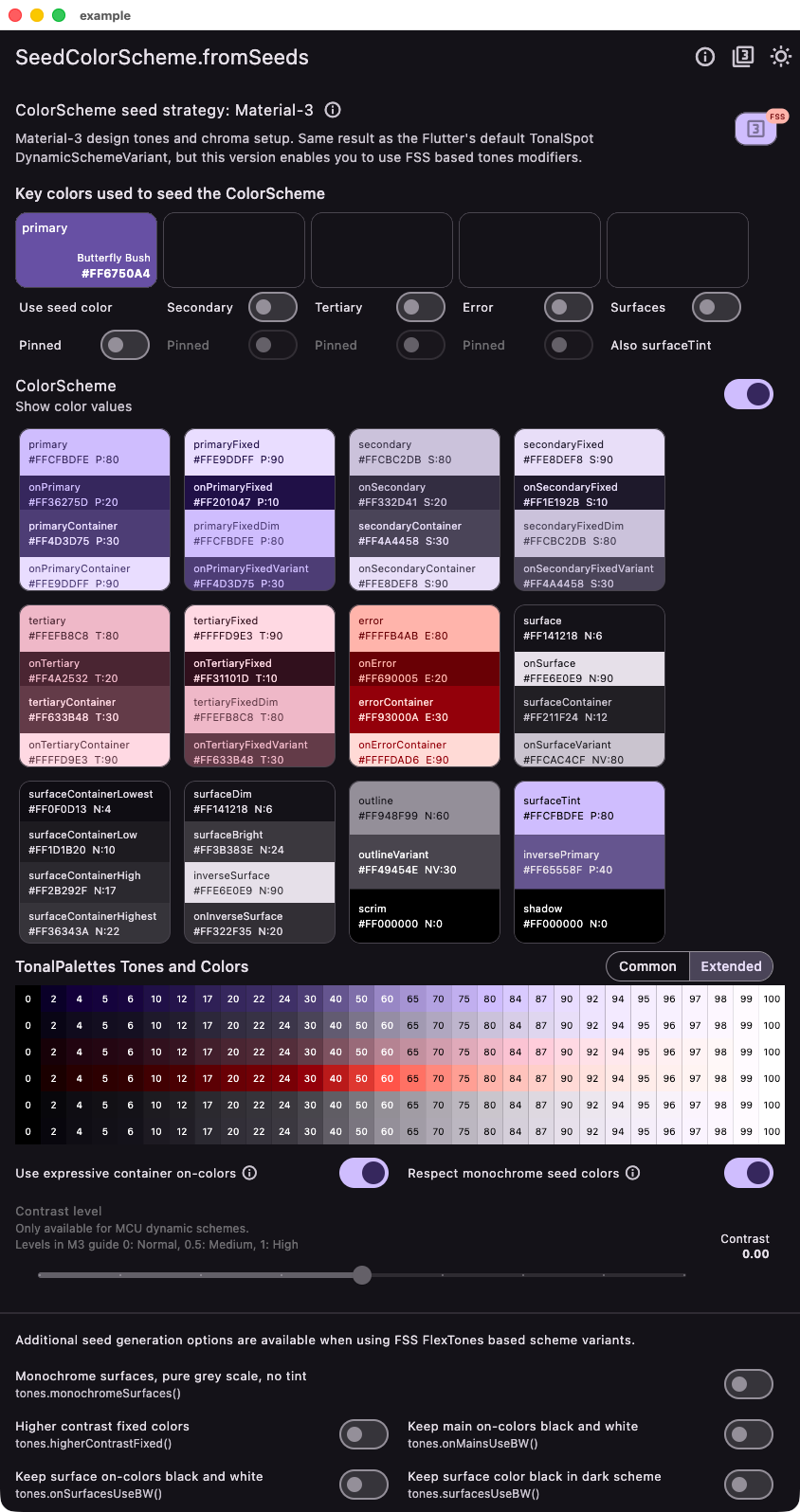 |
#### Variant `material3Legacy` based - Based on `FlexTones.material3Legacy`
Replicates the Flutter Material default as it was before Flutter 3.22. You can use this if you need the legacy M3 seed generated scheme style in Flutter used before Flutter 3.22.
| Light from single seed - Material 3 legacy | Dark from single seed - Material 3 legacy |
| --------------------------------------------------------------------------------------------------------------------------------------------- | -------------------------------------------------------------------------------------------------------------------------------------------- |
|
|
#### Variant `material3Legacy` based - Based on `FlexTones.material3Legacy`
Replicates the Flutter Material default as it was before Flutter 3.22. You can use this if you need the legacy M3 seed generated scheme style in Flutter used before Flutter 3.22.
| Light from single seed - Material 3 legacy | Dark from single seed - Material 3 legacy |
| --------------------------------------------------------------------------------------------------------------------------------------------- | -------------------------------------------------------------------------------------------------------------------------------------------- |
| 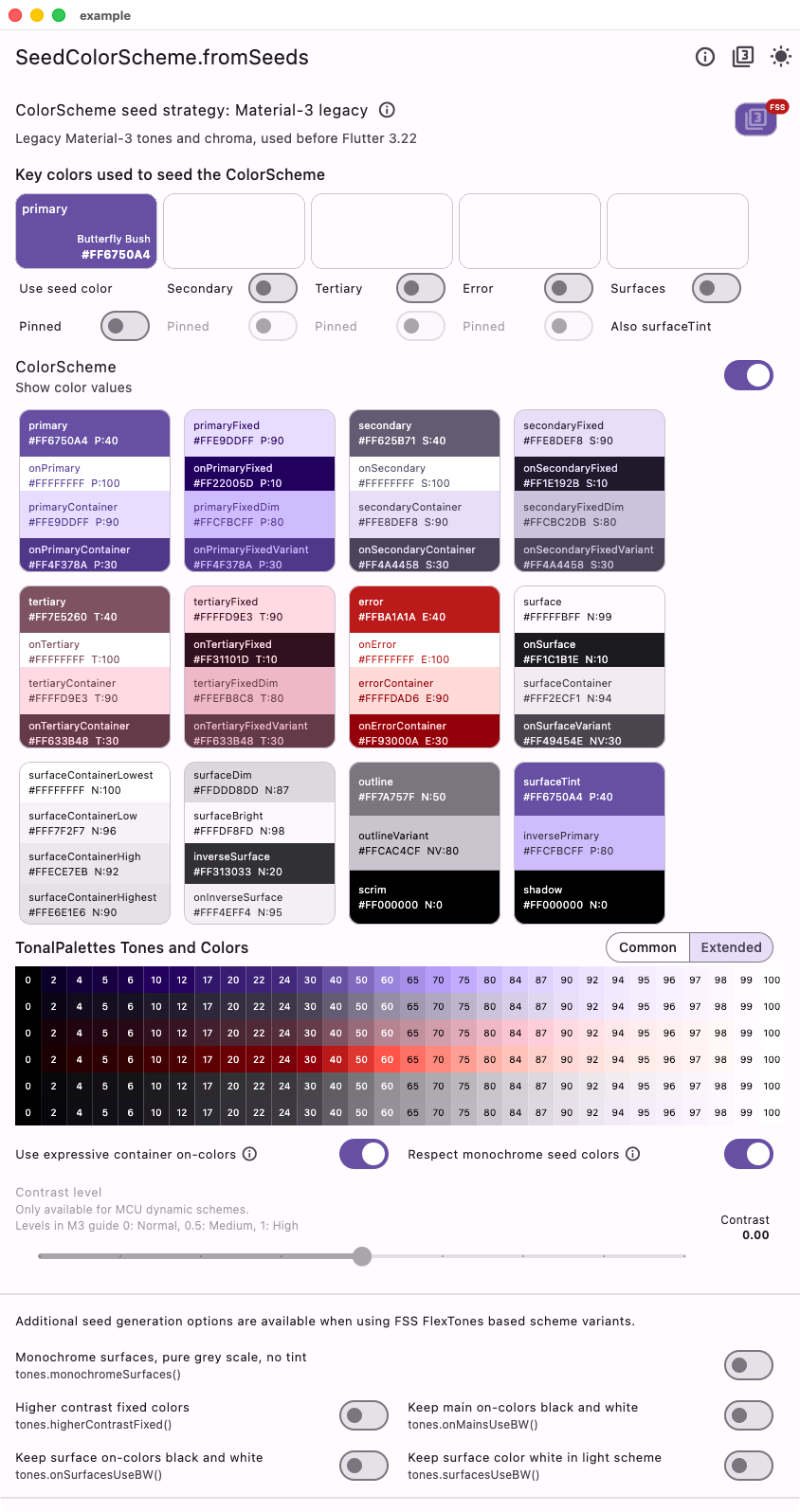 |
| 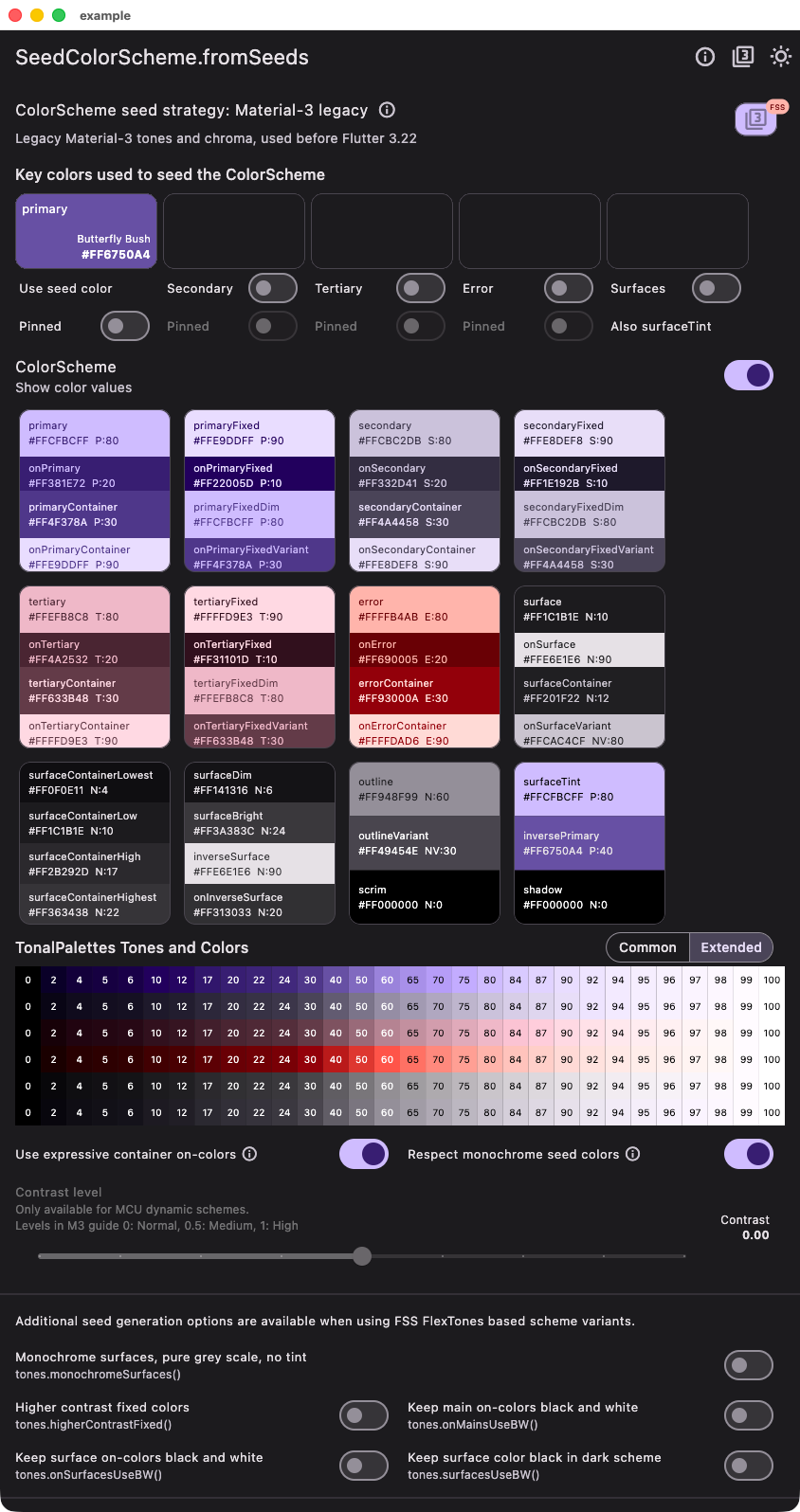 |
### Candy Pop Strategy with One Seed Color
This example using `tones` strategy `FlexTones.candyPop` shows the difference when using the same single seed color, as in the above case with the default Material-3 seed strategy. We can observe that the colors are brighter and have more candy like pop to them.
| Light from single seed - Candy pop tones | Dark from single seed - Candy pop tones |
| ----------------------------------------------------------------------------------------------------------------------------------------- | ---------------------------------------------------------------------------------------------------------------------------------------- |
|
|
### Candy Pop Strategy with One Seed Color
This example using `tones` strategy `FlexTones.candyPop` shows the difference when using the same single seed color, as in the above case with the default Material-3 seed strategy. We can observe that the colors are brighter and have more candy like pop to them.
| Light from single seed - Candy pop tones | Dark from single seed - Candy pop tones |
| ----------------------------------------------------------------------------------------------------------------------------------------- | ---------------------------------------------------------------------------------------------------------------------------------------- |
| 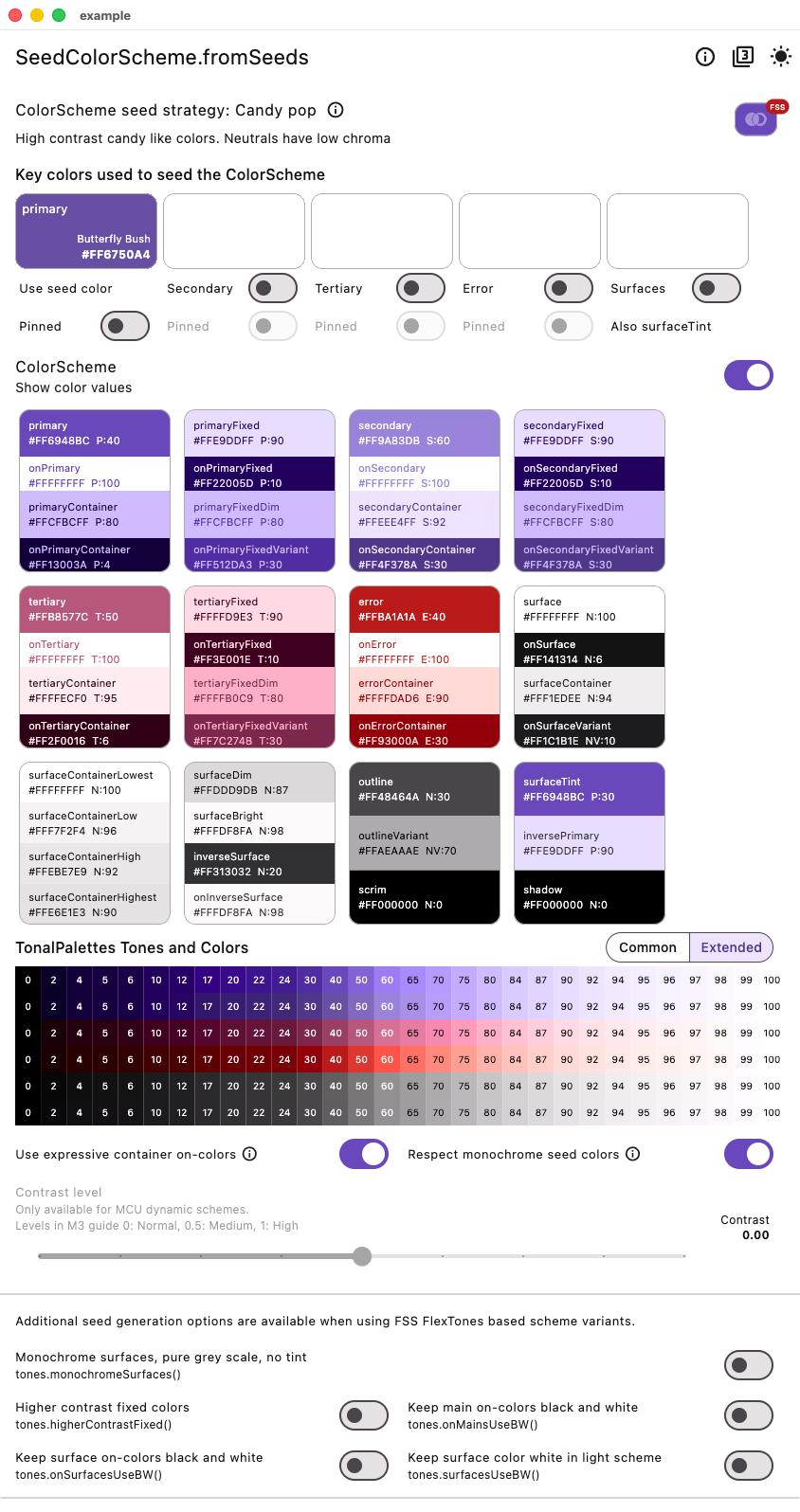 |
| 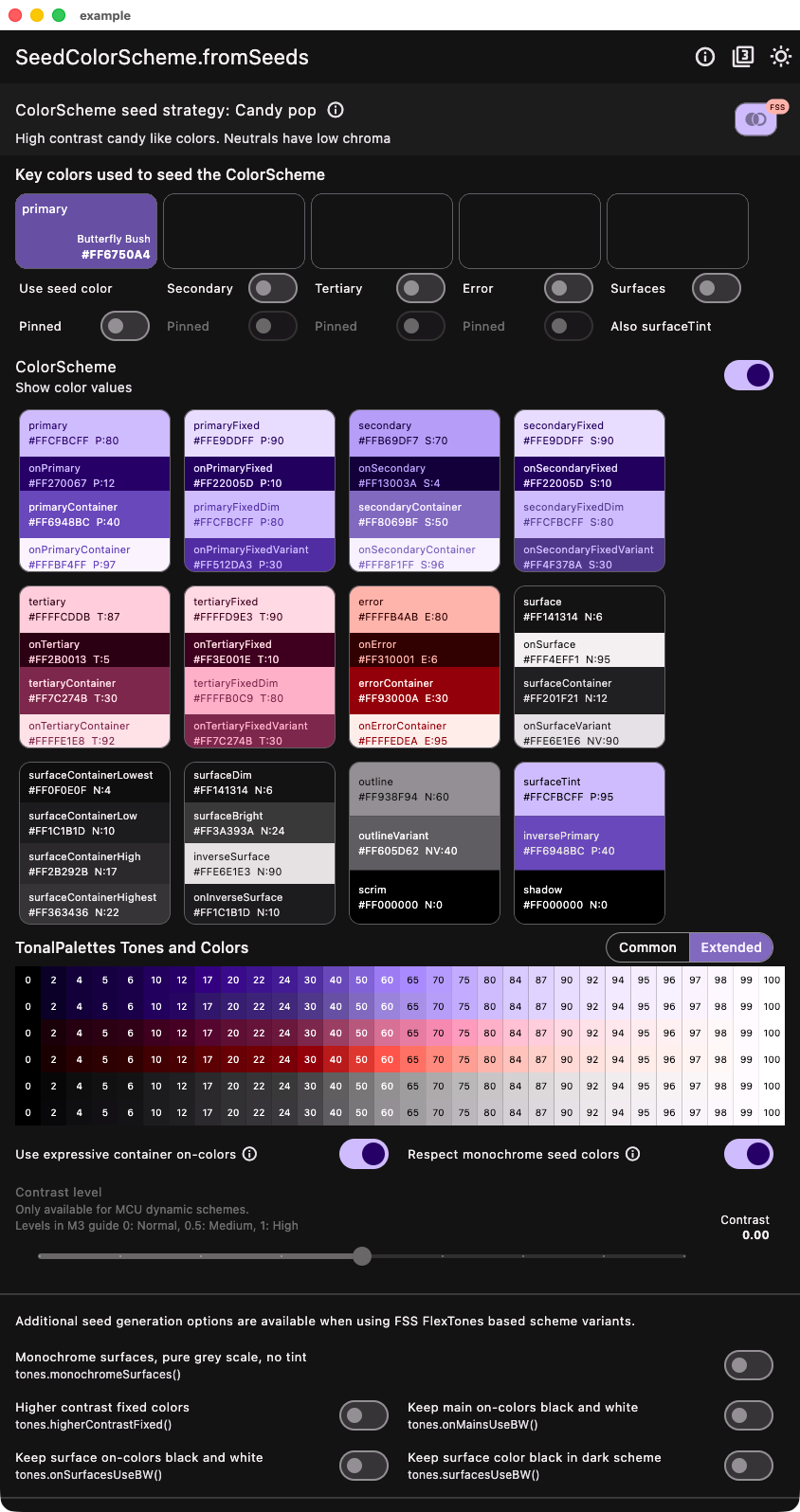 |
### Candy Pop Strategy with Four Seed Colors
This example shows how to use four seeds colors, including a custom error seed color, using the same **CandyPop** seed strategy.
| Light from four seeds - Candy pop tones | Dark from four seeds - Candy pop tones |
| --------------------------------------------------------------------------------------------------------------------------------------- | -------------------------------------------------------------------------------------------------------------------------------------- |
|
|
### Candy Pop Strategy with Four Seed Colors
This example shows how to use four seeds colors, including a custom error seed color, using the same **CandyPop** seed strategy.
| Light from four seeds - Candy pop tones | Dark from four seeds - Candy pop tones |
| --------------------------------------------------------------------------------------------------------------------------------------- | -------------------------------------------------------------------------------------------------------------------------------------- |
| 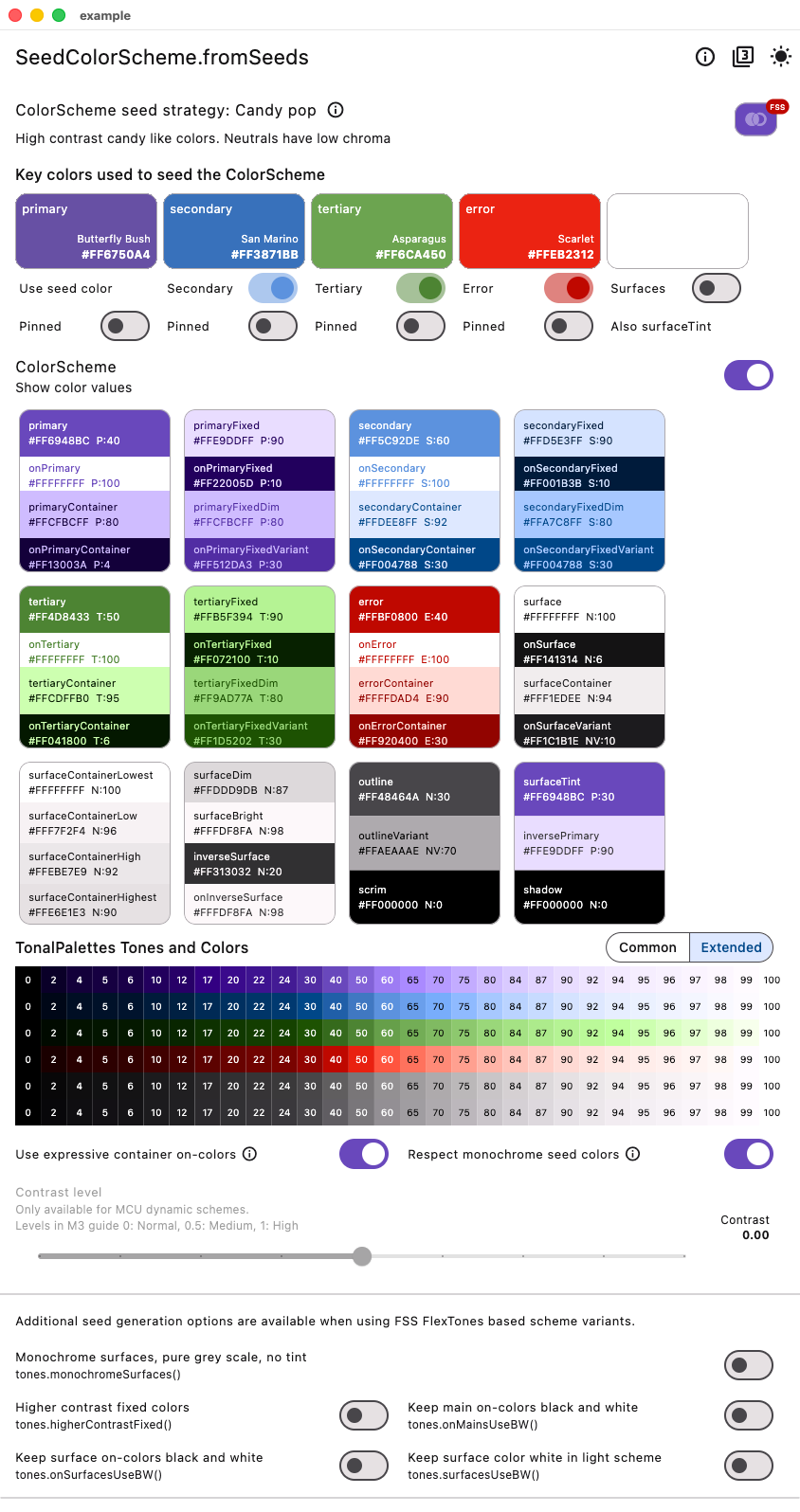 |
| 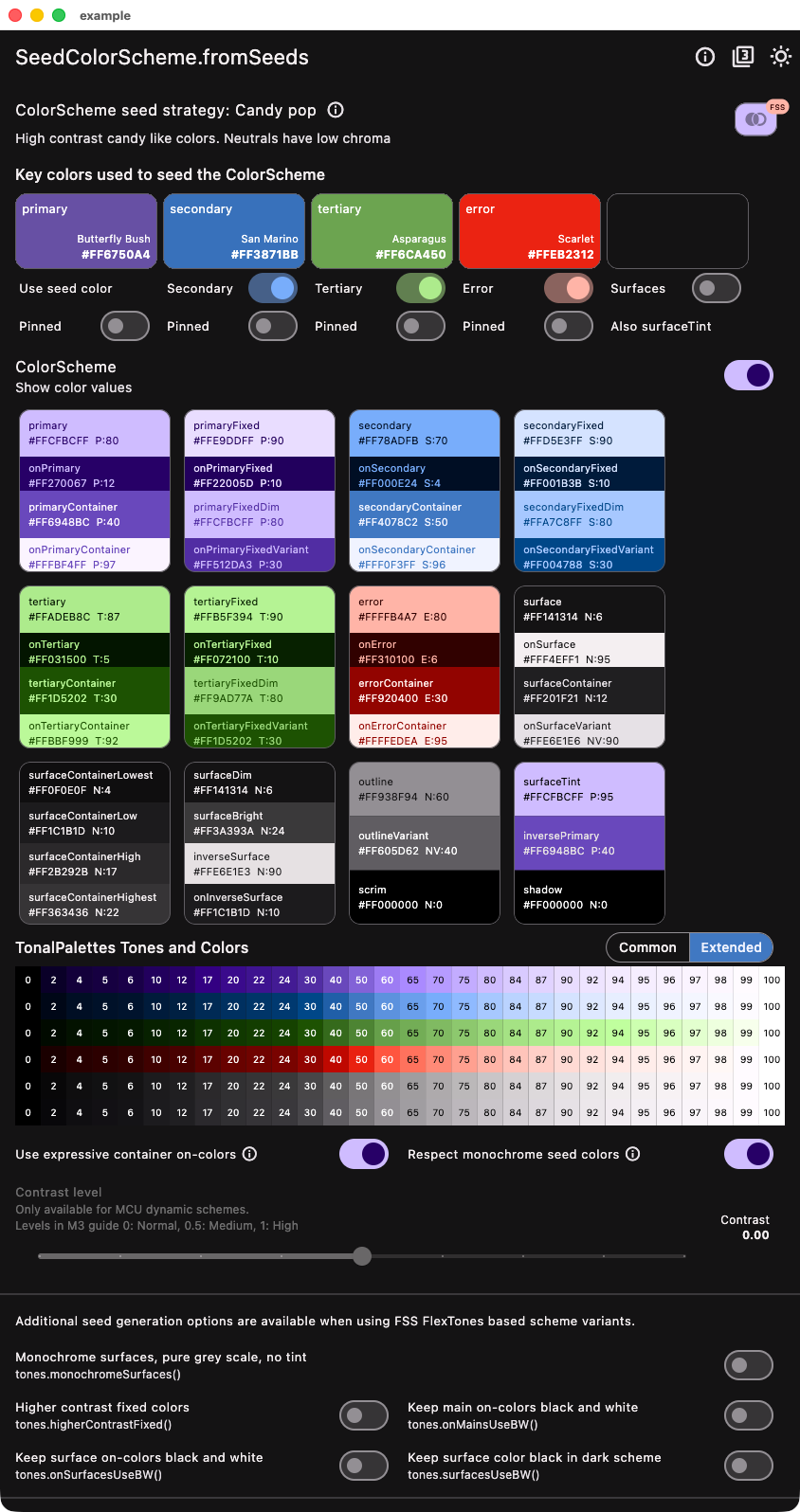 |
### One hue
This example shows the light and dark version of the `tones` strategy called `oneHue`.
In some cases, you may want to create a color scheme based on a single brand color and pin it as your `primary` color in the seed produced light `ColorScheme`. A brand color intended for white paper is usually a good fit for the `primary` color in light mode. It can be used as both as seed and pinned to `primary` in light mode to guarantee that the brand color is present in the produced color scheme. In this example, we are using a strong blue brand color called "Governor Bay" as the seed color, and also using it as override for `primary` in `SeedColorScheme.fromSeeds` in light mode. This happens when we select "Pinned" option in the demo example app. In code, you would do this:
```dart
const Color brandBlue = Color(0xFF2539B0); // Governor Bay blue
// Make a light ColorScheme from the seeds.
final ColorScheme schemeLight = SeedColorScheme.fromSeeds(
brightness: Brightness.light,
// Use a "brand" seed color as primary color and pin it to primary.
primaryKey: brandBlue,
primary: brandBlue,
tones: FlexTones.oneHue(Brightness.light),
);
```
In dark mode, a brand color intended for use on white paper rarely fits on primary color in a dark mode scheme, but it usually works well pinned to `primaryContainer`. In this example, we use this when "Pinned" is selected in the demo app. In code, you would do this:
```dart
// Make a dark ColorScheme from the seeds.
final ColorScheme schemeDark = SeedColorScheme.fromSeeds(
brightness: Brightness.dark,
// Use a "brand" seed color as primary color and pin it to primary.
primaryKey: brandBlue,
primaryContainer: brandBlue,
tones: FlexTones.oneHue(Brightness.dark),
);
```
You should typically use the same seed color in light and dark mode to get the same matching tonal palettes for your light and dark mode. You can often still use different token colors as pinned override color values in light and dark mode seed generation, to get your brand colors into fitting `ColorScheme` colors. Do make sure it fits with its contrasting on-color and of course also with the other colors in the scheme.
A key feature with the `oneHue` seed strategy is that it does not invent any new hues for any tonal palettes, but uses the same hue as the primary seed color for all the tonal palettes. This makes it possible to create a color scheme from a single color all based on the hue in source brand color. The `oneHue` strategy is useful when you have a single brand color and want to create a color scheme based on its color, and not get any other color hues in your resulting `ColorScheme`.
| Light from seed - One hue | Dark from seed - One hue |
| -------------------------------------------------------------------------------------------------------------------------- | ------------------------------------------------------------------------------------------------------------------------- |
|
|
### One hue
This example shows the light and dark version of the `tones` strategy called `oneHue`.
In some cases, you may want to create a color scheme based on a single brand color and pin it as your `primary` color in the seed produced light `ColorScheme`. A brand color intended for white paper is usually a good fit for the `primary` color in light mode. It can be used as both as seed and pinned to `primary` in light mode to guarantee that the brand color is present in the produced color scheme. In this example, we are using a strong blue brand color called "Governor Bay" as the seed color, and also using it as override for `primary` in `SeedColorScheme.fromSeeds` in light mode. This happens when we select "Pinned" option in the demo example app. In code, you would do this:
```dart
const Color brandBlue = Color(0xFF2539B0); // Governor Bay blue
// Make a light ColorScheme from the seeds.
final ColorScheme schemeLight = SeedColorScheme.fromSeeds(
brightness: Brightness.light,
// Use a "brand" seed color as primary color and pin it to primary.
primaryKey: brandBlue,
primary: brandBlue,
tones: FlexTones.oneHue(Brightness.light),
);
```
In dark mode, a brand color intended for use on white paper rarely fits on primary color in a dark mode scheme, but it usually works well pinned to `primaryContainer`. In this example, we use this when "Pinned" is selected in the demo app. In code, you would do this:
```dart
// Make a dark ColorScheme from the seeds.
final ColorScheme schemeDark = SeedColorScheme.fromSeeds(
brightness: Brightness.dark,
// Use a "brand" seed color as primary color and pin it to primary.
primaryKey: brandBlue,
primaryContainer: brandBlue,
tones: FlexTones.oneHue(Brightness.dark),
);
```
You should typically use the same seed color in light and dark mode to get the same matching tonal palettes for your light and dark mode. You can often still use different token colors as pinned override color values in light and dark mode seed generation, to get your brand colors into fitting `ColorScheme` colors. Do make sure it fits with its contrasting on-color and of course also with the other colors in the scheme.
A key feature with the `oneHue` seed strategy is that it does not invent any new hues for any tonal palettes, but uses the same hue as the primary seed color for all the tonal palettes. This makes it possible to create a color scheme from a single color all based on the hue in source brand color. The `oneHue` strategy is useful when you have a single brand color and want to create a color scheme based on its color, and not get any other color hues in your resulting `ColorScheme`.
| Light from seed - One hue | Dark from seed - One hue |
| -------------------------------------------------------------------------------------------------------------------------- | ------------------------------------------------------------------------------------------------------------------------- |
| 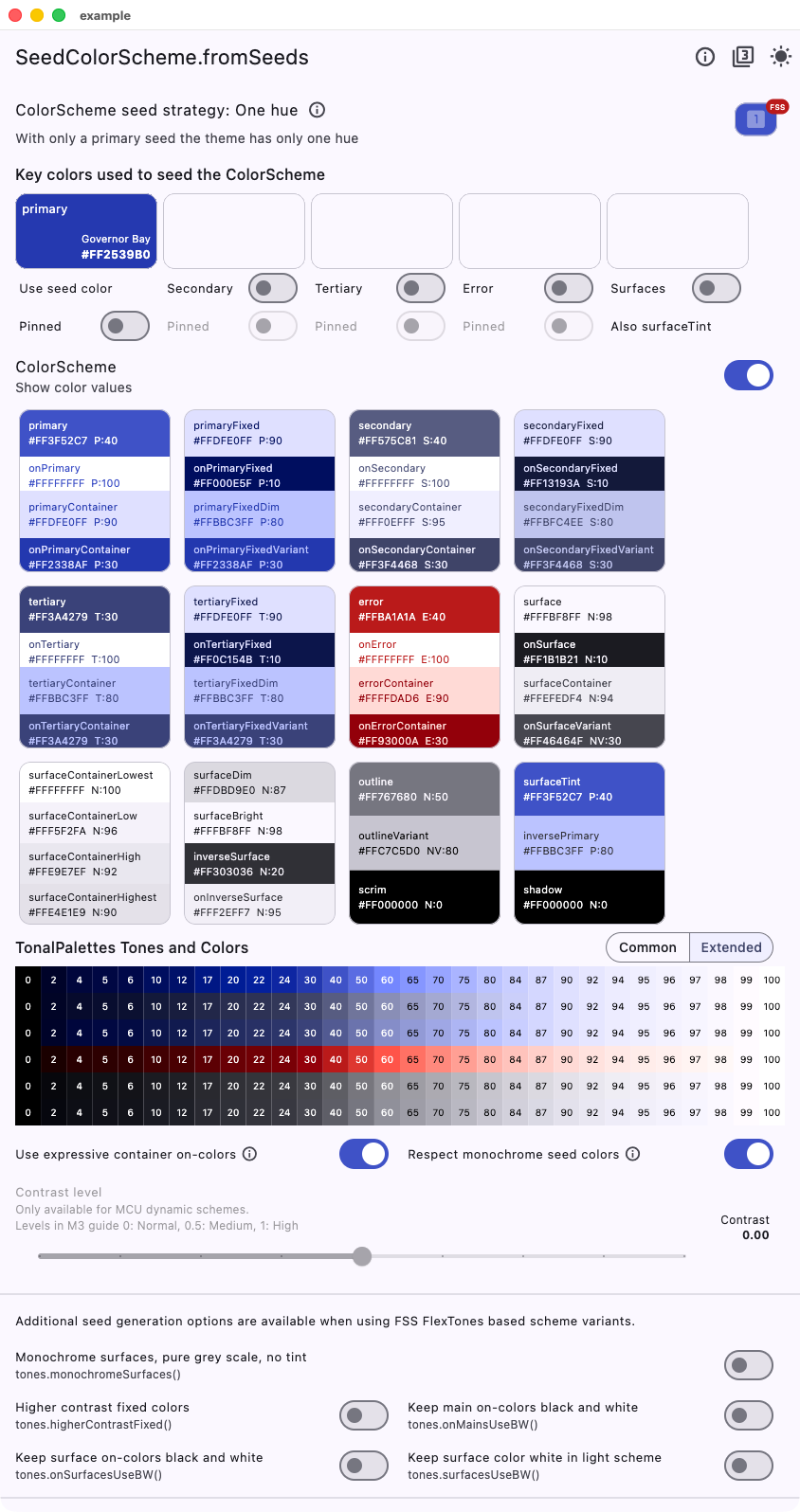 |
| 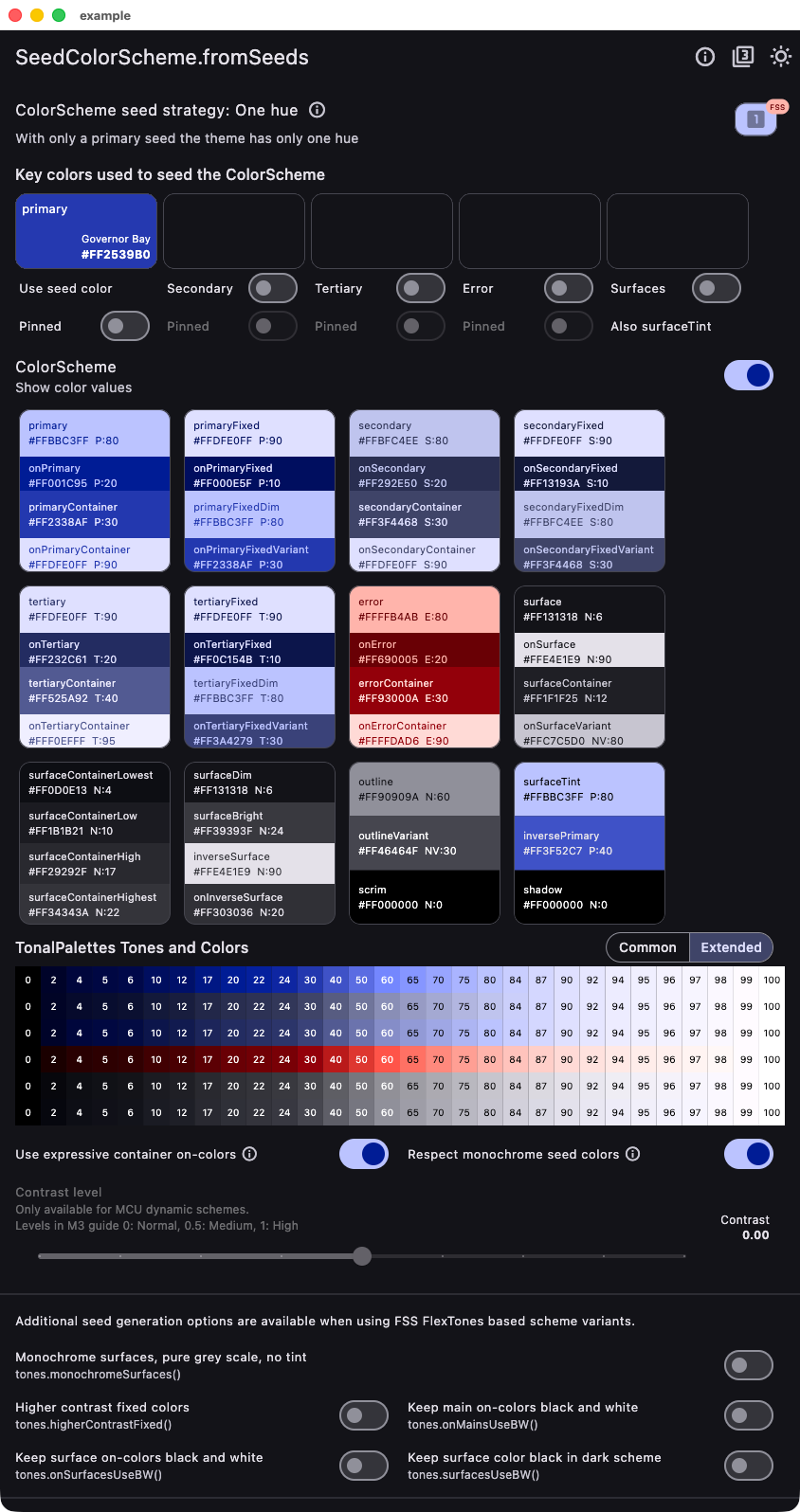 |
## Comparing Flutter Default and One Hue
Below an example of Material widgets using the theme created using the `oneHue` strategy versus the Flutter default one, using the same brand color seed color.
| Light from brand - One hue | Light from brand - Flutter default |
| --------------------------------------------------------------------------------------------------------------------------------------- | -------------------------------------------------------------------------------------------------------------------------------------- |
|
|
## Comparing Flutter Default and One Hue
Below an example of Material widgets using the theme created using the `oneHue` strategy versus the Flutter default one, using the same brand color seed color.
| Light from brand - One hue | Light from brand - Flutter default |
| --------------------------------------------------------------------------------------------------------------------------------------- | -------------------------------------------------------------------------------------------------------------------------------------- |
| 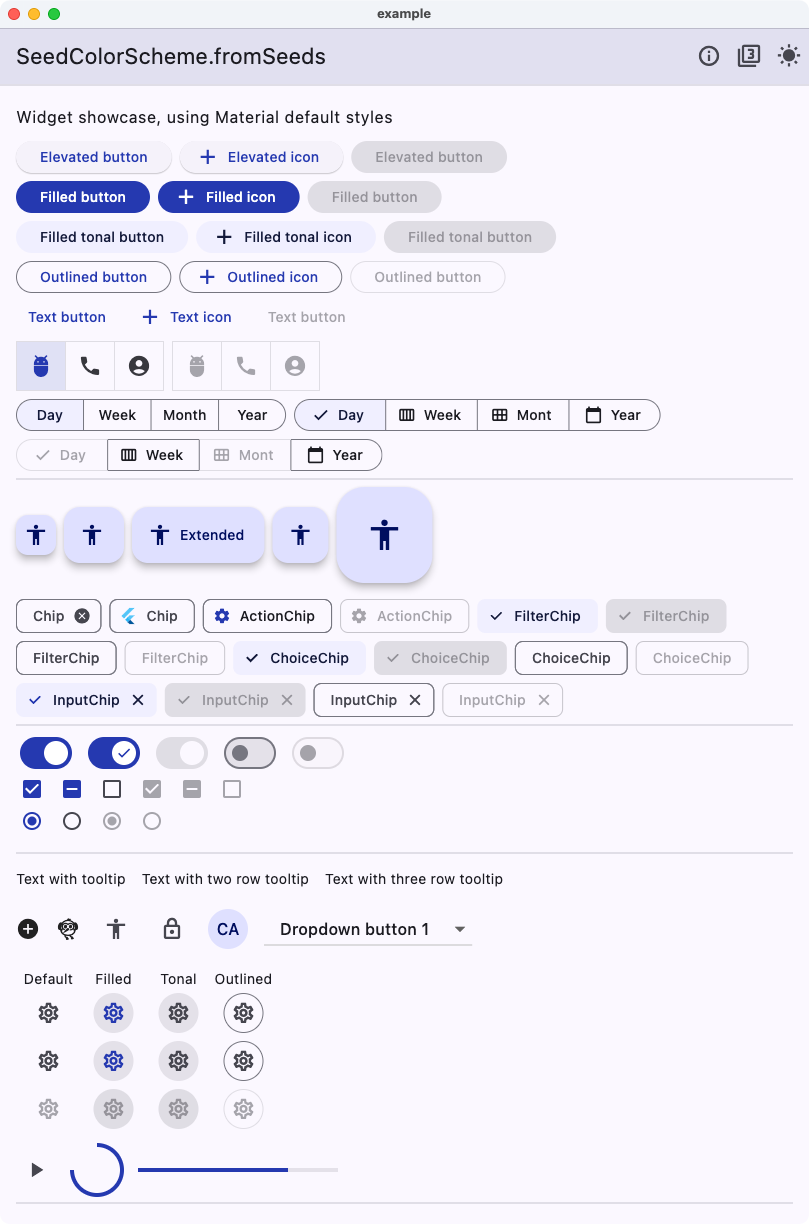 |
| 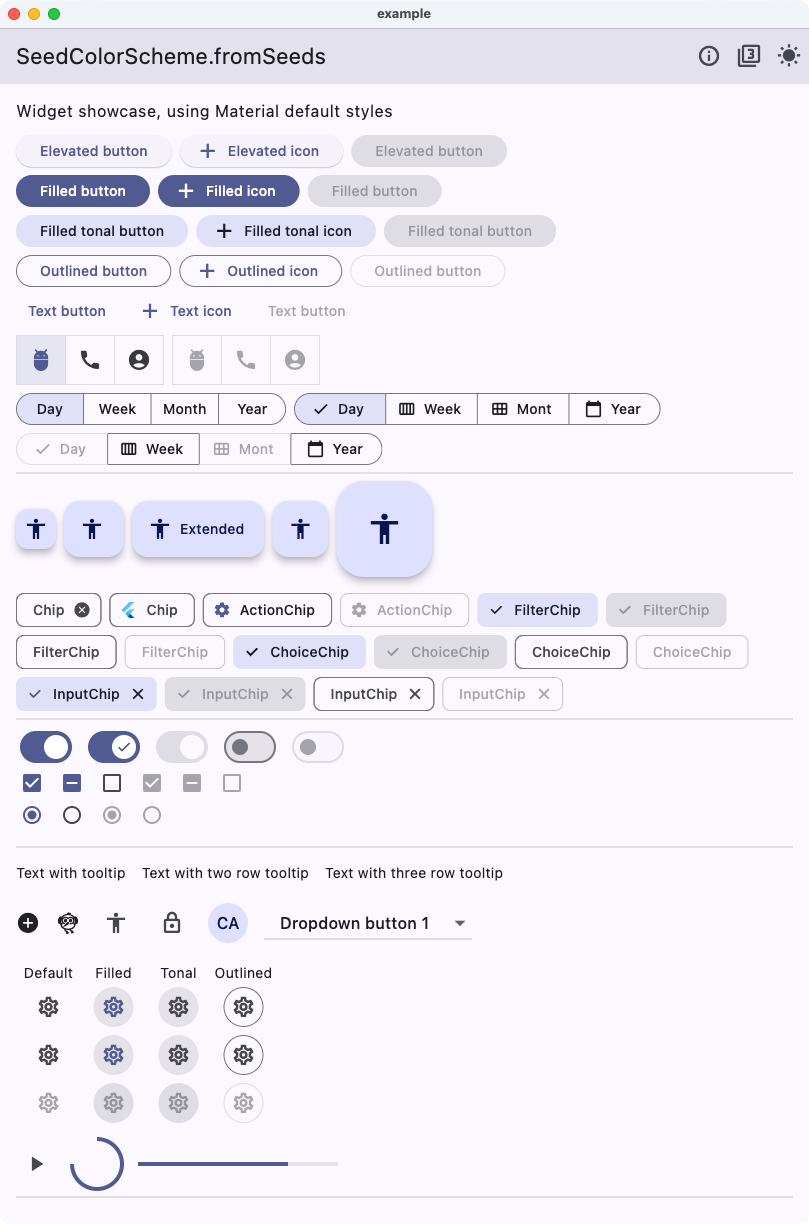 |
Same for dark mode.
| Dark from brand - One hue | Dark from brand - Flutter default |
| ---------------------------------------------------------------------------------------------------------------------------------------- | --------------------------------------------------------------------------------------------------------------------------------------- |
|
|
Same for dark mode.
| Dark from brand - One hue | Dark from brand - Flutter default |
| ---------------------------------------------------------------------------------------------------------------------------------------- | --------------------------------------------------------------------------------------------------------------------------------------- |
| 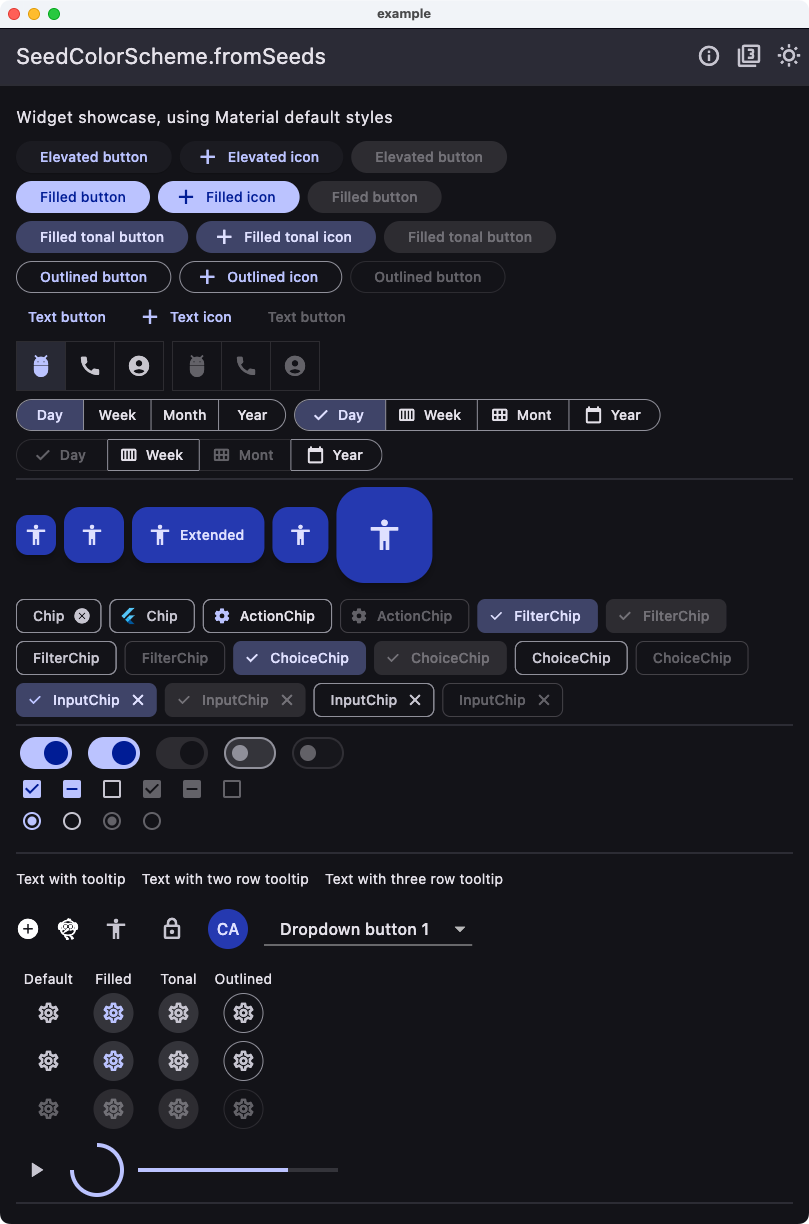 |
| 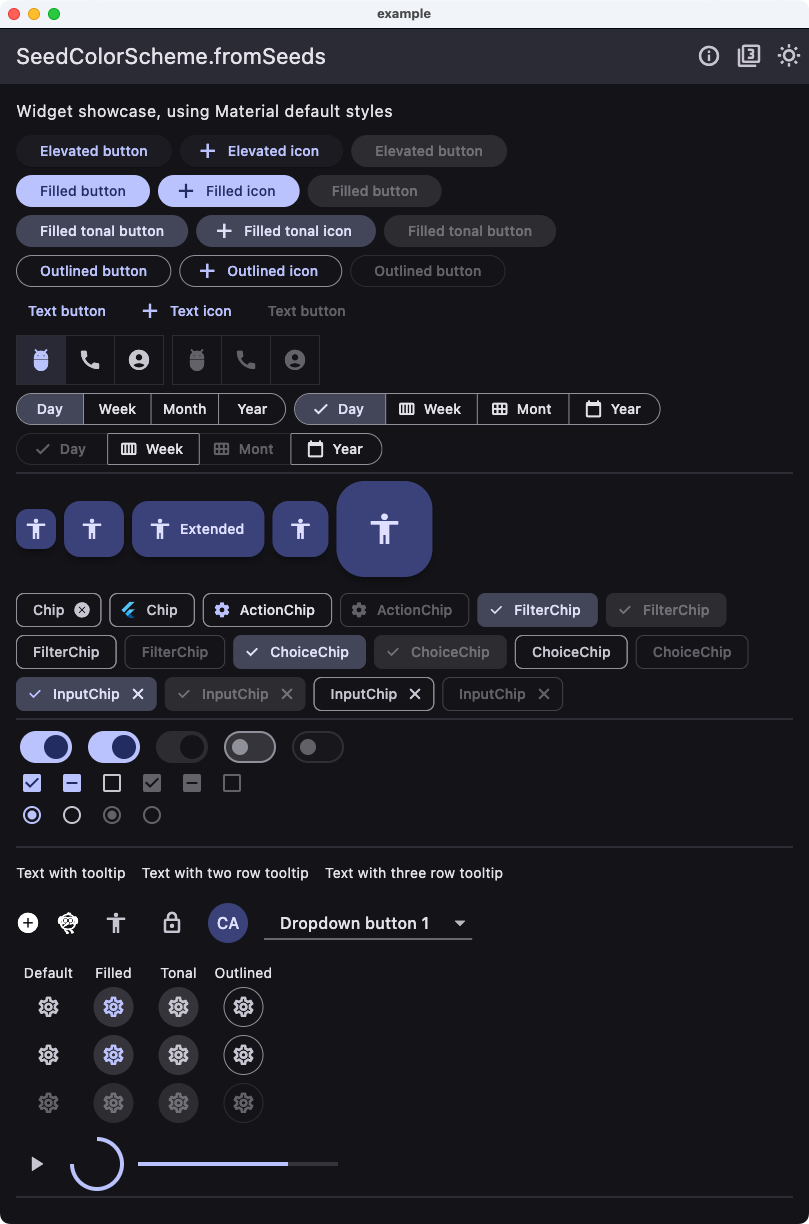 |
As we can see, there is more pop and colorfulness in the **One hue** version. We can also notice that most common widgets only use colors based on `primary` and `secondary` and their shades. The `tertiary` colors that get a different hue are rarely used in common widgets when using their default `ColorScheme` mappings. We can find it if we compare e.g., the `DatePicker` result.
| Pickers from brand - One hue | Pickers from brand - Flutter default |
| ----------------------------------------------------------------------------------------------------------------------------------------- | ----------------------------------------------------------------------------------------------------------------------------------------------- |
|
|
As we can see, there is more pop and colorfulness in the **One hue** version. We can also notice that most common widgets only use colors based on `primary` and `secondary` and their shades. The `tertiary` colors that get a different hue are rarely used in common widgets when using their default `ColorScheme` mappings. We can find it if we compare e.g., the `DatePicker` result.
| Pickers from brand - One hue | Pickers from brand - Flutter default |
| ----------------------------------------------------------------------------------------------------------------------------------------- | ----------------------------------------------------------------------------------------------------------------------------------------------- |
| 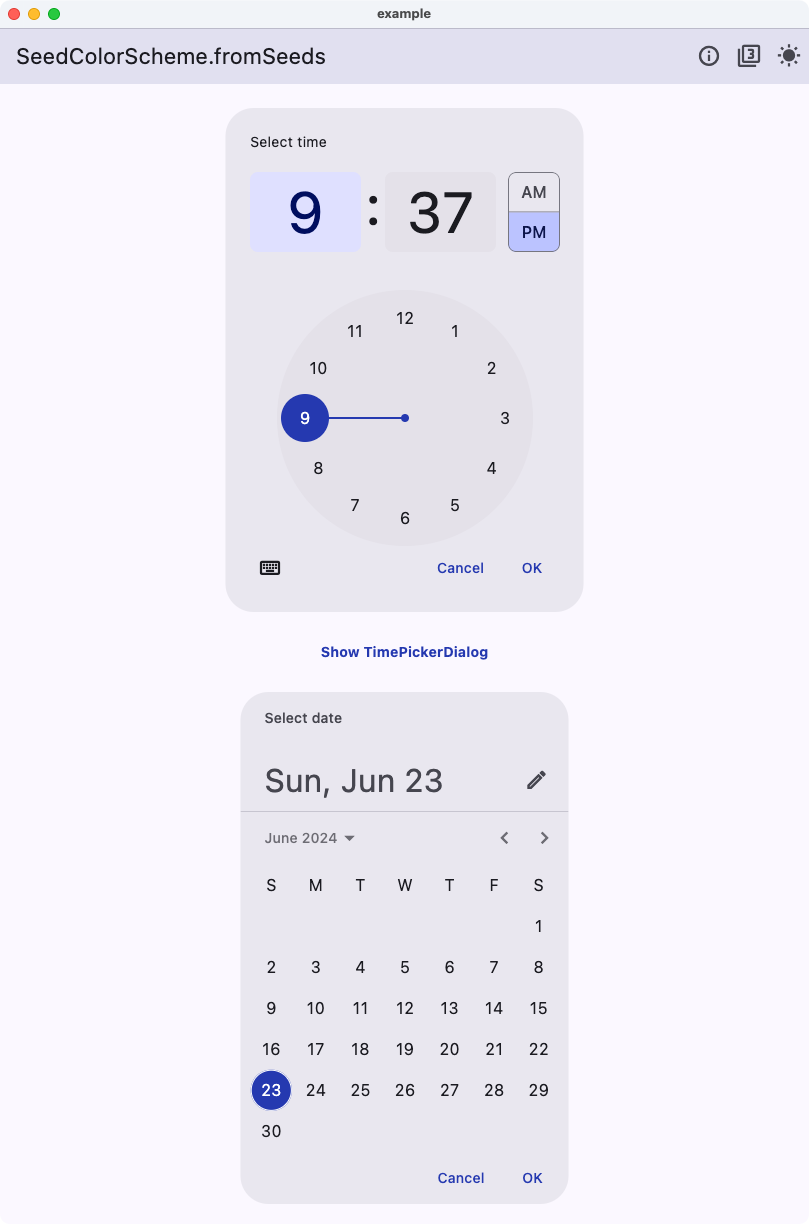 |
| 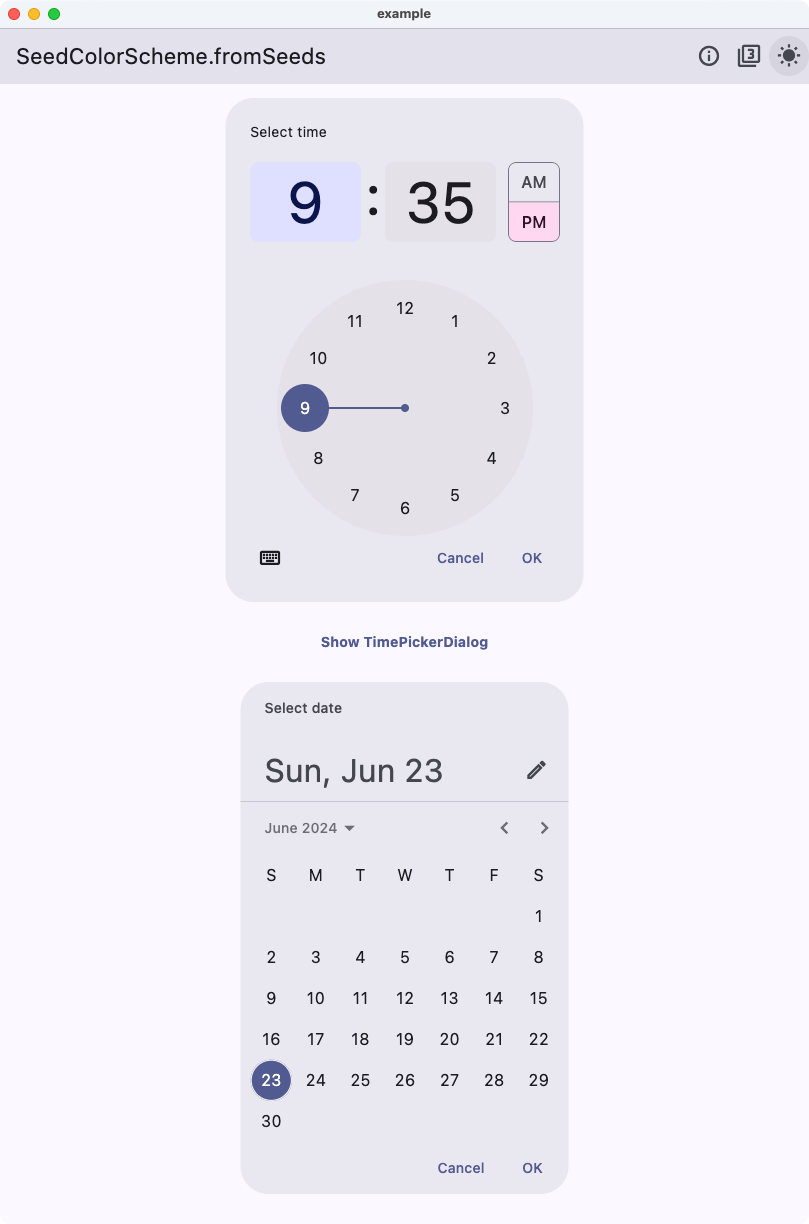 |
Now we see that the `DatePicker` no longer has the pink color it got from its default `tertiaryContainer` color. Instead, it uses the same blue hue related color as the `primary` color. This is because the `oneHue` strategy uses the same hue for all tonal palettes. This makes it possible to create a color scheme from a single color all based on the hue in the source brand color, without using tedious component color scheme re-mappings.
## Color Channel Getters
Flutter deprecated the `Color.value` getter and its 8-bit channel getters `alpha`, `red`, `green` and `blue`. FlexSeedScheme exports non-deprecated replacements for them as extensions on `Color`, called `value32bit`, `alpha8bit`, `red8bit`, `green8bit` and `blue8bit`. They are implemented the same way as the deprecated getters and will not be deprecated by this package.
They are convenient when you need the old 32-bit integer ARGB value of a `Color`, for example when calling APIs in the included forked Material Color Utilities (MCU) library, that operate on ARGB integer values.
```dart
// A color and its 32-bit ARGB integer value.
const Color seed = Color(0xFF6750A4);
final int argb = seed.value32bit; // Replaces deprecated seed.value.
// For example, to use MCU APIs directly:
final Scheme scheme = Scheme.light(seed.value32bit);
```
## Package Background
This package was extracted from the customizable color scheme seeding engine in the [**FlexColorScheme (FCS)**](https://pub.dev/packages/flex_color_scheme) package to its own package.
This allows developers to use the same customizable `ColorScheme` seeding algorithms used by **FlexColorScheme**, without using the FlexColorScheme package. Starting with **FlexColorScheme** version 6 and later, FCS depends on this package instead.
If you use **FlexColorScheme** version 6 or later, you do not need to add **FlexSeedScheme** to use its features, FlexColorScheme exports its API as well.
If you use FlexColorScheme, you typically do not even need to use FlexSeedScheme directly, its usage is baked in and used based on how you configure FlexColorScheme.
## For coding agents
Pub does not install Cursor or Claude skills. To give an agent the consume-side API (seeds vs pins, `tones` vs `variant`, modifiers), copy [`.agents/skills/flex-seed-scheme/`](https://github.com/rydmike/flex_seed_scheme/tree/master/.agents/skills/flex-seed-scheme) into your app’s `.agents/skills/` or `.cursor/skills/`.
## Changelog
# Changelog
All notable changes to the **FlexSeedScheme** (FSS) package are documented here.
## 5.0.1
**Aug 30, 2026**
**EXAMPLE**
- Example app bumped to use FlexColorPicker 4.0.0, and removed the temporary use of `MaterialUiCompatibilityBridge`.
- Example web demo: replaced the deprecated Flutter service-worker / `loadEntrypoint` bootstrap with `flutter_bootstrap.js`.
**DOCS**
- `SeedColorScheme.buildDynamicScheme` now has the same dartdoc shape as `fromSeeds`: a short purpose, then parameter sections, plus matching inline parameter docs.
**CHORE**
- Example web demo: replaced the deprecated Flutter service-worker bootstrap with `flutter_bootstrap.js`.
## 5.0.0
**Aug 24, 2026**
The version requires Flutter 3.47.0 or higher. Offers support for SDK decoupled Material and Cupertino libraries.
**BREAKING**
- This version requires Flutter 3.47.0 or higher
- It also opts in on Dart 3.13.0 language features and lints.
- This release brings full support for the standalone `material_ui` and `cupertino_ui` packages.
- Per **Flutter's official recommendation** the package is released as a **major breaking** release, but contains no breaking APIs or any new APIs. Produced `ColorScheme` results are same as before too, with one intentional bug fix exception, see the `surfaceTintTone` fix below.
- **FIX-BREAKING**: The `FlexTones.surfaceTintTone` tone mapping is now actually applied to the produced `ColorScheme.surfaceTint` on the `tones` based generation path. It was always intended to be, but the produced scheme previously always assigned the produced primary color to `ColorScheme.surfaceTint`, silently ignoring the tone mapping. This bug fix changes produced `ColorScheme.surfaceTint` results for the built-in configurations `FlexTones.ultraContrast`, `FlexTones.candyPop` and `FlexTones.chroma`, whose custom `surfaceTintTone` (30 in light mode, 95 in dark mode) differs from their primary tone, as well as for custom `FlexTones` where `surfaceTintTone` differs from `primaryTone`. The built-ins `vivid`, `vividSurfaces`, `vividBackground`, `highContrast` and `jolly` define `surfaceTintTone` 30 in light mode where their primary tone is also 30, so their produced results do not change. The `surfaceTint` override parameter in `SeedColorScheme.fromSeeds` works as before. The MCU `variant` based path is unchanged and keeps `surfaceTint` equal to `primary`, matching Flutter's `ColorScheme.fromSeed`, which uses `MaterialDynamicColors.primary` and not `MaterialDynamicColors.surfaceTint` for the produced `surfaceTint` color. This is intentional Flutter parity: the two MCU colors differ when `contrastLevel` is not 0 and for the monochrome variant; a code comment now documents this so it is not mistaken for a bug. Usage of the `surfaceTintTone` feature is likely extremely rare, so consumer impact of its fix should be very low, and the new result is the originally intended one.
**FIX**
- `FlexTones`: the `useCam16` property was missing from `copyWith`, `operator ==`, `hashCode` and `debugFillProperties`. Any `copyWith` call silently reset `useCam16` to its default true, including the internal copyWith-based modifier `expressiveOnContainer` that `SeedColorScheme.fromSeeds` applies. This did not change any produced colors, since `Cam16.fromInt` and `Hct.fromInt` return the same hue and chroma for the same input color, which is also why the omission went unnoticed. Equality however wrongly reported two `FlexTones` configs differing only in `useCam16` as equal. All four are fixed and `debugFillProperties` also gained the previously missing `onErrorTone` entry.
**CHANGE DOCS**
The changes below are only documentation and agent changes. No code behavior was changed.
- Reviewed and corrected the informational `FlexSchemeVariant` UI strings `description` and `configDetails` against the actual scheme generation code. As documented, these strings may change in any release and this is not a breaking change. No generated colors are affected.
- `expressive`: config details tertiary palette uses Chroma 32 (not 24) and hue rotation range 15-120 degrees (not 20-120).
- `soft`, `vivid`, `highContrast` and `oneHue`: config details neutral palette uses Chroma 6 (not 4). The value 4 was a leftover from before FSS 2.0.0, when the Material-3 default neutral chroma changed to 6.
- `fidelity` and `content`: the descriptions were nearly identical, they now state their actual difference: tertiary palette is the seed color's complement (fidelity) versus an analogous hue (content).
- `vividBackground`: description no longer refers to the deprecated `background` color swap, it now describes the actual difference to `vividSurfaces` (white surface in light mode, slightly darker surface in dark mode).
- Aligned hue rotation phrasing: variants that also rotate a provided key color's hue (`vibrant`, `expressive`) now read "Hue from primary or key rotated x-y degrees", while variants that use a provided key hue as-is keep the "Hue primary rotated 60 degrees or key" form.
- Fixed stale doc comments that no longer matched the code:
- `FlexSchemeVariant.vividSurfaces`: neutral chroma is 5 and neutralVariant 10, not 8 and 16.
- `FlexSchemeVariant.candyPop` and `FlexSchemeVariant.chroma`: removed references to the removed `background` color and corrected surface tones (chroma uses light surface tone 99 and dark 4).
- `FlexTones.dark`: default neutral chroma limits are 6 and 8, not 4 and 8.
- `FlexTones.candyPop`: dark mode surface tone is 6, not 5.
- `FlexTones.chroma`: light mode surface tone is 99 (not 98) and dark mode 4 (not 6).
- Codebase-wide documentation review, verified doc comment claims against the actual code and fixed stale information and typos. No code behavior was changed. Highlights:
- `FlexPaletteType.extended` has **30** tones; docs variously claimed 24, 25, 26 and 27, and omitted the FSS extra tones 65, 75 and 84 from listings. Also corrected which extended tones are M3 spec additions versus FSS extras (2 and 97 are FSS extras).
- Removed the stale `FlexPaletteType` narrative about the `common` type limiting chroma to max 40 for tones >= 90. That clamp was removed in FSS 2.0.0; the palette types now differ only in included tones.
- `FlexTones` field docs: `secondaryMinChroma` and `tertiaryMinChroma` effective fallbacks are 0 (docs claimed 16 and 24); `neutralChroma` constructor default is 6 (doc claimed 4); `onSecondaryFixedTone` maps to `onSecondaryFixed` (doc said `secondaryFixed`); `onSurfacesUseBW` doc no longer claims it affects main on-colors.
- Documented two known code quirks instead of changing behavior: `FlexTones.copyWith` does not include `useCam16` (a copy always resets it to true) and produced `ColorScheme.surfaceTint` is always assigned `primary`, so `FlexTones.surfaceTintTone` is currently not applied. Both are candidates for actual code fixes in a future release.
- `FlexCorePalette` docs: six palettes (not five), error palette defaults to hue 25 / chroma 84; code sample now uses `value32bit` instead of deprecated `Color.value`; "matching Flutter SDK" chroma claims qualified as pre Flutter 3.22 behavior.
- MCU fork (comments only, all divergences from upstream text are listed in the mcu-fork-sync skill reference): corrected the stale `useExpressiveOnContainerColors` doc block (defaults to true since FSS 4.0.0 and only switches the light mode on-container tone, not the contrast curve), wrong color names on `outline`, `onBackground` and `secondary` docs, a duplicated `Cam16` class doc, inverted L*/Y linearity claims, restored two "nonlinearity" comments corrupted by line reflow, added the missing Google license header to `key_color.dart`, removed a misleading "automatically generated" banner from the heavily customized `scheme.dart`, removed dead commented-out imports, and fixed assorted upstream typos.
- **Example app**: updated stale UI text and comments that said expressive on-container colors are "not yet used by Flutter" (Flutter 3.44+ uses them, with no opt-out; FSS keeps the opt-out). Corrected "only depends on the SDK" claims to `material_ui`, wrong default value comments in `custom_tones.dart`, and assorted typos.
- Repo docs and CI comments: `dart format --fix` no longer exists in Dart 3.13, commands updated in `AGENTS.md` and skills; `CONTRIBUTING.md` now says `master` branch; corrected stale workflow header comments (`test.yml` is the active CI, `validate.yaml` is disabled and used a removed `flutter format` command; web build no longer references a renderer flag).
- Reviewed the README against the code and updated stale information, typos and grammar. Screenshots are unchanged; they were made with earlier demo app versions but remain valid for documentation purposes. Highlights:
- Corrected the predefined `FlexTones` configuration count to twelve (said eleven) and the pre-FSS 2.0.0 default value comments in the custom `FlexTones` code sample (`primaryMinChroma`, `secondaryChroma` and `tertiaryChroma` default to null, not 36/16/24).
- Removed the stale description of the `FlexPaletteType.common` high-tone chroma clamp, deleted in FSS 2.0.0; the palette types now differ only in included tones.
- Rewrote the resolved Flutter/MCU speculation in the expressive on-container section: Flutter stable 3.44 and later use MCU 0.13.0 with expressive on-containers as the only option, FSS keeps the opt-out. Also clarified that the FSS fork's flag only switches the light on-container tone 30/10, the contrast curve always follows the newer spec.
- Fixed a broken code sample (`Colors(0xFF555555)` → `Color(0xFF555555)`), wrong sample comments (chroma variant labeled vibrant), and replaced a misleading example that chained `onMainsUseBW().expressiveOnContainer()`, where the second modifier was a no-op, with a working example plus a note about modifier order.
- Fixed wrong symbol names (`FlexTones.extended`/`FlexTones.common` → `FlexPaletteType.*`), `tonalSport` → `tonalSpot`, `FlexSeedSeed scheme` → `FlexSeedScheme`, "FFS" → FSS, repeated "from a seeds", "none surface" → non-surface, and assorted grammar issues.
- Added a "Version 5.0.0" note (Flutter 3.47/Dart 3.13 requirement, `material_ui`/`cupertino_ui` support, the `surfaceTintTone` fix), a headline bullet for `respectMonochromeSeed`, and a new "Color Channel Getters" section documenting the exported `value32bit`/`alpha8bit`/`red8bit`/`green8bit`/`blue8bit` extensions.
- The Example Application section heading now links to the v5 demo.
- Agent/skills config: added a new `release` skill (pub.dev publish flow, GitHub release triggered web demo deploy, downstream coordination), added a "Verify claims against code" section with known stale-info traps and the `FlexSchemeVariant` string phrasing conventions to the `code-documentation` skill, and logged deliberate MCU comment divergences in the `mcu-fork-sync` skill reference. Also documented in the `package-development` skill that `analysis_options.yaml` is the versioned RydMike linter preferences file publicly shared as a gist, so rule changes to it or `all_lint_rules.yaml` get a CHANGELOG note and a reminder to update the gist.
**TESTS**
- Added full-scheme golden locks for `FlexTones.candyPop` and `FlexTones.chroma`, light and dark (FCS7.028, FCS7.029). Together with the existing `ultraContrast` goldens, all three tone mappings whose produced results changed with the `surfaceTintTone` fix are now locked against unintended changes.
- Added a test locking the legacy `useExpressiveOnContainerColors: false` on-container colors on the MCU variant path (FCS7.030). Coverage of those legacy branches was lost when other tests moved to the new expressive default.
- Added a no-op test for all six `FlexTones` modifiers called with a false flag (FTO1.15).
- Improved MCU fork test coverage and removed 14 `coverage:ignore` markers by adding tests for previously untested branches. These are extra coverage tests not done by MCU upstream. They will allow us to better verify our forked MCU version and detect changes made to MCU upstream in the future:
- `DynamicColor.getTone`: background color landing in the awkward tone 50..60 zone, `ToneDeltaPair` with `stayTogether` in both light and dark mode, all dual background fallback branches, and the `foregroundTone` negligible-difference edge case.
- `TemperatureCache`: `analogous` with more divisions than hue steps and with count larger than divisions, plus cached `complement` and `inputRelativeTemperature` calls.
- `Score.score` fallback color when all input colors are filtered out.
- `QuantizerWsmeans` empty cluster reset when a starting cluster captures no points.
- Covered the last IDE-reported coverage misses: the `identical` equality short circuits in `CorePalette` and `CorePalettes` (self comparison tests) and the awkward-zone adjustment to tone 60 in `DynamicColor.getTone`, used when tone 49 cannot reach the required contrast against a dark background.
- The package now has 100% line coverage with only 8 remaining ignore markers, all on verified dead code: compile-time disabled debug logging in `QuantizerWsmeans`, negative modulo guards in `MathUtils` that Dart's `%` operator can never produce, index guards in `TemperatureCache.analogous` that its callers can never trigger, and one unreachable defensive padding line.
- Added regression tests for the `FlexTones` `useCam16` fix: equality of configs differing only in `useCam16` (FTO1.02c) and `copyWith`/modifier preservation of `useCam16` (FTO1.09d).
- Updated the `FlexTones` toString golden for the added `onErrorTone` and `useCam16` diagnostics properties.
- Corrected the expected configurations in FTO1.017/FTO1.018: they omitted `useCam16: false` for `FlexTones.material`, which the previous incomplete equality operator could not detect.
- Update tests to no longer use `useExpressiveOnContainerColors: false` for all MCU `DynamicSchemeVariant`s. This is no longer needed as the default is now `true` in Flutter stable 3.44.0 and later. The option to **not** use expressive on container colors is still available and can be used by setting `useExpressiveOnContainerColors` to `false` when calling `SeedColorScheme.fromSeeds`. However, Flutter's `ColorScheme.fromSeed` does not use expressive on container colors anymore, nor does it offer it as an option. With `FlexSeedScheme` it is still available and can be used as before. The `SeedColorScheme.fromSeeds` parameter `useExpressiveOnContainerColors` already defaulted to `true` instead of `false` in FSS version 4.0.0, and started using it as default before Flutter switched to it. You can still use the legacy option if you need it.
**CHORE**
- Bump all dependencies.
- Publishing: resolved both `dart pub publish --dry-run` warnings and reduced the published package archive from 13 MB to about 0.5 MB.
- Untracked the git-ignored, Flutter tool generated example platform files (`generated_plugin_registrant.*`, `generated_plugins.cmake` and `GeneratedPluginRegistrant.swift` for Windows, Linux and macOS). They are regenerated by `flutter pub get` and builds, and current Flutter project templates git-ignore them. They are no longer part of the published package either.
- Added a root `.pubignore`. It restates the publishing-relevant `.gitignore` rules (a `.pubignore` replaces the `.gitignore` in the same directory for publishing decisions) and additionally excludes internal repository content from the published archive: `AGENTS.md`, `docs/`, `scripts/`, and the README image folder `doc_assets/`. The README references its images via absolute GitHub URLs, so pub.dev does not need them in the archive. Excluding `docs/` also resolves the pub layout warning about a plural top-level docs directory. The `example/screenshots/` folder is intentionally still published: its files are declared in the pubspec `screenshots:` section and the pub.dev server rejects the upload if they are missing from the archive, a check the local dry run does not perform.
- CI: bumped `codecov/codecov-action` from the end-of-life v3 to v5 in all three workflows and renamed its `file:` input to `files:` per the v4+ API. The `-dev.1` release will serve as a live test of the deploy workflow.
- Verified included MCU fork to be at parity with MCU 0.13.1. It was stated to be at 0.13.0 parity before this release. Flutter 3.47 just started using MCU 0.13.0. A check revealed that MCU 0.13.1 is a small internal change, that we also already had in FSS version 4.0.0, it was added before it was published in MCU.
- The new `Cam16` hue helper was already in FSS version 4.0.0; MCU 0.13.1 published that commit.
- This release is only a doc update about Scheme migration URL + declare fork at 0.13.1 (Flutter 3.47 still on 0.13.0).
- No user-facing ColorScheme / HCT change.
- Example app's macOS and iOS builds migrated from CocoaPods to Swift Package Manager.
- Code style: Changed from RydMike lints 2.6.0 to RydMike lints 3.0.0. Big code diffs and changes in the code style.
- Updated to opt in on using min Dart 3.13.0 SDK.
- Old code base was compile time incompatible with Dart 3.13.0, fixed the issues that don't compile with Dart 3.13.0. The issue was this **breaking change in Dart 3.13:**
- Restriction on final and var in normal function parameters: With primary constructors, using final or var on formal parameters in normal functions becomes a compile-time error.
- They are reserved exclusively for declaring parameters in primary constructors. Note that the lints `avoid_final_parameters` and `var_with_no_type_annotation` only work with a language version of **Dart 3.12** or lower.
- To enforce immutable parameters as a style choice in **Dart 3.13** and later, use the `parameter_assignments` linter rule, which this repo already always enforced. See https://dart.dev/language/primary-constructors
- Fixed all new lints that came with Dart 3.13.
- **Example app**: Fixed Flutter SDK deprecation of `axisAlignment` in `ListTileReveal` and `SwitchListTileReveal` widgets.
- **Example app**: Temporary use of `MaterialUiCompatibilityBridge`.
- Used as temporary fix for **MaterialUi** compatibility for packages that still use Material from SDK, pre Flutter 3.47.0. It is in the **example** app used for the not yet updated **FlexColorPicker** that the **example** app uses.
- The color picker will be updated next and then this temporary fix will be removed and a 5.0.1 release will be published. It is a bit of a chicken and egg situation. The color picker also uses this package, and we need to publish a version of this package first, then update the picker and then update this package again so its example app can use the new version of the picker and remove the `MaterialUiCompatibilityBridge`.
## 4.0.1
**Nov 23, 2025**
The version requires Flutter 3.38.0 or higher.
**FIX**
- Fix mistakes in `README.md` section about [`useExpressiveOnContainerColors`](https://pub.dev/packages/flex_seed_scheme#expressive-on-container-colors).
## 4.0.0
**Nov 22, 2025**
The version requires Flutter 3.38.0 or higher.
This release **really** brings the bundled forked version of the package [Material Color Utilities (MCU)](https://pub.dev/packages/material_color_utilities) to parity with version 0.13.0. Flutter stable 3.38.x still uses MCU 0.11.1. Next version of Flutter, after stable 0.38, will use MCU 0.13.0, see [PR 12125](https://github.com/flutter/website/pull/12125).
This FSS release contains a breaking change to match the default for expressive on-container colors in MCU 0.12.0. This is also included in the coming bump to MCU 0.13.0 in Flutter after version 3.38.
**BREAKING**
- The `SeedColorScheme.fromSeeds` parameter `useExpressiveOnContainerColors` now defaults to `true` instead of `false`.
- This makes the default behavior of `SeedColorScheme.fromSeeds` match the default behavior of MCU 0.12.0 and later, where expressive on-container colors are used by default in light mode.
- If you want to maintain the previous behavior, you can explicitly set `useExpressiveOnContainerColors` to `false` when calling `SeedColorScheme.fromSeeds`.
- For more information see https://pub.dev/packages/flex_seed_scheme#expressive-on-container-colors
- The `DynamicScheme` parameter `customErrorPalette` was renamed to `errorPalette` to match newly exposed MCU 0.13.0 naming.
- Previously MCU did not expose this parameter, it was named customErrorPalette in the FSS fork. Now that MCU exposes it, we rename it to match MCU's naming.
- This is a **minor breaking** change, you will **only** hit it if you have used named parameter `customErrorPalette` in `DynamicScheme`. It is very unlikely to be used directly by end users of this package, as it is a very low-level API and not used by recommended main public APIs directly, but it was a public API, unfortunately.
- **FlexColorScheme** and **Themes Playground** did not and do not use this API directly, only indirectly via FSS higher APIs.
- **Removed** already in **version 2.0.0** deprecated **private** `int` properties in `FlexSeedScheme._()` and same named **public** `Color` parameters in `SeedColorScheme.fromSeeds()`:
- `background`
- `onBackground`
- `surfaceVariant`
- Removed already in **version 2.0.0** deprecated **public** `int` properties in `FlexTones()`, `FlexTones.light()` and `FlexTones.dark()` and same named parameters in `FlexTones.copyWith()`:
- `backgroundTone`
- `onBackgroundTone`
- `surfaceVariantTone`
**CHANGE**
- Updated `FlexSchemeVariant` and their `configDetails` descriptions to offer better explanations.
- As stated in the change policy doc comment for the enum `FlexSchemeVariant`, any changes in the property values `variantName`, `description`, `configDetails`, `icon` and `shade` are not considered breaking changes, only patches.
- These properties may be used when building UIs that present the different scheme variants. They serve no other purpose. They can also be ignored, you can use the enum values as input to build your own UI for selecting and describing the scheme variants. The values are used in the example app and also in the `FlexColorScheme` package example apps, like the **Themes Playground**.
**CHORE**
- MCU: Use `MathUtils.sanitizeDegreesDouble` for hue calculation in Cam16. (MCU update Nov 19, 2025, not yet in any package version)
- MCU: Added the `KeyColor` algorithm and its binary search optimization that was added in **MCU 0.11.2**. This may improve performance when extracting tonal palettes from seed colors.
- MCU: Optimize ARGB and HCT usage in DynamicScheme.
- MCU: A bunch of internal final statics were made const.
**TESTS**
* Add explicit test for ARGB int representation.
* Improved tests for TonalPalettes.
* Updated test for new `useExpressiveOnContainerColors` defaulting to `true`.
* Added loop test for all MCU `DynamicSchemeVariant`s to ensure they can be created without errors, so that same `DynamicScheme` matches results from Flutter's `ColorScheme.fromSeed` using corresponding `DynamicSchemeVariant`. The loop test excludes the variants `DynamicSchemeVariant.fidelity`, `DynamicSchemeVariant.monochrome` and `DynamicSchemeVariant.content` that have their own special tone logic. Previously only the default `DynamicSchemeVariant.tonalSpot` was tested this way. This test helps us verify that our fork of MCU can match the version of MCU that Flutter uses internally. When Flutter stable changes to use MCU 0.13.0, this test will need to change its flag `useExpressiveOnContainerColors` from `false` to `true`.
## 3.6.1
**Nov 5, 2025**
**FIX**
* FIX changelog that dropped the 3.5.1 heading in 3.6.0 release
## 3.6.0
Requires at least Flutter 3.35.0
**Nov 5, 2025**
**CHORE**
* Bump dependencies.
* Update lints to RydMike 2.5.0 lint rules and fix new lint warnings.
* Update the example to support Flutter v3.35.0.
* Due to breaking changes in Flutter 3.35.0, the package now also requires at least Flutter 3.35.0.
* Update included custom fork of material_color_utilities to include changes in version 0.13.0
* All of the `MaterialDynamicColors` fields are now final.
* NOTE: Flutter stable 3.35.x still uses material_color_utilities 0.11.1, at the time of publishing this, master also does.
* Since FSS uses its own fork, we can use the latest MCU features without conflicts with the pinned version Flutter uses.
## 3.5.1
**March 15, 2025**
**CHORE**
* Update lints for package scoring.
* Minor API documentation updates and fix API doc references.
## 3.5.0
**Dec 29, 2024**
**PACKAGE**
* Updated the package to support and require at least Flutter v3.27.0.
* Fixed all new analyzer lint warnings and removed usage of all deprecated `Color` properties.
**NEW**
* Added convenience `Color` sRGB extensions that can be used as none deprecated replacements for `alpha`, `red`, `green`, `blue` and `value` they are called `alpha8bit`, `red8bit`, `green8bit`, `blue8bit` and `value32bit`. FlexSeedScheme uses them internally to avoid using the deprecated Color properties.
## 3.4.1
**Sep 25, 2024**
**PACKAGE**
* No changes to the FlexSeedScheme package!
**WEB DEMO**
* Updated the web demo example to use FlexColorPicker version 3.6.0, where the tonal palette can now also respect monochrome seed colors as its displayed Material tonal palette. This is a new feature in FlexColorPicker 3.6.0.
* In the updated Web demo, the picker's setting is tied into the demo using the setting `respectMonochromeSeed` so the picker only uses it when the FlexSeedScheme web demo is configured to do so. The setting for the FlexColorPicker to make monochrome tonal palette for monochrome input and to use chroma of selected color, is a separate feature in the picker, it is not tied to FlexSeedScheme, but for this demo they are linked and use the same settings toggle.
## 3.4.0
**Sep 23, 2024**
**CHANGE**
* The parameter `useExpressiveOnContainerColors` in `SeedColorScheme.fromSeeds` now works with a scheme `variant` regardless of if it has `isFlutterScheme` set to true or false. Meaning it impacts both MCU `DynamicSchemeVariant` and FSS `FlexTones` based scheme variants.
* For `FlexTones` based variants, when using a built-in `FlexTones` or even a custom one, it is no longer necessary to use the `FlexTones` modifier `.expressiveOnContainer()` on the used `tones` to get a seeded color scheme with expressive on container tones in light mode.
* The `FlexTones` based modifier `.expressiveOnContainer()` is still used, but it is applied internally when the flag `useExpressiveOnContainerColors` is set to true.
* The `useExpressiveOnContainerColors` only applies in light mode to on container tones that are equal to 10, other tones are considered custom on purpose and are not changed. This is in-line with that the MCU `DynamicSchemeVariant`s that did not use tone 30 before as on container color in light mode, like Fidelity, Monochrome and Content were not affected by this change in MCU 0.12.0. In the same manner, this flag no longer changes `FlexTones` based schemes that have on container tones that are not 10. This applies to some on container colors in UltraContrast, Candy Pop and Chroma predefined `FlexTones`.
* This change makes this flag consistent and applicable to all seed generated schemes, regardless of if it is based on `DynamicSchemeVariant`, built-in `FlexTones` or even custom `FlexTones` configurations.
* For MCU seed generated schemes, `useExpressiveOnContainerColors` only has any impact when contrast level is at the default value (0), normal contrast.
* When using FFS seed generated schemes with `useExpressiveOnContainerColors` set to true, the modifier is applied before any `FlexTones` modifiers. Using tones modifiers, like e.g. `onMainsUseBW()` will thus as expected, override this setting and set on container colors to tone 0 or tone 100, depending on the container colors brightness.
**NEW**
* A new `bool` parameter, `respectMonochromeSeed` in `SeedColorScheme.fromSeeds` can now be used to make seed generated ColorSchemes that work as expected if a monochrome color is used as seed color input.
* When set to `true`, any monochrome RGB input value will result in the creation of a greyscale tonal palette for the palette using the monochrome seed color. An RGB monochrome value is one where Red, Green and Blue values are all equal.
* Previously in FSS and in Material Color Utilities (MCU) and thus still as default in Flutter `ColorScheme.fromSeed`, using a monochrome seed color value or white, resulted in a tonal palette with cyan color tones. A black input resulted in red like color tones. This is not very intuitive and not really expected when using monochrome seed colors.
* FSS still defaults to setting `respectMonochromeSeed` to `false`, to not break any existing code that may rely on the old behavior.
* Prefer setting `respectMonochromeSeed` to `true`, to get more logical seed results when using monochrome seed colors or white and black as seed colors.
* **NOTE:** When using `respectMonochromeSeed` with `DynamicSchemeVariant` variants `fidelity` or `content`, for some monochrome input colors they produce `primaryContainer` and `onPrimaryContainer` as well as `tertiaryContainer` and `onTertiaryContainer` color pairs, with low contrast. Consider using some other scheme variants with monochrome seed colors. All others work well with any monochrome seed color. This is just how the MCU `DynamicScheme`s `SchemeContent` and `SchemeFidelity` are defined in MCU. They also produce fairly low contrast for these color pairs with very dark seed colors. This behavior with MCU's `SchemeContent` and `SchemeFidelity` could be fixed in FlexSeedScheme's internal MCU fork, but we want to keep the result of these schemes consistent with MCU.
## 3.3.0
**Sep 7, 2024**
**NEW**
* Exposed `DynamicColor`, `MaterialDynamicColors` and `Scheme` from the underlying forked Material Color Utilities (MCU) library.
* Un-deprecated `Scheme`, that original MCU deprecated. It does not conflict with the new `DynamicSchemes` that replaced it, thus in the internal MCU fork, we do not need to deprecate it and can offer it for legacy access to old `ColorScheme.fromSeed` scheme result in use before Flutter 3.22.0.
* Internally FlexSeedScheme does not use `Scheme` for its own legacy version of the same scheme, it uses its FlexTones based setup instead, but produces the same color values. We still recommend using its tones `FlexTones.material3Legacy` version instead of `Scheme` for a legacy Material-3 seed generated `ColorScheme`.
* This API is provided for legacy access to the old MCU `Scheme` style and API, that was used in Flutter 3.19.0 and earlier in its `ColorScheme.fromSeed` constructor back then. If you want to recreate its exact older internal API algorithm, you can now do so using `Scheme` that it used to use before Flutter 3.22.0.
* This revived `Scheme` class was also complemented with the new `ColorScheme` colors added in Flutter 3.22.0, but it uses legacy Flutter 3.19 and earlier tone mappings for all colors that existed then. Except for dark mode `onErrorContainer` that it corrected from 80 to 90. It was always a bug in Flutter version 3.19 and earlier that tone 80 was used.
## 3.2.0
**Aug 27, 2024**
**CHANGE**
* The `FlexPaletteType.extended` tones got three new tones, tones 65, 75 and 84. It now has 30 tones.
**NEW**
* The `tones` configuration class `FlexTones` got a new modifier, `higherContrastFixed()`. It can be applied to any predefined or custom `FlexTones` to make a returned `FlexTones` instance where the tones for the fixed colors `fixed`, `onFixed`, `fixedDim` and `onFixedVariant` are set to **92, 6, 84 and 12** instead of their Material-3 specification tones **90, 10, 80 and 30**. This for an alternative set of fixed colors with more contrast.
## 3.1.2
**July 23, 2024**
**FIX**
* FIX the faulty tones for the modified `FlexTones.vividSurfaces` surface tones. They were in version 3.1.0 set to **96** for a light scheme and **10** for a dark scheme. The values need to be **98** and **6** to not clash with any other important tones used by all the surface colors and provide separation to them. Tones **98** and **6** are also the default tones in M3 design for them, there is very little wiggle room here.
* FIX tone for the modified `FlexTones.vividBackground` it was in version 3.1.0 set to **97** for its light scheme, it needs to use value 100 (white) to really provide a "vivid" background mode in light mode and offer some differentiation to `FlexTones.vividSurfaces` in light mode. In dark mode it still uses tone **5**, which is already different and darker than **6** used by `FlexTones.vividSurfaces`.
**INFO**
* How to use legacy `FlexTones.vividSurfaces` and `FlexTones.vividBackground` tone mappings?
* FSS version 3.1.0 removed the deprecated colors `background`, `onBackground` and `surfaceVariant` from being defined as a part of the `SeedColorScheme.fromSeeds` result. They still get color values, but they are whatever the default values the default Flutter SDK `ColorScheme()` constructor gives them. These colors were deprecated in Flutter 3.22.0 and are now removed from being defined and accessed by FSS.
* FSS 3.1.0 also changed the tone mappings for `FlexTones.vividSurfaces` and `FlexTones.vividBackground` to make them have some distinguishing differences when `background` color no longer has any effect or usage, and also to adhere to new the `ColorScheme` design intent.
* You should prefer to map one of the new surface colors that are already of a shade close to old surface and background colors, to theme colors as needed by your design. There are **eight** different surface shades to choose from in the ColorScheme introduced in Flutter 3.22, compared to **three** before.
* If you really need the pre-Flutter 3.22 legacy style for `FlexTones.vividSurfaces` or `FlexTones.vividBackground` you can optionally recreate them with `copyWith` on their definitions like this:
```dart
// For light legacy FlexTones.vividSurfaces
final ColorScheme vividSurfacesLight = SeedColorScheme.fromSeeds(
brightness: Brightness.light,
primaryKey: mySeedColor,
tones: FlexTones.vividSurfaces(Brightness.light).copyWith(surfaceTone: 95),
);
// For dark legacy FlexTones.vividSurfaces
final ColorScheme vividSurfacesDark = SeedColorScheme.fromSeeds(
brightness: Brightness.dark,
primaryKey: mySeedColor,
tones: FlexTones.vividSurfaces(Brightness.dark).copyWith(surfaceTone: 20),
);
// For light legacy FlexTones.vividBackground
final ColorScheme vividBackgroundLight = SeedColorScheme.fromSeeds(
brightness: Brightness.light,
primaryKey: mySeedColor,
tones: FlexTones.vividBackground(Brightness.light).copyWith(surfaceTone: 98),
);
// For dark legacy FlexTones.vividBackground
final ColorScheme vividBackgroundDark = SeedColorScheme.fromSeeds(
brightness: Brightness.dark,
primaryKey: mySeedColor,
tones: FlexTones.vividBackground(Brightness.dark).copyWith(surfaceTone: 6),
);
```
## 3.1.1
**July 13, 2024**
**CHORE**
* FIX the pub score.
* Update readme.
## 3.1.1-dev.1
**July 12, 2024**
**CHORE**
* Experiment to find and remove references from the package to deprecated properties for scoring purposes. The deprecated colors are **NOT** used anymore, but pub's pana analyzer still complains. It happily ignores the "allow usage of self-deprecated members" setting. It also complains about references used in doc comments. This is the first attempt to find and fix all things it complains about.
## 3.1.0
**July 12, 2024**
**CHANGE**
* Removes the in Flutter 3.22.0 deprecated `ColorScheme` colors `background`, `onBackground` and `surfaceVariant` from being defined as a part of the `SeedColorScheme.fromSeeds` result. They still get color values, but they are whatever the default values the default Flutter SDK `ColorScheme()` constructor gives them. These colors were deprecated in Flutter 3.22.0 and are now removed from being defined and accessed by FSS.
* The removal is done to keep FSS in sync with Flutter SDK and to avoid using deprecated colors.
* These colors should in application usage be replaced by `surface`, `onSurface` and `surfaceContainerLowest` in Flutter 3.22.0 and later.
* If you for some reason in Flutter 3.22.0 and later still need the deprecated colors, use FSS version 3.0.0.
* To make `FlexTones.vividSurfaces` and `FlexTones.vividBackground` have some distinguishing differences when `background` color no longer has any effect or usage, the following changes were made to their tone mappings:
* `FlexTones.vividSurfaces`:
* Light: surfaceTone 95 -> 96,
* Dark: surfaceTone 20 -> 10.
* `FlexTones.vividBackground`:
* Light: surfaceTone 98 -> 97,
* Dark: surfaceTone 6 -> 5.
* How to use legacy `FlexTones.vividSurfaces` and `FlexTones.vividBackground` tone mappings?
* You should prefer to map one of the new surface colors that are already of a shade close to old surface and background colors, to theme colors as needed by your design. There are **eight** different surface shades to choose from in the ColorScheme introduced in Flutter 3.22, compared to **three** before.
* If you really need the pre-Flutter 3.22 legacy style for `FlexTones.vividSurfaces` or `FlexTones.vividBackground` you can optionally recreate them with `copyWith` on their definitions like this:
```dart
// For light legacy FlexTones.vividSurfaces
final ColorScheme vividSurfacesLight = SeedColorScheme.fromSeeds(
brightness: Brightness.light,
primaryKey: mySeedColor,
tones: FlexTones.vividSurfaces(Brightness.light).copyWith(surfaceTone: 95),
);
// For dark legacy FlexTones.vividSurfaces
final ColorScheme vividSurfacesDark = SeedColorScheme.fromSeeds(
brightness: Brightness.dark,
primaryKey: mySeedColor,
tones: FlexTones.vividSurfaces(Brightness.dark).copyWith(surfaceTone: 20),
);
// For light legacy FlexTones.vividBackground
final ColorScheme vividBackgroundLight = SeedColorScheme.fromSeeds(
brightness: Brightness.light,
primaryKey: mySeedColor,
tones: FlexTones.vividBackground(Brightness.light).copyWith(surfaceTone: 98),
);
// For dark legacy FlexTones.vividBackground
final ColorScheme vividBackgroundDark = SeedColorScheme.fromSeeds(
brightness: Brightness.dark,
primaryKey: mySeedColor,
tones: FlexTones.vividBackground(Brightness.dark).copyWith(surfaceTone: 6),
);
```
**CHORE**
* Update `all_lint_rules.yaml`.
**EXAMPLE**
* Remove showing the deprecated colors `background`, `onBackground` and `surfaceVariant` in the example app.
## 3.0.0
**June 24, 2024**
Bring the bundled forked version of the package [Material Color Utilities (MCU)](https://pub.dev/packages/material_color_utilities) to feature parity with version 0.12.0 of the original package. The internal fork for the first time nw also adds features and capabilities that do not exist in the original package. Previously FSS only bundled MCU to avoid version conflicts with Flutter SDK when using different channels. Different Flutter channels typically pin incompatible versions of MCU.
The bundled forked version of MCU also has more tests than the original, allowing us to detect when any new MCU version "silently" changes color results it produced in the past.
* **BREAKING**
* The API for `SeedColorScheme.buildDynamicScheme` was changed to enable support for multiple seed colors on the MCU based `DynamicScheme` APIs and its extended schemes. For most normal use cases, you will not notice this, as it is quite a low-level API in FSS that end users normally do not use.
* **NEW**
* The forked internal MCU version received new features. The `DynamicScheme` can now accept an optional `customErrorPalette` and then `SchemeTonalSpot`, `SchemeContent`, `SchemeFidelity`, `SchemeExpressive`, `SchemeFruitSalad`, `SchemeMonochrome`, `SchemeNeutral`, `SchemeRainbow` and `SchemeVibrant` that extend `DynamicScheme` all received properties to support individual seed colors for all tonal palettes.
* The above addition enables `SeedColorScheme.fromSeeds` to support using all its key seed colors also when using MCU based `DynamicScheme` variants and not just for `FlexTones` based `tones` and `variants`. When using key seed colors with MCU variants, they still respect their original design intent.
* Added support for `contrastLevel` to `SeedColorScheme.fromSeeds`. This allows you to set the desired contrast level of the generated color scheme when using `SeedColorScheme.fromSeeds` with the `variant` property, for variants that are based on MCU's `DynamicScheme`. Such variants have their `isFlutterScheme` set to true.
* The `contrastLevel` parameter indicates the contrast level between color pairs, such as `primary` and `onPrimary`.The value 0.0 is the default (normal); -1.0 is the lowest; 1.0 is the highest. From Material Design guideline, the medium and high-contrast levels correspond to 0.5 and 1.0 respectively.
* The `contrastLevel` in Flutter SDK is not yet available in `ColorScheme.fromSeed` in Flutter stable 3.22.x, but is available on the master channel 3.23.x. With FSS you can use it already in Flutter 3.22.x.
* **NOTE:** Using `contrastLevel` has no effect when using `tones`. However, with `tones` you can create custom tones with even more flexibility in seed generation to make schemes with higher or less contrast. Two pre-configured high contrast tones exist earlier via `FlexTones.highContrast` and `FlexTones.ultraContrast`.
* Updated `MaterialDynamicColors` to optionally use the new Material expressive on-colors spec for none surface on-container colors. This feature is not on by default. You can opt in on this new standard by setting `useExpressiveOnContainerColors` to true in `SeedColorScheme.fromSeeds`.
* This option is only available when using MCU based `DynamicScheme` variants and not when using `FlexTones` based `tones` and `variants`, plus it only applies to variants that are based on MCU's `DynamicScheme`. Such variants have their `isFlutterScheme` set to true.
* Opting in changes the light mode color tone for the colors `onPrimaryContainer`, `onSecondaryContainer`, `onTertiaryContainer` and `onErrorContainer` from 10 to 30 making them more color expressive, but they also have less contrast.
* The accepted min contrast curve is thus now `ContrastCurve(3, 4.5, 7, 11)` instead of `ContrastCurve(4.5, 7, 11, 21)` for the on-container colors. Meaning normal contrast of 4.5 is now accepted when it was 7 before.
* Prior to MCU version 0.12.0 the `MaterialDynamicColors` used an older M3 spec. Flutter stable 3.22.x and Flutter master 3.23.x still use MCU versions lower than 0.12.0 and default to the older color tones 10 in light mode. This will be changed in Flutter SDK when Flutter is updated to use MCU 0.12.0 or later. With FSS 3.0.0, you can opt in on using the new spec already now. But FSS still also defaults to the older spec with more contrast. When Flutter stable changes to use the new spec, FSS will also change to use it as default. While Flutter and MCU will then no longer offer the older higher contrast version, FSS will continue to do so.
* The optional usage of the expressive colors for on-container colors is also a customization of MCU features in the forked version. We see value in being able to offer both the higher contrast older version and the new more color expressive one.
* The `tones` configuration class `FlexTones` got a new built-in modifier, `monochromeSurfaces()`. It can be applied to any predefined or custom `FlexTones` to make the surface colors monochrome and use pure greyscale for the neutral and neutral variant tonal palettes, with no color tint from their key color or primary key seed color.
* The `tones` configuration class `FlexTones` also got the new modifier, `expressiveOnContainer()`. It can be applied to any predefined or custom `FlexTones` to make a returned `FlexTones` instance where the tones for light mode on container tones are set to 30 for more color expressive container text and icons on none surface containers.
* This modifier only impacts none surface on-container tones that are dark and thus only has any impact on the light theme mode on-container colors.
* The impacted on container colors are `onPrimaryContainerTone`,`onSecondaryContainerTone`, `onTertiaryContainerTone` and `onErrorContainerTone`.
* This feature brings optional light mode expressive on-container colors to any predefined or custom `FlexTones` configuration. The expressive on-color in light mode containers are a new change to Material Design 3 ColorScheme. It was introduced in Material Color Utilities (MCU) package v0.12.0.
* This modifier is equivalent to setting the `SeedColorScheme.fromSeeds` and its `useExpressiveOnContainerColors` to true when using MCU dynamic scheme variant based seeded color schemes.
* **COLOR VALUE STYLE BREAKING**
* Changed `FlexTones.chroma` tone `secondaryTone` from 60 to 50 in light mode for better chroma fidelity when using `FlexTone.chroma` in light mode.
* **CHANGE**
* Revert Flutter constraint back to `>=3.22.0` from `>=3.22.0-0.3.pre` that was only used by FSS dev release `2.1.0-dev.1`. Since beta and master are now on `3.23.0` or higher versions, the `>=3.22.0` constraint can now be used by master and beta channels without any issue.
* Improved the descriptions and config info strings of `FlexSchemeVariant` enum values.
* The EXAMPLE APP was extensively revised to include support for all the new features and to also show some old features not demonstrated before.
* **FIX**
* The `FlexTones.material3Legacy` was corrected. It had some incorrect tones and chroma in its configuration. The mistakes were fixed. Tests were added to check the FlexTones.material3Legacy compared to the MCU deprecated Scheme-based colors, for colors that exist in both.
* EXAMPLE APP: The key color to seed the error palette was not used in the main example in dark mode.
## 2.1.0-dev.1
**May 21, 2024**
This is a temp pre-release of FFS 2.1.0.
**FIX**
* [FIX #13](https://github.com/rydmike/flex_seed_scheme/issues/13). Sets Flutter version constraint to flutter: `>=3.22.0-0.3.pre`, so that the package can also be used on **beta** and **stable** channels, while they are still on 3.22.0-a.b.pre versions, which is considered smaller than **3.22.0**, used in the stable release of the package. You can use this version of the package if you need to use **beta** or **master** channel before they have been bumped to 3.23.x. This release is apart from the version constraint difference identical to the `2.0.0` release.
## 2.0.0
**May 14, 2024**
This release adds support for the revised Material-3 `ColorScheme` released in Flutter version 3.22.0 and for seeded scheme variants, that will arrive in the Flutter stable release after 3.22.x.
* **CHANGE**
* Bring the internal Material Color Utilities (MCU) library version to parity with its latest package release 0.11.1. Flutter SDK stable 3.22 still uses MCU 0.8.0, but the Flutter master channel already uses MCU 0.11.1.
* The `FlexPaletteType.extended` tones got two new tones added, tone 2, and 24. It now has 27 tones.
* **NEW**
* Support revised Material-3 `ColorScheme` with the new colors `primaryFixed`, `primaryFixedDim`, `onPrimaryFixed`, `onPrimaryFixedVariant`, `secondaryFixed`, `secondaryFixedDim`, `onSecondaryFixed`, `onSecondaryFixedVariant`, `tertiaryFixed`, `tertiaryFixedDim`, `onTertiaryFixed`, `onTertiaryFixedVariant`, `surfaceDim`, `surfaceBright`, `surfaceContainerLowest`, `surfaceContainerLow`, `surfaceContainer`, `surfaceContainerHigh` and `surfaceContainerHighest`.
* New alternative way to specify the used seeding algorithm in `SeedColorScheme.fromSeeds` by providing new enum value `FlexSchemeVariant` to its `variant` property.
* In addition to supporting selection of built-in `FlexTones`, the `variant` property also supports using Flutter SDK, MCU based scheme variants `tonalSpot`, `monochrome`, `neutral`, `vibrant`, `expressive`, `content`,`rainbow` and `fruitSalad` in by specifying them in property `variant` in `SeedColorScheme.fromSeeds`. In Flutter 3.22 only the default `tonalSpot` is available, but with FSS you can use any of the other variants as well already in Flutter 3.22. The other variants are not yet available in Flutter 3.22, but they are available in the `ColorScheme` API in the master channel and will be available in Flutter `ColorScheme.fromSeed` in the next stable release after 3.22. With FSS you can use them already starting from Flutter 3.22.0.
* With the `variants` enum property you can also select built-in `FlexTones` that you could use before in `SeedColorScheme.fromSeeds` in `tones`. The `FlexTones` are still available and can be used as before, it has some advantages. With `tones` you can create customized seed extractions based on `FlexTones` and you can use tones surface quick modifiers, `onMainsUseBW`, `onSurfacesUseBW` and `surfacesUseBW`.
* When using `variants`, if the variant is one of the Flutter SDK/MCU variants, it will not use more than one key color, the primary as seed color. The `FlexSchemeVariant` that have their property `isFlutterScheme` set to true are part of the Flutter SDK/MCU variants.
* The Flutter SDK/MCU variants are `tonalSpot`, `fidelity`, `monochrome`, `neutral`, `vibrant`, `expressive`, `content`, `rainbow` and `fruitSalad`.
* The other `FlexSchemeVariant` that have their property `isFlutterScheme` set to false are part of the `FlexTones` variants using the corresponding built-in `FlexTones` as seed extraction. The variants are `material`, `material3Legacy`, `soft`, `vivid`, `vividSurfaces`, `highContrast`, `ultraContrast`, `jolly`, `vividBackground`, `oneHue`, `candyPop` and `chroma`. The `chroma` option is similar to the new nice SDK/MCU one called `fidelity`, in that it follows chroma of seed color, with the added benefit that it can use a separate seed color for each tonal palette.
* The APIs `variant` and `tones` are mutually exclusive, you can only use one of them in `SeedColorScheme.fromSeeds`. Both can be unspecified, but if you specify one, the other must be unspecified/null.
* A new `FlexTones.material3Legacy` was added. This `FlexTones` configuration preserves and provides access to the seed generation used by Flutter prior to Flutter version 3.22 and as used by `FlexTones.material`in FlexSeedScheme before version 2.0.0. If you in Flutter 3.22 and FlexSeedScheme 2.0.0 need to replicate this style you can use this `FlexTones` in `SeedColorScheme.fromSeeds` property `tones` or the `FlexSchemeVariant.material3Legacy` in `variants`.
* **BREAKING**
* The Material-3 `ColorScheme` colors `background`, `onBackground` and `surfaceVariant` have been deprecated since they are also deprecated in Flutter 3.22.
* These **deprecated** colors are **still supported** in `SeedColorScheme.fromSeeds` and `FlexTones`, but they will be removed in a future release. They are replaced by `surface`, `onSurface` and `surfaceContainerLowest`. There are also many new surface colors, like `surfaceDim`, `surfaceBright` and `surfaceContainerLowest` in the new Material-3 `ColorScheme` in Flutter 3.22.
* The fact that these deprecated colors are still **referenced** in the package **will reduce** its **pub.dev** score with **10 points**, but they are kept for now to maintain **FULL** compatibility with **Flutter 3.22** that also still provides values for these deprecated colors and uses them in code. This package needs to provide the same values to be fully compatible. The `ColorScheme` colors `background`, `onBackground` and `surfaceVariant` may only be fully removed when they have been removed from the Flutter SDK stable channel. If later tests show they can be removed without breaking any styles earlier, they will be removed in a future release of this package, even if they are still available in the Flutter SDK stable channel. A future dev version may also remove them to provide compatibility with the Flutter master channel when they are removed there.
* **BREAKING STYLES**
* All built-in `FlexTones` now use the `paletteType` extended via `FlexPaletteType.extended` as default for additional tone fidelity. This is used for compatibility with Flutter 3.22 and its revised `ColorScheme`.
* The default tones for the built-in `FlexTones` have been adjusted to match the new Material-3 `ColorScheme` in Flutter 3.22. The new tones and default styles are marginally different but also better than in previous Flutter versions. If you need the result and style used in Flutter 3.19 and earlier, you can use the `FlexTones.material3Legacy` as `tones` in `SeedColorScheme.fromSeeds` to get the result `FlexTones.material` produced in FSS before version 2.0.0 and that was also the default in Flutter in version 3.19 and earlier.
* The `FlexSchemeVariant.tonalSpot` is the `variant` that Flutter SDK uses from MCU in `ColorScheme.fromSeed` in **Flutter 3.22 and later** when you make seed generated color schemes with it. This generated scheme is different from the one `ColorScheme.fromSeed` generated in **Flutter 3.19 and earlier**. If you need the result and style used in Flutter 3.19 and earlier, you can use the `material3Legacy` as `tones` or `variant` in `SeedColorScheme.fromSeeds` to get the result `FlexTones.material` produced in FSS before version 2.0.0 and that was also the default in Flutter in version 3.19 and earlier when using `ColorScheme.fromSeed`.
* The `FlexTones.material` has been updated and now produces the same result as `tonalSpot` in tests. There may be some edge cases where there are rounding differences. The `material` alternative can be used both in `variant` and `tones`. It provides the advantages over `tonalSpot` that since it is a `FlexTones`, it can use multiple seed colors and if used in `tones`, its results can be quick adjusted with `onMainsUseBW`, `onSurfacesUseBW` and `surfacesUseBW`. The `tonalSpot` is a Flutter SDK/MCU variant and does not support these customizations.
## 1.5.0
**April 3, 2024**
* **NEW**
* Exposed `Hct` and `ViewingConditions` from the underlying Material Color Utilities (MCU) library. They are exposed for convenience, you no longer have to add and import (MCU) to use them.
* Add `CODE_OF_CONDUCT.md` and `CONTRIBUTING.md` files for guidance on contributing to the package.
## 1.4.0
**July 2, 2023**
* **NEW**
* Added support for new HCT tones used by updated Material3 color system, that were added during the first half of 2023 to the Material 3 color system specification. The added tones 4, 6, 12, 17, 22 are for new dark mode surfaces in revised Material 3 dark surface colors. Likewise, added tones 97, 96, 94, 92, 87 are for light mode surfaces in the updated Material 3 color system. For more information, see: https://m3.material.io/styles/color/the-color-system/color-roles.
* The change and additions are none breaking. APIs that want and can use the extended tones can pass in an optional `paletteType` of `FlexPaletteType` and set it to `FlexPaletteType.extended`, by default its values `FlexPaletteType.common` resulting in the 15 tones `[0, 5, 10, 20, 30, 40, 50, 60, 70, 80, 90, 95, 98, 99, 100]` being produced as before.
* The complete list of the 25 extended tones are `[0, 4, 5, 6, 10, 12, 17, 20, 22, 30, 40, 50, 60, 70, 80, 87, 90, 92, 94, 95, 96, 97, 98, 99, 100]`.
* None breaking Changed APIs that now support using `paletteType` of `FlexPaletteType`are:
* `FlexTonalPalette.of`
* `FlexTonalPalette.fromList`
* `FlexCorePalette.of`
* `FlexCorePalette.fromHueChroma`
* `FlexCorePalette.fromList`
* `FlexCorePalette.fromSeeds`
* `FlexTones`
* Flutter 3.10 and earlier do not yet use these new tones in its standard `ColorScheme`, but since they are in the Material 3 spec, they will arrive at some later point.
* `FlexTonalPalette`, like MCU `TonalPalette`, caps chroma for tones higher than or equal to 90, to maximum chroma value of 40. In `FlexTonalPalette` this still applies when using `FlexPaletteType.common`, when you use the `FlexPaletteType.extended`, there is no chroma max cap on high tones, it uses fidelity mode for high tones. When using type `FlexPaletteType.common` the chroma of high tones (>= 90), is limited to maximum 40. This keeps the chromacity of tones 90 to 100, lower than 40. If the source uses has more chromacity than 40, there may be a sudden jump in chroma reduction at tone 90. This is the standard behavior for the original Material-3 tonal palette computation. The `FlexPaletteType.common` type is intended to be used when there is a need to follow strict M3's original palette design.
* When using the `FlexPaletteType.extended` type tones, there are not only the new tones, but the chroma limit of tones >= 90 is also removed. This increases fidelity of higher tone when high chromacity is used.
* Added two new pre-configured `FlexTones`s, `candyPop` and `chroma`, they use the new `FlexPaletteType.extended` tonal palette.
* Added new `FlexTones` modifier `surfacesUseBW()`. It can be used as a modifier to force any `FlexTones` seed strategy to use tone 100 (white) or tone 0 (black) as `background` and `surface` colors, depending on if they are dark or light
* **CHANGE**
* **Minor style breaking**: To correct and improve produced themes, the tones `primaryContainerTone` and `secondaryContainerTone` for light mode `FlexTones.highContrast` and `FlexTones.ultraContrast` were both changed from 95 to 90. This produces brighter and more punchy themes for these two high-contrast themes in light mode.
* **CHORE**
* Bump Dart SDK to >= 3.0.0 and Flutter SDK to >= 3.10.0. Fix lints for the bump.
* Add all Material Color Utilities (MCU) updates from its Dart version to the internal bundled version.
* This includes all PRs up to and including "PR: 28.6.2023 Change var back to double in Java." This equals Dart version 0.8.0 published on June 29, 2023, with its two new schemes fruit salad and rainbow.
* At this time, Flutter master was using MCU version 0.5.0 and Flutter stable 3.10.0 still used the MCU version 0.2.0.
* Since MCU is using zero semver and Flutter SDK, depends on it, any minor version number change is breaking and cannot be resolved across Flutter channels if a package also uses MCU. This is the reason why (FSS) for now does not use MCU directly. It bundles its own version of it for now. This also means FSS may sometimes use a newer version of MCU than Flutter stable, beta, and master. FSS may stop bundling MCU when it stops getting so many frequent breaking updates that cause dependency hell for a package that needs to depend on MCU and work on all Flutter channels.
* **EXAMPLE**
* Major refactoring of the example app.
* Use a theme controller and ListenableBuilder to rebuild the app theme when the theme controller changes.
* Feature: Add showing generated tonal palettes to the example.
* Feature: Separate controls for making on Main and on Surface colors black and white.
* Feature: Change seed colors in the app with Color picker.
* Feature: Add switching between showing common tones and extended tones.
* Feature: Add selecting a custom color as key color for error palette.
## 1.3.0
**May 11, 2023**
**INTERNAL CHANGE**
- Removed the **Material Color Utilities** (MCU) dependency.
- It is now included and maintained as a separate forked code base in **FSS**, while keeping **MCU**'s original license in place for its parts. The included **MCU** library was only modified to abide by the much stricter lint rules used in **FSS**. More unit tests for better test coverage of **MCU** were added as well.
- Why is **MCU** included as a forked version baked into **FSS**?
The constant changes in **MCU**, with e.g., recent three different breaking-pinned zero-ver versions used in **Flutter** **stable**, **beta** and **master** channels, made it hopeless to depend on **MCU**. Using it caused repeated version conflicts with Flutter's own pinned dependency on different breaking versions of it, in different **Flutter** channels. **FSS** needs to be able to work across all Flutter channels without constant hassle caused by **MCU** and which exact version of it different version of **Flutter** repo itself is pinned to.
- The included forked version will be kept in sync with the original and updated when needed. Currently included **MCU** version is 0.5.0, the latest one, which is what **Flutter master** channel currently uses. However, new **Flutter stable** 3.10 is still using **MCU** 0.2.0. If the **MCU** package stabilizes and improves its constant breaking changes, **FSS** may later again be changed to depend on the original package. Until then, it embeds the code for it in its package to avoid the version conflict hassles it has repeatedly caused. These changes are all internal to the **FSS** package and do not affect how it works.
**NEW**
- Exposed `Blend`, `CorePalette` and `TonalPalette` from **MCU**. Previously only `Cam16` was exposed. These APIs from **MCU** are exposed because [FlexColorScheme (FCS)](https://pub.dev/packages/flex_color_scheme) uses them. By exposing these APIs from the included **MCU** in **FSS**, it also no longer has any dependency on the **MCU** package that Flutter depends on. This makes it easier for the latest release of **FCS** to also work on all current Flutter channels.
Future versions of **FSS** may expose a few more APIs from **MCU**, but more likely it will offer a few new alternative ones with its own twist. Like it is for example, doing with `SeedColorScheme.fromSeeds`.
## 1.2.4
**Apr 16, 2023**
- Bumped Flutter sdk version constraint to `>=2.19.0 <4.0.0` (from `>=2.18.0 <3.0.0`)
- Changed `material_color_utilities` version constraint to `>=0.2.0 <0.4.0` from `^0.2.0`.
These changes enable the package to be used on current Flutter **stable** 3.7 versions, as well as the latest 3.10.x versions on channels **beta** and **master**. It will also work with the next stable Flutter release after 3.7.
## 1.2.3
**Mar 19, 2023**
- FIX: Version 1.2.0 unintentionally introduced a lower level breaking API from version 1.1.0. This release relaxes the API and fixes the breakage.
## 1.2.2
**Jan 30, 2023**
- Add example screenshots to pubspec.yaml.
## 1.2.1
**Jan 25, 2023**
- Fix date on 1.2.0 changelog.
## 1.2.0
**Jan 25, 2023**
Requires minimum Flutter 3.7.0. Now support `outlineVariant` and `scrim` colors in `ColorScheme` in Flutter stable 3.7.0 and later.
This release also adds new features to allow customization of seed generation of error, neutral and neutral variant tonal palettes. All listed features are unchanged from the previous dev pre-release 1.2.0-dev.1.
**NEW**
* Adds support for `outlineVariant` and `scrim` colors in `ColorScheme`.
* Added support for customizing seed generation for error, neutral and neutral variant tonal palettes.
* To support the new features the `SeedColorScheme.fromSeeds` got the following new `Color` properties `errorKey`, `neutralKey` and `neutralVariantKey`.
* The `FlexTones` class got the following new `double` properties
`errorChroma`, `errorMinChroma`, `neutralMinChroma` and `neutralVariantMinChroma`
* The `FlexCorePalette.fromSeeds` factory got the following new `int` properties `error`, `neutral`, `neutralVariant` and `neutralVariantMinChroma`. As well as new `double` properties `errorChroma`, `errorMinChroma`, `neutralChroma`, `neutralMinChroma`, `neutralVariantChroma` and `neutralVariantMinChroma`.
* The demo application got an **About** dialog. The demo app also shows the `ColorScheme` applied on common **Material** components.
## 1.2.0-dev.1
**Dec 23, 2022**
Requires minimum Flutter 3.7.0-1.2.pre (beta channel). This is a development pre-release to support `outlineVariant` and `scrim` colors in `ColorScheme`. It is used for development and testing against new Material 3 features in Flutter 3.7 beta and master channel. It will be released as a stable version when the new color properties land in the Flutter stable channel, most likely after January 25, 2023.
The release also adds new features to allow customization of seed generation of error, neutral and neutral variant tonal palettes.
**NEW**
* Adds support for `outlineVariant` and `scrim` colors in `ColorScheme`.
* Added support for customizing seed generation for error, neutral and neutral variant tonal palettes.
* To support the new features the `SeedColorScheme.fromSeeds` got the following new `Color` properties `errorKey`, `neutralKey` and `neutralVariantKey`.
* The `FlexTones` class got the following new `double` properties
`errorChroma`, `errorMinChroma`, `neutralMinChroma` and `neutralVariantMinChroma`
* The `FlexCorePalette.fromSeeds` factory got the following new `int` properties `error`, `neutral`, `neutralVariant` and `neutralVariantMinChroma`. As well as new `double` properties `errorChroma`, `errorMinChroma`, `neutralChroma`, `neutralMinChroma`, `neutralVariantChroma` and `neutralVariantMinChroma`.
* The demo application got an **About** dialog. The demo app also shows the `ColorScheme` applied on common **Material** components.
## 1.1.0
**Nov 17, 2022**
**NEW**
* Added new `FlexTones` method `onMainsUseBW`, that can return a new instance of its configurations with tone mapping for its main **on* colors set to tone, 0 (black) or 100 (white), depending on what is appropriate for its main color tones. The main colors are primary, secondary, tertiary, error and their containers. The method works on any configured `FlexTones`, also custom ones, not only the built-in ones.
* Added new `FlexTones` method `onSurfacesUseBW`, that can return a new instance of its configurations with tone mapping for its surface **on* colors set to tone, 0 (black) or 100 (white), depending on what is appropriate for its surface color tones. Surface colors are background, surface, surfaceVariant and inverseSurface. The method works on any configured `FlexTones`, also custom ones, not only the built-in ones.
* To be able to support creating mono-hue seeded color schemes, the `FlexCorePalette.fromSeeds` got a new property
`tertiaryHueRotation`. It controls the used hue rotation degrees from primary key color, that is used when a tertiary seed key color is not provided. The `tertiaryHueRotation` defaults 60 degrees, same as previously from Material 3 color system hard-coded value.
* Added two new `FlexTones`.
- `FlexTones.oneHue` that set `tertiaryHueRotation` to 0, so we can create a mono hue palette if we only provide primary key color as seed.
- `FlexTones.vividBackground` that is a copy of `FlexTones.vividSurfaces` but with tone mapping for `background` and `surface` swapped.
**CHANGE**
Tone mappings for some pre-configured `FlexTones` were slightly modified. They now produce improved and more usable color schemes. Most significantly, the mappings for `FlexTones.vividSurfaces` were modified to provide a more usable and improved vivid surfaces tinted color scheme, while still offering a slightly more tinted surface design than `FlexTones.vivid`. Tone mapping changes are as follows:
* The `FlexTones.vivid`, brightness **light**:
- Tone `surfaceTone` was changed from 99 to 98.
* The `FlexTones.vivid`, brightness **dark**:
- Tone `onErrorContainerTone` was changed from 90 to 80 (dark M3 default).
- Tone `backgroundTone` was changed from 10 to 5.
* The `FlexTones.vividSurfaces` brightness **light**:
- Tone `onPrimaryTone` was changed from 95 to 98.
- Tone `onSecondaryTone` was changed from 95 to 98.
- Tone `onTertiaryTone` was changed from 95 to 98.
- Tone `onErrorTone` was changed from 95 to 98.
- Tone `primaryContainerTone` was changed from 80 to 90 (light M3 default).
- Tone `secondaryContainerTone` was changed from 80 to 90 (light M3 default).
- Tone `tertiaryContainerTone` was changed from 80 to 90 (light M3 default).
- Tone `errorContainerTone` was changed from 80 to 90 (light M3 default).
- Tone `surfaceVariantTone` was changed from 80 to 90 (light M3 default).
- Tone `backgroundTone` was changed from 90 to 98.
- `neutralChroma` was changed from 8 to 5.
- `neutralVariantChroma` was changed from 16 to 10.
* The `FlexTones.vividSurfaces` brightness **dark**:
- Tone `primaryContainerTone` was changed from 40 to 20.
- Tone `tertiaryContainerTone` was changed from 40 to 30 (dark M3 default).
- Tone `primaryContainerTone` was changed from 40 to 30 (dark M3 default).
- Tone `onErrorTone` was changed from 20 to 30 (dark M3 default).
- Tone `onErrorContainerTone` was changed from 90 to 80 (dark M3 default).
- Tone `surfaceTone` was changed from 10 to 20.
- Tone `surfaceVariantTone` was changed from 40 to 30 (dark M3 default).
- Tone `backgroundTone` was changed from 20 to 10.
- Tone `onSurfaceVariantTone` was changed from 90 to 95.
- Tone `onInverseSurfaceTone` was changed from 30 to 20 (dark M3 default).
- `neutralChroma` was changed from 8 to 5.
- `neutralVariantChroma` was changed from 16 to 10.
* The `FlexTones.ultraContrast` brightness **light**:
- Tone `primaryTone` was changed from 30 to 20.
* The `FlexTones.ultraContrast` brightness **dark**:
- Tone `surfaceTone` was changed from 10 to 5.
- Tone `backgroundTone` was changed from 10 to 5.
## 1.0.1
**Sep 2, 2022**
**DOCS**
* Readme: Removed old notice about package being a beta release and using Flutter 3.3 beta.
* Readme: Described custom FlexTones config with an example.
* API doc improvements.
**EXAMPLE**
* Allow selection of example custom tones example and all built-in `FlexTones` options.
* Publish example app as a live web demo.
## 1.0.0
**Aug 30, 2022**
First stable release.
* Document updates.
* Updated minimum dependencies to Dart >=2.18.0 and Flutter >= 3.3.0.
## 0.2.0-dev.2
**Aug 28, 2022**
**NEW**
* From Material Color utilities export and show `Cam16`.
## 0.2.0-dev.1
**Aug 27, 2022**
**NEW**
* Add customization possibility of `error` tonal palette to the default `FlexTonalPalette`
constructor.
**BREAKING**
* The `FlexTonalPalette` method `asList` and constructor `fromList`, now include the values of the error color in produced `asList`, and as required values in `fromList`.
## 0.1.0-dev.3
**Aug 27, 2022**
* Fix pub points.
## 0.1.0-dev.2
**Aug 27, 2022**
* Relax version constraint to make it work on beta 3.3.0-0.3.pre and later.
* Remove in Flutter beta 3.3.0 unsupported `ColorScheme` colors `scrim` and `outlineVariant`.
## 0.1.0-dev.1
**Aug 26, 2022**
* First dev release of the package.
|
Now we see that the `DatePicker` no longer has the pink color it got from its default `tertiaryContainer` color. Instead, it uses the same blue hue related color as the `primary` color. This is because the `oneHue` strategy uses the same hue for all tonal palettes. This makes it possible to create a color scheme from a single color all based on the hue in the source brand color, without using tedious component color scheme re-mappings.
## Color Channel Getters
Flutter deprecated the `Color.value` getter and its 8-bit channel getters `alpha`, `red`, `green` and `blue`. FlexSeedScheme exports non-deprecated replacements for them as extensions on `Color`, called `value32bit`, `alpha8bit`, `red8bit`, `green8bit` and `blue8bit`. They are implemented the same way as the deprecated getters and will not be deprecated by this package.
They are convenient when you need the old 32-bit integer ARGB value of a `Color`, for example when calling APIs in the included forked Material Color Utilities (MCU) library, that operate on ARGB integer values.
```dart
// A color and its 32-bit ARGB integer value.
const Color seed = Color(0xFF6750A4);
final int argb = seed.value32bit; // Replaces deprecated seed.value.
// For example, to use MCU APIs directly:
final Scheme scheme = Scheme.light(seed.value32bit);
```
## Package Background
This package was extracted from the customizable color scheme seeding engine in the [**FlexColorScheme (FCS)**](https://pub.dev/packages/flex_color_scheme) package to its own package.
This allows developers to use the same customizable `ColorScheme` seeding algorithms used by **FlexColorScheme**, without using the FlexColorScheme package. Starting with **FlexColorScheme** version 6 and later, FCS depends on this package instead.
If you use **FlexColorScheme** version 6 or later, you do not need to add **FlexSeedScheme** to use its features, FlexColorScheme exports its API as well.
If you use FlexColorScheme, you typically do not even need to use FlexSeedScheme directly, its usage is baked in and used based on how you configure FlexColorScheme.
## For coding agents
Pub does not install Cursor or Claude skills. To give an agent the consume-side API (seeds vs pins, `tones` vs `variant`, modifiers), copy [`.agents/skills/flex-seed-scheme/`](https://github.com/rydmike/flex_seed_scheme/tree/master/.agents/skills/flex-seed-scheme) into your app’s `.agents/skills/` or `.cursor/skills/`.
## Changelog
# Changelog
All notable changes to the **FlexSeedScheme** (FSS) package are documented here.
## 5.0.1
**Aug 30, 2026**
**EXAMPLE**
- Example app bumped to use FlexColorPicker 4.0.0, and removed the temporary use of `MaterialUiCompatibilityBridge`.
- Example web demo: replaced the deprecated Flutter service-worker / `loadEntrypoint` bootstrap with `flutter_bootstrap.js`.
**DOCS**
- `SeedColorScheme.buildDynamicScheme` now has the same dartdoc shape as `fromSeeds`: a short purpose, then parameter sections, plus matching inline parameter docs.
**CHORE**
- Example web demo: replaced the deprecated Flutter service-worker bootstrap with `flutter_bootstrap.js`.
## 5.0.0
**Aug 24, 2026**
The version requires Flutter 3.47.0 or higher. Offers support for SDK decoupled Material and Cupertino libraries.
**BREAKING**
- This version requires Flutter 3.47.0 or higher
- It also opts in on Dart 3.13.0 language features and lints.
- This release brings full support for the standalone `material_ui` and `cupertino_ui` packages.
- Per **Flutter's official recommendation** the package is released as a **major breaking** release, but contains no breaking APIs or any new APIs. Produced `ColorScheme` results are same as before too, with one intentional bug fix exception, see the `surfaceTintTone` fix below.
- **FIX-BREAKING**: The `FlexTones.surfaceTintTone` tone mapping is now actually applied to the produced `ColorScheme.surfaceTint` on the `tones` based generation path. It was always intended to be, but the produced scheme previously always assigned the produced primary color to `ColorScheme.surfaceTint`, silently ignoring the tone mapping. This bug fix changes produced `ColorScheme.surfaceTint` results for the built-in configurations `FlexTones.ultraContrast`, `FlexTones.candyPop` and `FlexTones.chroma`, whose custom `surfaceTintTone` (30 in light mode, 95 in dark mode) differs from their primary tone, as well as for custom `FlexTones` where `surfaceTintTone` differs from `primaryTone`. The built-ins `vivid`, `vividSurfaces`, `vividBackground`, `highContrast` and `jolly` define `surfaceTintTone` 30 in light mode where their primary tone is also 30, so their produced results do not change. The `surfaceTint` override parameter in `SeedColorScheme.fromSeeds` works as before. The MCU `variant` based path is unchanged and keeps `surfaceTint` equal to `primary`, matching Flutter's `ColorScheme.fromSeed`, which uses `MaterialDynamicColors.primary` and not `MaterialDynamicColors.surfaceTint` for the produced `surfaceTint` color. This is intentional Flutter parity: the two MCU colors differ when `contrastLevel` is not 0 and for the monochrome variant; a code comment now documents this so it is not mistaken for a bug. Usage of the `surfaceTintTone` feature is likely extremely rare, so consumer impact of its fix should be very low, and the new result is the originally intended one.
**FIX**
- `FlexTones`: the `useCam16` property was missing from `copyWith`, `operator ==`, `hashCode` and `debugFillProperties`. Any `copyWith` call silently reset `useCam16` to its default true, including the internal copyWith-based modifier `expressiveOnContainer` that `SeedColorScheme.fromSeeds` applies. This did not change any produced colors, since `Cam16.fromInt` and `Hct.fromInt` return the same hue and chroma for the same input color, which is also why the omission went unnoticed. Equality however wrongly reported two `FlexTones` configs differing only in `useCam16` as equal. All four are fixed and `debugFillProperties` also gained the previously missing `onErrorTone` entry.
**CHANGE DOCS**
The changes below are only documentation and agent changes. No code behavior was changed.
- Reviewed and corrected the informational `FlexSchemeVariant` UI strings `description` and `configDetails` against the actual scheme generation code. As documented, these strings may change in any release and this is not a breaking change. No generated colors are affected.
- `expressive`: config details tertiary palette uses Chroma 32 (not 24) and hue rotation range 15-120 degrees (not 20-120).
- `soft`, `vivid`, `highContrast` and `oneHue`: config details neutral palette uses Chroma 6 (not 4). The value 4 was a leftover from before FSS 2.0.0, when the Material-3 default neutral chroma changed to 6.
- `fidelity` and `content`: the descriptions were nearly identical, they now state their actual difference: tertiary palette is the seed color's complement (fidelity) versus an analogous hue (content).
- `vividBackground`: description no longer refers to the deprecated `background` color swap, it now describes the actual difference to `vividSurfaces` (white surface in light mode, slightly darker surface in dark mode).
- Aligned hue rotation phrasing: variants that also rotate a provided key color's hue (`vibrant`, `expressive`) now read "Hue from primary or key rotated x-y degrees", while variants that use a provided key hue as-is keep the "Hue primary rotated 60 degrees or key" form.
- Fixed stale doc comments that no longer matched the code:
- `FlexSchemeVariant.vividSurfaces`: neutral chroma is 5 and neutralVariant 10, not 8 and 16.
- `FlexSchemeVariant.candyPop` and `FlexSchemeVariant.chroma`: removed references to the removed `background` color and corrected surface tones (chroma uses light surface tone 99 and dark 4).
- `FlexTones.dark`: default neutral chroma limits are 6 and 8, not 4 and 8.
- `FlexTones.candyPop`: dark mode surface tone is 6, not 5.
- `FlexTones.chroma`: light mode surface tone is 99 (not 98) and dark mode 4 (not 6).
- Codebase-wide documentation review, verified doc comment claims against the actual code and fixed stale information and typos. No code behavior was changed. Highlights:
- `FlexPaletteType.extended` has **30** tones; docs variously claimed 24, 25, 26 and 27, and omitted the FSS extra tones 65, 75 and 84 from listings. Also corrected which extended tones are M3 spec additions versus FSS extras (2 and 97 are FSS extras).
- Removed the stale `FlexPaletteType` narrative about the `common` type limiting chroma to max 40 for tones >= 90. That clamp was removed in FSS 2.0.0; the palette types now differ only in included tones.
- `FlexTones` field docs: `secondaryMinChroma` and `tertiaryMinChroma` effective fallbacks are 0 (docs claimed 16 and 24); `neutralChroma` constructor default is 6 (doc claimed 4); `onSecondaryFixedTone` maps to `onSecondaryFixed` (doc said `secondaryFixed`); `onSurfacesUseBW` doc no longer claims it affects main on-colors.
- Documented two known code quirks instead of changing behavior: `FlexTones.copyWith` does not include `useCam16` (a copy always resets it to true) and produced `ColorScheme.surfaceTint` is always assigned `primary`, so `FlexTones.surfaceTintTone` is currently not applied. Both are candidates for actual code fixes in a future release.
- `FlexCorePalette` docs: six palettes (not five), error palette defaults to hue 25 / chroma 84; code sample now uses `value32bit` instead of deprecated `Color.value`; "matching Flutter SDK" chroma claims qualified as pre Flutter 3.22 behavior.
- MCU fork (comments only, all divergences from upstream text are listed in the mcu-fork-sync skill reference): corrected the stale `useExpressiveOnContainerColors` doc block (defaults to true since FSS 4.0.0 and only switches the light mode on-container tone, not the contrast curve), wrong color names on `outline`, `onBackground` and `secondary` docs, a duplicated `Cam16` class doc, inverted L*/Y linearity claims, restored two "nonlinearity" comments corrupted by line reflow, added the missing Google license header to `key_color.dart`, removed a misleading "automatically generated" banner from the heavily customized `scheme.dart`, removed dead commented-out imports, and fixed assorted upstream typos.
- **Example app**: updated stale UI text and comments that said expressive on-container colors are "not yet used by Flutter" (Flutter 3.44+ uses them, with no opt-out; FSS keeps the opt-out). Corrected "only depends on the SDK" claims to `material_ui`, wrong default value comments in `custom_tones.dart`, and assorted typos.
- Repo docs and CI comments: `dart format --fix` no longer exists in Dart 3.13, commands updated in `AGENTS.md` and skills; `CONTRIBUTING.md` now says `master` branch; corrected stale workflow header comments (`test.yml` is the active CI, `validate.yaml` is disabled and used a removed `flutter format` command; web build no longer references a renderer flag).
- Reviewed the README against the code and updated stale information, typos and grammar. Screenshots are unchanged; they were made with earlier demo app versions but remain valid for documentation purposes. Highlights:
- Corrected the predefined `FlexTones` configuration count to twelve (said eleven) and the pre-FSS 2.0.0 default value comments in the custom `FlexTones` code sample (`primaryMinChroma`, `secondaryChroma` and `tertiaryChroma` default to null, not 36/16/24).
- Removed the stale description of the `FlexPaletteType.common` high-tone chroma clamp, deleted in FSS 2.0.0; the palette types now differ only in included tones.
- Rewrote the resolved Flutter/MCU speculation in the expressive on-container section: Flutter stable 3.44 and later use MCU 0.13.0 with expressive on-containers as the only option, FSS keeps the opt-out. Also clarified that the FSS fork's flag only switches the light on-container tone 30/10, the contrast curve always follows the newer spec.
- Fixed a broken code sample (`Colors(0xFF555555)` → `Color(0xFF555555)`), wrong sample comments (chroma variant labeled vibrant), and replaced a misleading example that chained `onMainsUseBW().expressiveOnContainer()`, where the second modifier was a no-op, with a working example plus a note about modifier order.
- Fixed wrong symbol names (`FlexTones.extended`/`FlexTones.common` → `FlexPaletteType.*`), `tonalSport` → `tonalSpot`, `FlexSeedSeed scheme` → `FlexSeedScheme`, "FFS" → FSS, repeated "from a seeds", "none surface" → non-surface, and assorted grammar issues.
- Added a "Version 5.0.0" note (Flutter 3.47/Dart 3.13 requirement, `material_ui`/`cupertino_ui` support, the `surfaceTintTone` fix), a headline bullet for `respectMonochromeSeed`, and a new "Color Channel Getters" section documenting the exported `value32bit`/`alpha8bit`/`red8bit`/`green8bit`/`blue8bit` extensions.
- The Example Application section heading now links to the v5 demo.
- Agent/skills config: added a new `release` skill (pub.dev publish flow, GitHub release triggered web demo deploy, downstream coordination), added a "Verify claims against code" section with known stale-info traps and the `FlexSchemeVariant` string phrasing conventions to the `code-documentation` skill, and logged deliberate MCU comment divergences in the `mcu-fork-sync` skill reference. Also documented in the `package-development` skill that `analysis_options.yaml` is the versioned RydMike linter preferences file publicly shared as a gist, so rule changes to it or `all_lint_rules.yaml` get a CHANGELOG note and a reminder to update the gist.
**TESTS**
- Added full-scheme golden locks for `FlexTones.candyPop` and `FlexTones.chroma`, light and dark (FCS7.028, FCS7.029). Together with the existing `ultraContrast` goldens, all three tone mappings whose produced results changed with the `surfaceTintTone` fix are now locked against unintended changes.
- Added a test locking the legacy `useExpressiveOnContainerColors: false` on-container colors on the MCU variant path (FCS7.030). Coverage of those legacy branches was lost when other tests moved to the new expressive default.
- Added a no-op test for all six `FlexTones` modifiers called with a false flag (FTO1.15).
- Improved MCU fork test coverage and removed 14 `coverage:ignore` markers by adding tests for previously untested branches. These are extra coverage tests not done by MCU upstream. They will allow us to better verify our forked MCU version and detect changes made to MCU upstream in the future:
- `DynamicColor.getTone`: background color landing in the awkward tone 50..60 zone, `ToneDeltaPair` with `stayTogether` in both light and dark mode, all dual background fallback branches, and the `foregroundTone` negligible-difference edge case.
- `TemperatureCache`: `analogous` with more divisions than hue steps and with count larger than divisions, plus cached `complement` and `inputRelativeTemperature` calls.
- `Score.score` fallback color when all input colors are filtered out.
- `QuantizerWsmeans` empty cluster reset when a starting cluster captures no points.
- Covered the last IDE-reported coverage misses: the `identical` equality short circuits in `CorePalette` and `CorePalettes` (self comparison tests) and the awkward-zone adjustment to tone 60 in `DynamicColor.getTone`, used when tone 49 cannot reach the required contrast against a dark background.
- The package now has 100% line coverage with only 8 remaining ignore markers, all on verified dead code: compile-time disabled debug logging in `QuantizerWsmeans`, negative modulo guards in `MathUtils` that Dart's `%` operator can never produce, index guards in `TemperatureCache.analogous` that its callers can never trigger, and one unreachable defensive padding line.
- Added regression tests for the `FlexTones` `useCam16` fix: equality of configs differing only in `useCam16` (FTO1.02c) and `copyWith`/modifier preservation of `useCam16` (FTO1.09d).
- Updated the `FlexTones` toString golden for the added `onErrorTone` and `useCam16` diagnostics properties.
- Corrected the expected configurations in FTO1.017/FTO1.018: they omitted `useCam16: false` for `FlexTones.material`, which the previous incomplete equality operator could not detect.
- Update tests to no longer use `useExpressiveOnContainerColors: false` for all MCU `DynamicSchemeVariant`s. This is no longer needed as the default is now `true` in Flutter stable 3.44.0 and later. The option to **not** use expressive on container colors is still available and can be used by setting `useExpressiveOnContainerColors` to `false` when calling `SeedColorScheme.fromSeeds`. However, Flutter's `ColorScheme.fromSeed` does not use expressive on container colors anymore, nor does it offer it as an option. With `FlexSeedScheme` it is still available and can be used as before. The `SeedColorScheme.fromSeeds` parameter `useExpressiveOnContainerColors` already defaulted to `true` instead of `false` in FSS version 4.0.0, and started using it as default before Flutter switched to it. You can still use the legacy option if you need it.
**CHORE**
- Bump all dependencies.
- Publishing: resolved both `dart pub publish --dry-run` warnings and reduced the published package archive from 13 MB to about 0.5 MB.
- Untracked the git-ignored, Flutter tool generated example platform files (`generated_plugin_registrant.*`, `generated_plugins.cmake` and `GeneratedPluginRegistrant.swift` for Windows, Linux and macOS). They are regenerated by `flutter pub get` and builds, and current Flutter project templates git-ignore them. They are no longer part of the published package either.
- Added a root `.pubignore`. It restates the publishing-relevant `.gitignore` rules (a `.pubignore` replaces the `.gitignore` in the same directory for publishing decisions) and additionally excludes internal repository content from the published archive: `AGENTS.md`, `docs/`, `scripts/`, and the README image folder `doc_assets/`. The README references its images via absolute GitHub URLs, so pub.dev does not need them in the archive. Excluding `docs/` also resolves the pub layout warning about a plural top-level docs directory. The `example/screenshots/` folder is intentionally still published: its files are declared in the pubspec `screenshots:` section and the pub.dev server rejects the upload if they are missing from the archive, a check the local dry run does not perform.
- CI: bumped `codecov/codecov-action` from the end-of-life v3 to v5 in all three workflows and renamed its `file:` input to `files:` per the v4+ API. The `-dev.1` release will serve as a live test of the deploy workflow.
- Verified included MCU fork to be at parity with MCU 0.13.1. It was stated to be at 0.13.0 parity before this release. Flutter 3.47 just started using MCU 0.13.0. A check revealed that MCU 0.13.1 is a small internal change, that we also already had in FSS version 4.0.0, it was added before it was published in MCU.
- The new `Cam16` hue helper was already in FSS version 4.0.0; MCU 0.13.1 published that commit.
- This release is only a doc update about Scheme migration URL + declare fork at 0.13.1 (Flutter 3.47 still on 0.13.0).
- No user-facing ColorScheme / HCT change.
- Example app's macOS and iOS builds migrated from CocoaPods to Swift Package Manager.
- Code style: Changed from RydMike lints 2.6.0 to RydMike lints 3.0.0. Big code diffs and changes in the code style.
- Updated to opt in on using min Dart 3.13.0 SDK.
- Old code base was compile time incompatible with Dart 3.13.0, fixed the issues that don't compile with Dart 3.13.0. The issue was this **breaking change in Dart 3.13:**
- Restriction on final and var in normal function parameters: With primary constructors, using final or var on formal parameters in normal functions becomes a compile-time error.
- They are reserved exclusively for declaring parameters in primary constructors. Note that the lints `avoid_final_parameters` and `var_with_no_type_annotation` only work with a language version of **Dart 3.12** or lower.
- To enforce immutable parameters as a style choice in **Dart 3.13** and later, use the `parameter_assignments` linter rule, which this repo already always enforced. See https://dart.dev/language/primary-constructors
- Fixed all new lints that came with Dart 3.13.
- **Example app**: Fixed Flutter SDK deprecation of `axisAlignment` in `ListTileReveal` and `SwitchListTileReveal` widgets.
- **Example app**: Temporary use of `MaterialUiCompatibilityBridge`.
- Used as temporary fix for **MaterialUi** compatibility for packages that still use Material from SDK, pre Flutter 3.47.0. It is in the **example** app used for the not yet updated **FlexColorPicker** that the **example** app uses.
- The color picker will be updated next and then this temporary fix will be removed and a 5.0.1 release will be published. It is a bit of a chicken and egg situation. The color picker also uses this package, and we need to publish a version of this package first, then update the picker and then update this package again so its example app can use the new version of the picker and remove the `MaterialUiCompatibilityBridge`.
## 4.0.1
**Nov 23, 2025**
The version requires Flutter 3.38.0 or higher.
**FIX**
- Fix mistakes in `README.md` section about [`useExpressiveOnContainerColors`](https://pub.dev/packages/flex_seed_scheme#expressive-on-container-colors).
## 4.0.0
**Nov 22, 2025**
The version requires Flutter 3.38.0 or higher.
This release **really** brings the bundled forked version of the package [Material Color Utilities (MCU)](https://pub.dev/packages/material_color_utilities) to parity with version 0.13.0. Flutter stable 3.38.x still uses MCU 0.11.1. Next version of Flutter, after stable 0.38, will use MCU 0.13.0, see [PR 12125](https://github.com/flutter/website/pull/12125).
This FSS release contains a breaking change to match the default for expressive on-container colors in MCU 0.12.0. This is also included in the coming bump to MCU 0.13.0 in Flutter after version 3.38.
**BREAKING**
- The `SeedColorScheme.fromSeeds` parameter `useExpressiveOnContainerColors` now defaults to `true` instead of `false`.
- This makes the default behavior of `SeedColorScheme.fromSeeds` match the default behavior of MCU 0.12.0 and later, where expressive on-container colors are used by default in light mode.
- If you want to maintain the previous behavior, you can explicitly set `useExpressiveOnContainerColors` to `false` when calling `SeedColorScheme.fromSeeds`.
- For more information see https://pub.dev/packages/flex_seed_scheme#expressive-on-container-colors
- The `DynamicScheme` parameter `customErrorPalette` was renamed to `errorPalette` to match newly exposed MCU 0.13.0 naming.
- Previously MCU did not expose this parameter, it was named customErrorPalette in the FSS fork. Now that MCU exposes it, we rename it to match MCU's naming.
- This is a **minor breaking** change, you will **only** hit it if you have used named parameter `customErrorPalette` in `DynamicScheme`. It is very unlikely to be used directly by end users of this package, as it is a very low-level API and not used by recommended main public APIs directly, but it was a public API, unfortunately.
- **FlexColorScheme** and **Themes Playground** did not and do not use this API directly, only indirectly via FSS higher APIs.
- **Removed** already in **version 2.0.0** deprecated **private** `int` properties in `FlexSeedScheme._()` and same named **public** `Color` parameters in `SeedColorScheme.fromSeeds()`:
- `background`
- `onBackground`
- `surfaceVariant`
- Removed already in **version 2.0.0** deprecated **public** `int` properties in `FlexTones()`, `FlexTones.light()` and `FlexTones.dark()` and same named parameters in `FlexTones.copyWith()`:
- `backgroundTone`
- `onBackgroundTone`
- `surfaceVariantTone`
**CHANGE**
- Updated `FlexSchemeVariant` and their `configDetails` descriptions to offer better explanations.
- As stated in the change policy doc comment for the enum `FlexSchemeVariant`, any changes in the property values `variantName`, `description`, `configDetails`, `icon` and `shade` are not considered breaking changes, only patches.
- These properties may be used when building UIs that present the different scheme variants. They serve no other purpose. They can also be ignored, you can use the enum values as input to build your own UI for selecting and describing the scheme variants. The values are used in the example app and also in the `FlexColorScheme` package example apps, like the **Themes Playground**.
**CHORE**
- MCU: Use `MathUtils.sanitizeDegreesDouble` for hue calculation in Cam16. (MCU update Nov 19, 2025, not yet in any package version)
- MCU: Added the `KeyColor` algorithm and its binary search optimization that was added in **MCU 0.11.2**. This may improve performance when extracting tonal palettes from seed colors.
- MCU: Optimize ARGB and HCT usage in DynamicScheme.
- MCU: A bunch of internal final statics were made const.
**TESTS**
* Add explicit test for ARGB int representation.
* Improved tests for TonalPalettes.
* Updated test for new `useExpressiveOnContainerColors` defaulting to `true`.
* Added loop test for all MCU `DynamicSchemeVariant`s to ensure they can be created without errors, so that same `DynamicScheme` matches results from Flutter's `ColorScheme.fromSeed` using corresponding `DynamicSchemeVariant`. The loop test excludes the variants `DynamicSchemeVariant.fidelity`, `DynamicSchemeVariant.monochrome` and `DynamicSchemeVariant.content` that have their own special tone logic. Previously only the default `DynamicSchemeVariant.tonalSpot` was tested this way. This test helps us verify that our fork of MCU can match the version of MCU that Flutter uses internally. When Flutter stable changes to use MCU 0.13.0, this test will need to change its flag `useExpressiveOnContainerColors` from `false` to `true`.
## 3.6.1
**Nov 5, 2025**
**FIX**
* FIX changelog that dropped the 3.5.1 heading in 3.6.0 release
## 3.6.0
Requires at least Flutter 3.35.0
**Nov 5, 2025**
**CHORE**
* Bump dependencies.
* Update lints to RydMike 2.5.0 lint rules and fix new lint warnings.
* Update the example to support Flutter v3.35.0.
* Due to breaking changes in Flutter 3.35.0, the package now also requires at least Flutter 3.35.0.
* Update included custom fork of material_color_utilities to include changes in version 0.13.0
* All of the `MaterialDynamicColors` fields are now final.
* NOTE: Flutter stable 3.35.x still uses material_color_utilities 0.11.1, at the time of publishing this, master also does.
* Since FSS uses its own fork, we can use the latest MCU features without conflicts with the pinned version Flutter uses.
## 3.5.1
**March 15, 2025**
**CHORE**
* Update lints for package scoring.
* Minor API documentation updates and fix API doc references.
## 3.5.0
**Dec 29, 2024**
**PACKAGE**
* Updated the package to support and require at least Flutter v3.27.0.
* Fixed all new analyzer lint warnings and removed usage of all deprecated `Color` properties.
**NEW**
* Added convenience `Color` sRGB extensions that can be used as none deprecated replacements for `alpha`, `red`, `green`, `blue` and `value` they are called `alpha8bit`, `red8bit`, `green8bit`, `blue8bit` and `value32bit`. FlexSeedScheme uses them internally to avoid using the deprecated Color properties.
## 3.4.1
**Sep 25, 2024**
**PACKAGE**
* No changes to the FlexSeedScheme package!
**WEB DEMO**
* Updated the web demo example to use FlexColorPicker version 3.6.0, where the tonal palette can now also respect monochrome seed colors as its displayed Material tonal palette. This is a new feature in FlexColorPicker 3.6.0.
* In the updated Web demo, the picker's setting is tied into the demo using the setting `respectMonochromeSeed` so the picker only uses it when the FlexSeedScheme web demo is configured to do so. The setting for the FlexColorPicker to make monochrome tonal palette for monochrome input and to use chroma of selected color, is a separate feature in the picker, it is not tied to FlexSeedScheme, but for this demo they are linked and use the same settings toggle.
## 3.4.0
**Sep 23, 2024**
**CHANGE**
* The parameter `useExpressiveOnContainerColors` in `SeedColorScheme.fromSeeds` now works with a scheme `variant` regardless of if it has `isFlutterScheme` set to true or false. Meaning it impacts both MCU `DynamicSchemeVariant` and FSS `FlexTones` based scheme variants.
* For `FlexTones` based variants, when using a built-in `FlexTones` or even a custom one, it is no longer necessary to use the `FlexTones` modifier `.expressiveOnContainer()` on the used `tones` to get a seeded color scheme with expressive on container tones in light mode.
* The `FlexTones` based modifier `.expressiveOnContainer()` is still used, but it is applied internally when the flag `useExpressiveOnContainerColors` is set to true.
* The `useExpressiveOnContainerColors` only applies in light mode to on container tones that are equal to 10, other tones are considered custom on purpose and are not changed. This is in-line with that the MCU `DynamicSchemeVariant`s that did not use tone 30 before as on container color in light mode, like Fidelity, Monochrome and Content were not affected by this change in MCU 0.12.0. In the same manner, this flag no longer changes `FlexTones` based schemes that have on container tones that are not 10. This applies to some on container colors in UltraContrast, Candy Pop and Chroma predefined `FlexTones`.
* This change makes this flag consistent and applicable to all seed generated schemes, regardless of if it is based on `DynamicSchemeVariant`, built-in `FlexTones` or even custom `FlexTones` configurations.
* For MCU seed generated schemes, `useExpressiveOnContainerColors` only has any impact when contrast level is at the default value (0), normal contrast.
* When using FFS seed generated schemes with `useExpressiveOnContainerColors` set to true, the modifier is applied before any `FlexTones` modifiers. Using tones modifiers, like e.g. `onMainsUseBW()` will thus as expected, override this setting and set on container colors to tone 0 or tone 100, depending on the container colors brightness.
**NEW**
* A new `bool` parameter, `respectMonochromeSeed` in `SeedColorScheme.fromSeeds` can now be used to make seed generated ColorSchemes that work as expected if a monochrome color is used as seed color input.
* When set to `true`, any monochrome RGB input value will result in the creation of a greyscale tonal palette for the palette using the monochrome seed color. An RGB monochrome value is one where Red, Green and Blue values are all equal.
* Previously in FSS and in Material Color Utilities (MCU) and thus still as default in Flutter `ColorScheme.fromSeed`, using a monochrome seed color value or white, resulted in a tonal palette with cyan color tones. A black input resulted in red like color tones. This is not very intuitive and not really expected when using monochrome seed colors.
* FSS still defaults to setting `respectMonochromeSeed` to `false`, to not break any existing code that may rely on the old behavior.
* Prefer setting `respectMonochromeSeed` to `true`, to get more logical seed results when using monochrome seed colors or white and black as seed colors.
* **NOTE:** When using `respectMonochromeSeed` with `DynamicSchemeVariant` variants `fidelity` or `content`, for some monochrome input colors they produce `primaryContainer` and `onPrimaryContainer` as well as `tertiaryContainer` and `onTertiaryContainer` color pairs, with low contrast. Consider using some other scheme variants with monochrome seed colors. All others work well with any monochrome seed color. This is just how the MCU `DynamicScheme`s `SchemeContent` and `SchemeFidelity` are defined in MCU. They also produce fairly low contrast for these color pairs with very dark seed colors. This behavior with MCU's `SchemeContent` and `SchemeFidelity` could be fixed in FlexSeedScheme's internal MCU fork, but we want to keep the result of these schemes consistent with MCU.
## 3.3.0
**Sep 7, 2024**
**NEW**
* Exposed `DynamicColor`, `MaterialDynamicColors` and `Scheme` from the underlying forked Material Color Utilities (MCU) library.
* Un-deprecated `Scheme`, that original MCU deprecated. It does not conflict with the new `DynamicSchemes` that replaced it, thus in the internal MCU fork, we do not need to deprecate it and can offer it for legacy access to old `ColorScheme.fromSeed` scheme result in use before Flutter 3.22.0.
* Internally FlexSeedScheme does not use `Scheme` for its own legacy version of the same scheme, it uses its FlexTones based setup instead, but produces the same color values. We still recommend using its tones `FlexTones.material3Legacy` version instead of `Scheme` for a legacy Material-3 seed generated `ColorScheme`.
* This API is provided for legacy access to the old MCU `Scheme` style and API, that was used in Flutter 3.19.0 and earlier in its `ColorScheme.fromSeed` constructor back then. If you want to recreate its exact older internal API algorithm, you can now do so using `Scheme` that it used to use before Flutter 3.22.0.
* This revived `Scheme` class was also complemented with the new `ColorScheme` colors added in Flutter 3.22.0, but it uses legacy Flutter 3.19 and earlier tone mappings for all colors that existed then. Except for dark mode `onErrorContainer` that it corrected from 80 to 90. It was always a bug in Flutter version 3.19 and earlier that tone 80 was used.
## 3.2.0
**Aug 27, 2024**
**CHANGE**
* The `FlexPaletteType.extended` tones got three new tones, tones 65, 75 and 84. It now has 30 tones.
**NEW**
* The `tones` configuration class `FlexTones` got a new modifier, `higherContrastFixed()`. It can be applied to any predefined or custom `FlexTones` to make a returned `FlexTones` instance where the tones for the fixed colors `fixed`, `onFixed`, `fixedDim` and `onFixedVariant` are set to **92, 6, 84 and 12** instead of their Material-3 specification tones **90, 10, 80 and 30**. This for an alternative set of fixed colors with more contrast.
## 3.1.2
**July 23, 2024**
**FIX**
* FIX the faulty tones for the modified `FlexTones.vividSurfaces` surface tones. They were in version 3.1.0 set to **96** for a light scheme and **10** for a dark scheme. The values need to be **98** and **6** to not clash with any other important tones used by all the surface colors and provide separation to them. Tones **98** and **6** are also the default tones in M3 design for them, there is very little wiggle room here.
* FIX tone for the modified `FlexTones.vividBackground` it was in version 3.1.0 set to **97** for its light scheme, it needs to use value 100 (white) to really provide a "vivid" background mode in light mode and offer some differentiation to `FlexTones.vividSurfaces` in light mode. In dark mode it still uses tone **5**, which is already different and darker than **6** used by `FlexTones.vividSurfaces`.
**INFO**
* How to use legacy `FlexTones.vividSurfaces` and `FlexTones.vividBackground` tone mappings?
* FSS version 3.1.0 removed the deprecated colors `background`, `onBackground` and `surfaceVariant` from being defined as a part of the `SeedColorScheme.fromSeeds` result. They still get color values, but they are whatever the default values the default Flutter SDK `ColorScheme()` constructor gives them. These colors were deprecated in Flutter 3.22.0 and are now removed from being defined and accessed by FSS.
* FSS 3.1.0 also changed the tone mappings for `FlexTones.vividSurfaces` and `FlexTones.vividBackground` to make them have some distinguishing differences when `background` color no longer has any effect or usage, and also to adhere to new the `ColorScheme` design intent.
* You should prefer to map one of the new surface colors that are already of a shade close to old surface and background colors, to theme colors as needed by your design. There are **eight** different surface shades to choose from in the ColorScheme introduced in Flutter 3.22, compared to **three** before.
* If you really need the pre-Flutter 3.22 legacy style for `FlexTones.vividSurfaces` or `FlexTones.vividBackground` you can optionally recreate them with `copyWith` on their definitions like this:
```dart
// For light legacy FlexTones.vividSurfaces
final ColorScheme vividSurfacesLight = SeedColorScheme.fromSeeds(
brightness: Brightness.light,
primaryKey: mySeedColor,
tones: FlexTones.vividSurfaces(Brightness.light).copyWith(surfaceTone: 95),
);
// For dark legacy FlexTones.vividSurfaces
final ColorScheme vividSurfacesDark = SeedColorScheme.fromSeeds(
brightness: Brightness.dark,
primaryKey: mySeedColor,
tones: FlexTones.vividSurfaces(Brightness.dark).copyWith(surfaceTone: 20),
);
// For light legacy FlexTones.vividBackground
final ColorScheme vividBackgroundLight = SeedColorScheme.fromSeeds(
brightness: Brightness.light,
primaryKey: mySeedColor,
tones: FlexTones.vividBackground(Brightness.light).copyWith(surfaceTone: 98),
);
// For dark legacy FlexTones.vividBackground
final ColorScheme vividBackgroundDark = SeedColorScheme.fromSeeds(
brightness: Brightness.dark,
primaryKey: mySeedColor,
tones: FlexTones.vividBackground(Brightness.dark).copyWith(surfaceTone: 6),
);
```
## 3.1.1
**July 13, 2024**
**CHORE**
* FIX the pub score.
* Update readme.
## 3.1.1-dev.1
**July 12, 2024**
**CHORE**
* Experiment to find and remove references from the package to deprecated properties for scoring purposes. The deprecated colors are **NOT** used anymore, but pub's pana analyzer still complains. It happily ignores the "allow usage of self-deprecated members" setting. It also complains about references used in doc comments. This is the first attempt to find and fix all things it complains about.
## 3.1.0
**July 12, 2024**
**CHANGE**
* Removes the in Flutter 3.22.0 deprecated `ColorScheme` colors `background`, `onBackground` and `surfaceVariant` from being defined as a part of the `SeedColorScheme.fromSeeds` result. They still get color values, but they are whatever the default values the default Flutter SDK `ColorScheme()` constructor gives them. These colors were deprecated in Flutter 3.22.0 and are now removed from being defined and accessed by FSS.
* The removal is done to keep FSS in sync with Flutter SDK and to avoid using deprecated colors.
* These colors should in application usage be replaced by `surface`, `onSurface` and `surfaceContainerLowest` in Flutter 3.22.0 and later.
* If you for some reason in Flutter 3.22.0 and later still need the deprecated colors, use FSS version 3.0.0.
* To make `FlexTones.vividSurfaces` and `FlexTones.vividBackground` have some distinguishing differences when `background` color no longer has any effect or usage, the following changes were made to their tone mappings:
* `FlexTones.vividSurfaces`:
* Light: surfaceTone 95 -> 96,
* Dark: surfaceTone 20 -> 10.
* `FlexTones.vividBackground`:
* Light: surfaceTone 98 -> 97,
* Dark: surfaceTone 6 -> 5.
* How to use legacy `FlexTones.vividSurfaces` and `FlexTones.vividBackground` tone mappings?
* You should prefer to map one of the new surface colors that are already of a shade close to old surface and background colors, to theme colors as needed by your design. There are **eight** different surface shades to choose from in the ColorScheme introduced in Flutter 3.22, compared to **three** before.
* If you really need the pre-Flutter 3.22 legacy style for `FlexTones.vividSurfaces` or `FlexTones.vividBackground` you can optionally recreate them with `copyWith` on their definitions like this:
```dart
// For light legacy FlexTones.vividSurfaces
final ColorScheme vividSurfacesLight = SeedColorScheme.fromSeeds(
brightness: Brightness.light,
primaryKey: mySeedColor,
tones: FlexTones.vividSurfaces(Brightness.light).copyWith(surfaceTone: 95),
);
// For dark legacy FlexTones.vividSurfaces
final ColorScheme vividSurfacesDark = SeedColorScheme.fromSeeds(
brightness: Brightness.dark,
primaryKey: mySeedColor,
tones: FlexTones.vividSurfaces(Brightness.dark).copyWith(surfaceTone: 20),
);
// For light legacy FlexTones.vividBackground
final ColorScheme vividBackgroundLight = SeedColorScheme.fromSeeds(
brightness: Brightness.light,
primaryKey: mySeedColor,
tones: FlexTones.vividBackground(Brightness.light).copyWith(surfaceTone: 98),
);
// For dark legacy FlexTones.vividBackground
final ColorScheme vividBackgroundDark = SeedColorScheme.fromSeeds(
brightness: Brightness.dark,
primaryKey: mySeedColor,
tones: FlexTones.vividBackground(Brightness.dark).copyWith(surfaceTone: 6),
);
```
**CHORE**
* Update `all_lint_rules.yaml`.
**EXAMPLE**
* Remove showing the deprecated colors `background`, `onBackground` and `surfaceVariant` in the example app.
## 3.0.0
**June 24, 2024**
Bring the bundled forked version of the package [Material Color Utilities (MCU)](https://pub.dev/packages/material_color_utilities) to feature parity with version 0.12.0 of the original package. The internal fork for the first time nw also adds features and capabilities that do not exist in the original package. Previously FSS only bundled MCU to avoid version conflicts with Flutter SDK when using different channels. Different Flutter channels typically pin incompatible versions of MCU.
The bundled forked version of MCU also has more tests than the original, allowing us to detect when any new MCU version "silently" changes color results it produced in the past.
* **BREAKING**
* The API for `SeedColorScheme.buildDynamicScheme` was changed to enable support for multiple seed colors on the MCU based `DynamicScheme` APIs and its extended schemes. For most normal use cases, you will not notice this, as it is quite a low-level API in FSS that end users normally do not use.
* **NEW**
* The forked internal MCU version received new features. The `DynamicScheme` can now accept an optional `customErrorPalette` and then `SchemeTonalSpot`, `SchemeContent`, `SchemeFidelity`, `SchemeExpressive`, `SchemeFruitSalad`, `SchemeMonochrome`, `SchemeNeutral`, `SchemeRainbow` and `SchemeVibrant` that extend `DynamicScheme` all received properties to support individual seed colors for all tonal palettes.
* The above addition enables `SeedColorScheme.fromSeeds` to support using all its key seed colors also when using MCU based `DynamicScheme` variants and not just for `FlexTones` based `tones` and `variants`. When using key seed colors with MCU variants, they still respect their original design intent.
* Added support for `contrastLevel` to `SeedColorScheme.fromSeeds`. This allows you to set the desired contrast level of the generated color scheme when using `SeedColorScheme.fromSeeds` with the `variant` property, for variants that are based on MCU's `DynamicScheme`. Such variants have their `isFlutterScheme` set to true.
* The `contrastLevel` parameter indicates the contrast level between color pairs, such as `primary` and `onPrimary`.The value 0.0 is the default (normal); -1.0 is the lowest; 1.0 is the highest. From Material Design guideline, the medium and high-contrast levels correspond to 0.5 and 1.0 respectively.
* The `contrastLevel` in Flutter SDK is not yet available in `ColorScheme.fromSeed` in Flutter stable 3.22.x, but is available on the master channel 3.23.x. With FSS you can use it already in Flutter 3.22.x.
* **NOTE:** Using `contrastLevel` has no effect when using `tones`. However, with `tones` you can create custom tones with even more flexibility in seed generation to make schemes with higher or less contrast. Two pre-configured high contrast tones exist earlier via `FlexTones.highContrast` and `FlexTones.ultraContrast`.
* Updated `MaterialDynamicColors` to optionally use the new Material expressive on-colors spec for none surface on-container colors. This feature is not on by default. You can opt in on this new standard by setting `useExpressiveOnContainerColors` to true in `SeedColorScheme.fromSeeds`.
* This option is only available when using MCU based `DynamicScheme` variants and not when using `FlexTones` based `tones` and `variants`, plus it only applies to variants that are based on MCU's `DynamicScheme`. Such variants have their `isFlutterScheme` set to true.
* Opting in changes the light mode color tone for the colors `onPrimaryContainer`, `onSecondaryContainer`, `onTertiaryContainer` and `onErrorContainer` from 10 to 30 making them more color expressive, but they also have less contrast.
* The accepted min contrast curve is thus now `ContrastCurve(3, 4.5, 7, 11)` instead of `ContrastCurve(4.5, 7, 11, 21)` for the on-container colors. Meaning normal contrast of 4.5 is now accepted when it was 7 before.
* Prior to MCU version 0.12.0 the `MaterialDynamicColors` used an older M3 spec. Flutter stable 3.22.x and Flutter master 3.23.x still use MCU versions lower than 0.12.0 and default to the older color tones 10 in light mode. This will be changed in Flutter SDK when Flutter is updated to use MCU 0.12.0 or later. With FSS 3.0.0, you can opt in on using the new spec already now. But FSS still also defaults to the older spec with more contrast. When Flutter stable changes to use the new spec, FSS will also change to use it as default. While Flutter and MCU will then no longer offer the older higher contrast version, FSS will continue to do so.
* The optional usage of the expressive colors for on-container colors is also a customization of MCU features in the forked version. We see value in being able to offer both the higher contrast older version and the new more color expressive one.
* The `tones` configuration class `FlexTones` got a new built-in modifier, `monochromeSurfaces()`. It can be applied to any predefined or custom `FlexTones` to make the surface colors monochrome and use pure greyscale for the neutral and neutral variant tonal palettes, with no color tint from their key color or primary key seed color.
* The `tones` configuration class `FlexTones` also got the new modifier, `expressiveOnContainer()`. It can be applied to any predefined or custom `FlexTones` to make a returned `FlexTones` instance where the tones for light mode on container tones are set to 30 for more color expressive container text and icons on none surface containers.
* This modifier only impacts none surface on-container tones that are dark and thus only has any impact on the light theme mode on-container colors.
* The impacted on container colors are `onPrimaryContainerTone`,`onSecondaryContainerTone`, `onTertiaryContainerTone` and `onErrorContainerTone`.
* This feature brings optional light mode expressive on-container colors to any predefined or custom `FlexTones` configuration. The expressive on-color in light mode containers are a new change to Material Design 3 ColorScheme. It was introduced in Material Color Utilities (MCU) package v0.12.0.
* This modifier is equivalent to setting the `SeedColorScheme.fromSeeds` and its `useExpressiveOnContainerColors` to true when using MCU dynamic scheme variant based seeded color schemes.
* **COLOR VALUE STYLE BREAKING**
* Changed `FlexTones.chroma` tone `secondaryTone` from 60 to 50 in light mode for better chroma fidelity when using `FlexTone.chroma` in light mode.
* **CHANGE**
* Revert Flutter constraint back to `>=3.22.0` from `>=3.22.0-0.3.pre` that was only used by FSS dev release `2.1.0-dev.1`. Since beta and master are now on `3.23.0` or higher versions, the `>=3.22.0` constraint can now be used by master and beta channels without any issue.
* Improved the descriptions and config info strings of `FlexSchemeVariant` enum values.
* The EXAMPLE APP was extensively revised to include support for all the new features and to also show some old features not demonstrated before.
* **FIX**
* The `FlexTones.material3Legacy` was corrected. It had some incorrect tones and chroma in its configuration. The mistakes were fixed. Tests were added to check the FlexTones.material3Legacy compared to the MCU deprecated Scheme-based colors, for colors that exist in both.
* EXAMPLE APP: The key color to seed the error palette was not used in the main example in dark mode.
## 2.1.0-dev.1
**May 21, 2024**
This is a temp pre-release of FFS 2.1.0.
**FIX**
* [FIX #13](https://github.com/rydmike/flex_seed_scheme/issues/13). Sets Flutter version constraint to flutter: `>=3.22.0-0.3.pre`, so that the package can also be used on **beta** and **stable** channels, while they are still on 3.22.0-a.b.pre versions, which is considered smaller than **3.22.0**, used in the stable release of the package. You can use this version of the package if you need to use **beta** or **master** channel before they have been bumped to 3.23.x. This release is apart from the version constraint difference identical to the `2.0.0` release.
## 2.0.0
**May 14, 2024**
This release adds support for the revised Material-3 `ColorScheme` released in Flutter version 3.22.0 and for seeded scheme variants, that will arrive in the Flutter stable release after 3.22.x.
* **CHANGE**
* Bring the internal Material Color Utilities (MCU) library version to parity with its latest package release 0.11.1. Flutter SDK stable 3.22 still uses MCU 0.8.0, but the Flutter master channel already uses MCU 0.11.1.
* The `FlexPaletteType.extended` tones got two new tones added, tone 2, and 24. It now has 27 tones.
* **NEW**
* Support revised Material-3 `ColorScheme` with the new colors `primaryFixed`, `primaryFixedDim`, `onPrimaryFixed`, `onPrimaryFixedVariant`, `secondaryFixed`, `secondaryFixedDim`, `onSecondaryFixed`, `onSecondaryFixedVariant`, `tertiaryFixed`, `tertiaryFixedDim`, `onTertiaryFixed`, `onTertiaryFixedVariant`, `surfaceDim`, `surfaceBright`, `surfaceContainerLowest`, `surfaceContainerLow`, `surfaceContainer`, `surfaceContainerHigh` and `surfaceContainerHighest`.
* New alternative way to specify the used seeding algorithm in `SeedColorScheme.fromSeeds` by providing new enum value `FlexSchemeVariant` to its `variant` property.
* In addition to supporting selection of built-in `FlexTones`, the `variant` property also supports using Flutter SDK, MCU based scheme variants `tonalSpot`, `monochrome`, `neutral`, `vibrant`, `expressive`, `content`,`rainbow` and `fruitSalad` in by specifying them in property `variant` in `SeedColorScheme.fromSeeds`. In Flutter 3.22 only the default `tonalSpot` is available, but with FSS you can use any of the other variants as well already in Flutter 3.22. The other variants are not yet available in Flutter 3.22, but they are available in the `ColorScheme` API in the master channel and will be available in Flutter `ColorScheme.fromSeed` in the next stable release after 3.22. With FSS you can use them already starting from Flutter 3.22.0.
* With the `variants` enum property you can also select built-in `FlexTones` that you could use before in `SeedColorScheme.fromSeeds` in `tones`. The `FlexTones` are still available and can be used as before, it has some advantages. With `tones` you can create customized seed extractions based on `FlexTones` and you can use tones surface quick modifiers, `onMainsUseBW`, `onSurfacesUseBW` and `surfacesUseBW`.
* When using `variants`, if the variant is one of the Flutter SDK/MCU variants, it will not use more than one key color, the primary as seed color. The `FlexSchemeVariant` that have their property `isFlutterScheme` set to true are part of the Flutter SDK/MCU variants.
* The Flutter SDK/MCU variants are `tonalSpot`, `fidelity`, `monochrome`, `neutral`, `vibrant`, `expressive`, `content`, `rainbow` and `fruitSalad`.
* The other `FlexSchemeVariant` that have their property `isFlutterScheme` set to false are part of the `FlexTones` variants using the corresponding built-in `FlexTones` as seed extraction. The variants are `material`, `material3Legacy`, `soft`, `vivid`, `vividSurfaces`, `highContrast`, `ultraContrast`, `jolly`, `vividBackground`, `oneHue`, `candyPop` and `chroma`. The `chroma` option is similar to the new nice SDK/MCU one called `fidelity`, in that it follows chroma of seed color, with the added benefit that it can use a separate seed color for each tonal palette.
* The APIs `variant` and `tones` are mutually exclusive, you can only use one of them in `SeedColorScheme.fromSeeds`. Both can be unspecified, but if you specify one, the other must be unspecified/null.
* A new `FlexTones.material3Legacy` was added. This `FlexTones` configuration preserves and provides access to the seed generation used by Flutter prior to Flutter version 3.22 and as used by `FlexTones.material`in FlexSeedScheme before version 2.0.0. If you in Flutter 3.22 and FlexSeedScheme 2.0.0 need to replicate this style you can use this `FlexTones` in `SeedColorScheme.fromSeeds` property `tones` or the `FlexSchemeVariant.material3Legacy` in `variants`.
* **BREAKING**
* The Material-3 `ColorScheme` colors `background`, `onBackground` and `surfaceVariant` have been deprecated since they are also deprecated in Flutter 3.22.
* These **deprecated** colors are **still supported** in `SeedColorScheme.fromSeeds` and `FlexTones`, but they will be removed in a future release. They are replaced by `surface`, `onSurface` and `surfaceContainerLowest`. There are also many new surface colors, like `surfaceDim`, `surfaceBright` and `surfaceContainerLowest` in the new Material-3 `ColorScheme` in Flutter 3.22.
* The fact that these deprecated colors are still **referenced** in the package **will reduce** its **pub.dev** score with **10 points**, but they are kept for now to maintain **FULL** compatibility with **Flutter 3.22** that also still provides values for these deprecated colors and uses them in code. This package needs to provide the same values to be fully compatible. The `ColorScheme` colors `background`, `onBackground` and `surfaceVariant` may only be fully removed when they have been removed from the Flutter SDK stable channel. If later tests show they can be removed without breaking any styles earlier, they will be removed in a future release of this package, even if they are still available in the Flutter SDK stable channel. A future dev version may also remove them to provide compatibility with the Flutter master channel when they are removed there.
* **BREAKING STYLES**
* All built-in `FlexTones` now use the `paletteType` extended via `FlexPaletteType.extended` as default for additional tone fidelity. This is used for compatibility with Flutter 3.22 and its revised `ColorScheme`.
* The default tones for the built-in `FlexTones` have been adjusted to match the new Material-3 `ColorScheme` in Flutter 3.22. The new tones and default styles are marginally different but also better than in previous Flutter versions. If you need the result and style used in Flutter 3.19 and earlier, you can use the `FlexTones.material3Legacy` as `tones` in `SeedColorScheme.fromSeeds` to get the result `FlexTones.material` produced in FSS before version 2.0.0 and that was also the default in Flutter in version 3.19 and earlier.
* The `FlexSchemeVariant.tonalSpot` is the `variant` that Flutter SDK uses from MCU in `ColorScheme.fromSeed` in **Flutter 3.22 and later** when you make seed generated color schemes with it. This generated scheme is different from the one `ColorScheme.fromSeed` generated in **Flutter 3.19 and earlier**. If you need the result and style used in Flutter 3.19 and earlier, you can use the `material3Legacy` as `tones` or `variant` in `SeedColorScheme.fromSeeds` to get the result `FlexTones.material` produced in FSS before version 2.0.0 and that was also the default in Flutter in version 3.19 and earlier when using `ColorScheme.fromSeed`.
* The `FlexTones.material` has been updated and now produces the same result as `tonalSpot` in tests. There may be some edge cases where there are rounding differences. The `material` alternative can be used both in `variant` and `tones`. It provides the advantages over `tonalSpot` that since it is a `FlexTones`, it can use multiple seed colors and if used in `tones`, its results can be quick adjusted with `onMainsUseBW`, `onSurfacesUseBW` and `surfacesUseBW`. The `tonalSpot` is a Flutter SDK/MCU variant and does not support these customizations.
## 1.5.0
**April 3, 2024**
* **NEW**
* Exposed `Hct` and `ViewingConditions` from the underlying Material Color Utilities (MCU) library. They are exposed for convenience, you no longer have to add and import (MCU) to use them.
* Add `CODE_OF_CONDUCT.md` and `CONTRIBUTING.md` files for guidance on contributing to the package.
## 1.4.0
**July 2, 2023**
* **NEW**
* Added support for new HCT tones used by updated Material3 color system, that were added during the first half of 2023 to the Material 3 color system specification. The added tones 4, 6, 12, 17, 22 are for new dark mode surfaces in revised Material 3 dark surface colors. Likewise, added tones 97, 96, 94, 92, 87 are for light mode surfaces in the updated Material 3 color system. For more information, see: https://m3.material.io/styles/color/the-color-system/color-roles.
* The change and additions are none breaking. APIs that want and can use the extended tones can pass in an optional `paletteType` of `FlexPaletteType` and set it to `FlexPaletteType.extended`, by default its values `FlexPaletteType.common` resulting in the 15 tones `[0, 5, 10, 20, 30, 40, 50, 60, 70, 80, 90, 95, 98, 99, 100]` being produced as before.
* The complete list of the 25 extended tones are `[0, 4, 5, 6, 10, 12, 17, 20, 22, 30, 40, 50, 60, 70, 80, 87, 90, 92, 94, 95, 96, 97, 98, 99, 100]`.
* None breaking Changed APIs that now support using `paletteType` of `FlexPaletteType`are:
* `FlexTonalPalette.of`
* `FlexTonalPalette.fromList`
* `FlexCorePalette.of`
* `FlexCorePalette.fromHueChroma`
* `FlexCorePalette.fromList`
* `FlexCorePalette.fromSeeds`
* `FlexTones`
* Flutter 3.10 and earlier do not yet use these new tones in its standard `ColorScheme`, but since they are in the Material 3 spec, they will arrive at some later point.
* `FlexTonalPalette`, like MCU `TonalPalette`, caps chroma for tones higher than or equal to 90, to maximum chroma value of 40. In `FlexTonalPalette` this still applies when using `FlexPaletteType.common`, when you use the `FlexPaletteType.extended`, there is no chroma max cap on high tones, it uses fidelity mode for high tones. When using type `FlexPaletteType.common` the chroma of high tones (>= 90), is limited to maximum 40. This keeps the chromacity of tones 90 to 100, lower than 40. If the source uses has more chromacity than 40, there may be a sudden jump in chroma reduction at tone 90. This is the standard behavior for the original Material-3 tonal palette computation. The `FlexPaletteType.common` type is intended to be used when there is a need to follow strict M3's original palette design.
* When using the `FlexPaletteType.extended` type tones, there are not only the new tones, but the chroma limit of tones >= 90 is also removed. This increases fidelity of higher tone when high chromacity is used.
* Added two new pre-configured `FlexTones`s, `candyPop` and `chroma`, they use the new `FlexPaletteType.extended` tonal palette.
* Added new `FlexTones` modifier `surfacesUseBW()`. It can be used as a modifier to force any `FlexTones` seed strategy to use tone 100 (white) or tone 0 (black) as `background` and `surface` colors, depending on if they are dark or light
* **CHANGE**
* **Minor style breaking**: To correct and improve produced themes, the tones `primaryContainerTone` and `secondaryContainerTone` for light mode `FlexTones.highContrast` and `FlexTones.ultraContrast` were both changed from 95 to 90. This produces brighter and more punchy themes for these two high-contrast themes in light mode.
* **CHORE**
* Bump Dart SDK to >= 3.0.0 and Flutter SDK to >= 3.10.0. Fix lints for the bump.
* Add all Material Color Utilities (MCU) updates from its Dart version to the internal bundled version.
* This includes all PRs up to and including "PR: 28.6.2023 Change var back to double in Java." This equals Dart version 0.8.0 published on June 29, 2023, with its two new schemes fruit salad and rainbow.
* At this time, Flutter master was using MCU version 0.5.0 and Flutter stable 3.10.0 still used the MCU version 0.2.0.
* Since MCU is using zero semver and Flutter SDK, depends on it, any minor version number change is breaking and cannot be resolved across Flutter channels if a package also uses MCU. This is the reason why (FSS) for now does not use MCU directly. It bundles its own version of it for now. This also means FSS may sometimes use a newer version of MCU than Flutter stable, beta, and master. FSS may stop bundling MCU when it stops getting so many frequent breaking updates that cause dependency hell for a package that needs to depend on MCU and work on all Flutter channels.
* **EXAMPLE**
* Major refactoring of the example app.
* Use a theme controller and ListenableBuilder to rebuild the app theme when the theme controller changes.
* Feature: Add showing generated tonal palettes to the example.
* Feature: Separate controls for making on Main and on Surface colors black and white.
* Feature: Change seed colors in the app with Color picker.
* Feature: Add switching between showing common tones and extended tones.
* Feature: Add selecting a custom color as key color for error palette.
## 1.3.0
**May 11, 2023**
**INTERNAL CHANGE**
- Removed the **Material Color Utilities** (MCU) dependency.
- It is now included and maintained as a separate forked code base in **FSS**, while keeping **MCU**'s original license in place for its parts. The included **MCU** library was only modified to abide by the much stricter lint rules used in **FSS**. More unit tests for better test coverage of **MCU** were added as well.
- Why is **MCU** included as a forked version baked into **FSS**?
The constant changes in **MCU**, with e.g., recent three different breaking-pinned zero-ver versions used in **Flutter** **stable**, **beta** and **master** channels, made it hopeless to depend on **MCU**. Using it caused repeated version conflicts with Flutter's own pinned dependency on different breaking versions of it, in different **Flutter** channels. **FSS** needs to be able to work across all Flutter channels without constant hassle caused by **MCU** and which exact version of it different version of **Flutter** repo itself is pinned to.
- The included forked version will be kept in sync with the original and updated when needed. Currently included **MCU** version is 0.5.0, the latest one, which is what **Flutter master** channel currently uses. However, new **Flutter stable** 3.10 is still using **MCU** 0.2.0. If the **MCU** package stabilizes and improves its constant breaking changes, **FSS** may later again be changed to depend on the original package. Until then, it embeds the code for it in its package to avoid the version conflict hassles it has repeatedly caused. These changes are all internal to the **FSS** package and do not affect how it works.
**NEW**
- Exposed `Blend`, `CorePalette` and `TonalPalette` from **MCU**. Previously only `Cam16` was exposed. These APIs from **MCU** are exposed because [FlexColorScheme (FCS)](https://pub.dev/packages/flex_color_scheme) uses them. By exposing these APIs from the included **MCU** in **FSS**, it also no longer has any dependency on the **MCU** package that Flutter depends on. This makes it easier for the latest release of **FCS** to also work on all current Flutter channels.
Future versions of **FSS** may expose a few more APIs from **MCU**, but more likely it will offer a few new alternative ones with its own twist. Like it is for example, doing with `SeedColorScheme.fromSeeds`.
## 1.2.4
**Apr 16, 2023**
- Bumped Flutter sdk version constraint to `>=2.19.0 <4.0.0` (from `>=2.18.0 <3.0.0`)
- Changed `material_color_utilities` version constraint to `>=0.2.0 <0.4.0` from `^0.2.0`.
These changes enable the package to be used on current Flutter **stable** 3.7 versions, as well as the latest 3.10.x versions on channels **beta** and **master**. It will also work with the next stable Flutter release after 3.7.
## 1.2.3
**Mar 19, 2023**
- FIX: Version 1.2.0 unintentionally introduced a lower level breaking API from version 1.1.0. This release relaxes the API and fixes the breakage.
## 1.2.2
**Jan 30, 2023**
- Add example screenshots to pubspec.yaml.
## 1.2.1
**Jan 25, 2023**
- Fix date on 1.2.0 changelog.
## 1.2.0
**Jan 25, 2023**
Requires minimum Flutter 3.7.0. Now support `outlineVariant` and `scrim` colors in `ColorScheme` in Flutter stable 3.7.0 and later.
This release also adds new features to allow customization of seed generation of error, neutral and neutral variant tonal palettes. All listed features are unchanged from the previous dev pre-release 1.2.0-dev.1.
**NEW**
* Adds support for `outlineVariant` and `scrim` colors in `ColorScheme`.
* Added support for customizing seed generation for error, neutral and neutral variant tonal palettes.
* To support the new features the `SeedColorScheme.fromSeeds` got the following new `Color` properties `errorKey`, `neutralKey` and `neutralVariantKey`.
* The `FlexTones` class got the following new `double` properties
`errorChroma`, `errorMinChroma`, `neutralMinChroma` and `neutralVariantMinChroma`
* The `FlexCorePalette.fromSeeds` factory got the following new `int` properties `error`, `neutral`, `neutralVariant` and `neutralVariantMinChroma`. As well as new `double` properties `errorChroma`, `errorMinChroma`, `neutralChroma`, `neutralMinChroma`, `neutralVariantChroma` and `neutralVariantMinChroma`.
* The demo application got an **About** dialog. The demo app also shows the `ColorScheme` applied on common **Material** components.
## 1.2.0-dev.1
**Dec 23, 2022**
Requires minimum Flutter 3.7.0-1.2.pre (beta channel). This is a development pre-release to support `outlineVariant` and `scrim` colors in `ColorScheme`. It is used for development and testing against new Material 3 features in Flutter 3.7 beta and master channel. It will be released as a stable version when the new color properties land in the Flutter stable channel, most likely after January 25, 2023.
The release also adds new features to allow customization of seed generation of error, neutral and neutral variant tonal palettes.
**NEW**
* Adds support for `outlineVariant` and `scrim` colors in `ColorScheme`.
* Added support for customizing seed generation for error, neutral and neutral variant tonal palettes.
* To support the new features the `SeedColorScheme.fromSeeds` got the following new `Color` properties `errorKey`, `neutralKey` and `neutralVariantKey`.
* The `FlexTones` class got the following new `double` properties
`errorChroma`, `errorMinChroma`, `neutralMinChroma` and `neutralVariantMinChroma`
* The `FlexCorePalette.fromSeeds` factory got the following new `int` properties `error`, `neutral`, `neutralVariant` and `neutralVariantMinChroma`. As well as new `double` properties `errorChroma`, `errorMinChroma`, `neutralChroma`, `neutralMinChroma`, `neutralVariantChroma` and `neutralVariantMinChroma`.
* The demo application got an **About** dialog. The demo app also shows the `ColorScheme` applied on common **Material** components.
## 1.1.0
**Nov 17, 2022**
**NEW**
* Added new `FlexTones` method `onMainsUseBW`, that can return a new instance of its configurations with tone mapping for its main **on* colors set to tone, 0 (black) or 100 (white), depending on what is appropriate for its main color tones. The main colors are primary, secondary, tertiary, error and their containers. The method works on any configured `FlexTones`, also custom ones, not only the built-in ones.
* Added new `FlexTones` method `onSurfacesUseBW`, that can return a new instance of its configurations with tone mapping for its surface **on* colors set to tone, 0 (black) or 100 (white), depending on what is appropriate for its surface color tones. Surface colors are background, surface, surfaceVariant and inverseSurface. The method works on any configured `FlexTones`, also custom ones, not only the built-in ones.
* To be able to support creating mono-hue seeded color schemes, the `FlexCorePalette.fromSeeds` got a new property
`tertiaryHueRotation`. It controls the used hue rotation degrees from primary key color, that is used when a tertiary seed key color is not provided. The `tertiaryHueRotation` defaults 60 degrees, same as previously from Material 3 color system hard-coded value.
* Added two new `FlexTones`.
- `FlexTones.oneHue` that set `tertiaryHueRotation` to 0, so we can create a mono hue palette if we only provide primary key color as seed.
- `FlexTones.vividBackground` that is a copy of `FlexTones.vividSurfaces` but with tone mapping for `background` and `surface` swapped.
**CHANGE**
Tone mappings for some pre-configured `FlexTones` were slightly modified. They now produce improved and more usable color schemes. Most significantly, the mappings for `FlexTones.vividSurfaces` were modified to provide a more usable and improved vivid surfaces tinted color scheme, while still offering a slightly more tinted surface design than `FlexTones.vivid`. Tone mapping changes are as follows:
* The `FlexTones.vivid`, brightness **light**:
- Tone `surfaceTone` was changed from 99 to 98.
* The `FlexTones.vivid`, brightness **dark**:
- Tone `onErrorContainerTone` was changed from 90 to 80 (dark M3 default).
- Tone `backgroundTone` was changed from 10 to 5.
* The `FlexTones.vividSurfaces` brightness **light**:
- Tone `onPrimaryTone` was changed from 95 to 98.
- Tone `onSecondaryTone` was changed from 95 to 98.
- Tone `onTertiaryTone` was changed from 95 to 98.
- Tone `onErrorTone` was changed from 95 to 98.
- Tone `primaryContainerTone` was changed from 80 to 90 (light M3 default).
- Tone `secondaryContainerTone` was changed from 80 to 90 (light M3 default).
- Tone `tertiaryContainerTone` was changed from 80 to 90 (light M3 default).
- Tone `errorContainerTone` was changed from 80 to 90 (light M3 default).
- Tone `surfaceVariantTone` was changed from 80 to 90 (light M3 default).
- Tone `backgroundTone` was changed from 90 to 98.
- `neutralChroma` was changed from 8 to 5.
- `neutralVariantChroma` was changed from 16 to 10.
* The `FlexTones.vividSurfaces` brightness **dark**:
- Tone `primaryContainerTone` was changed from 40 to 20.
- Tone `tertiaryContainerTone` was changed from 40 to 30 (dark M3 default).
- Tone `primaryContainerTone` was changed from 40 to 30 (dark M3 default).
- Tone `onErrorTone` was changed from 20 to 30 (dark M3 default).
- Tone `onErrorContainerTone` was changed from 90 to 80 (dark M3 default).
- Tone `surfaceTone` was changed from 10 to 20.
- Tone `surfaceVariantTone` was changed from 40 to 30 (dark M3 default).
- Tone `backgroundTone` was changed from 20 to 10.
- Tone `onSurfaceVariantTone` was changed from 90 to 95.
- Tone `onInverseSurfaceTone` was changed from 30 to 20 (dark M3 default).
- `neutralChroma` was changed from 8 to 5.
- `neutralVariantChroma` was changed from 16 to 10.
* The `FlexTones.ultraContrast` brightness **light**:
- Tone `primaryTone` was changed from 30 to 20.
* The `FlexTones.ultraContrast` brightness **dark**:
- Tone `surfaceTone` was changed from 10 to 5.
- Tone `backgroundTone` was changed from 10 to 5.
## 1.0.1
**Sep 2, 2022**
**DOCS**
* Readme: Removed old notice about package being a beta release and using Flutter 3.3 beta.
* Readme: Described custom FlexTones config with an example.
* API doc improvements.
**EXAMPLE**
* Allow selection of example custom tones example and all built-in `FlexTones` options.
* Publish example app as a live web demo.
## 1.0.0
**Aug 30, 2022**
First stable release.
* Document updates.
* Updated minimum dependencies to Dart >=2.18.0 and Flutter >= 3.3.0.
## 0.2.0-dev.2
**Aug 28, 2022**
**NEW**
* From Material Color utilities export and show `Cam16`.
## 0.2.0-dev.1
**Aug 27, 2022**
**NEW**
* Add customization possibility of `error` tonal palette to the default `FlexTonalPalette`
constructor.
**BREAKING**
* The `FlexTonalPalette` method `asList` and constructor `fromList`, now include the values of the error color in produced `asList`, and as required values in `fromList`.
## 0.1.0-dev.3
**Aug 27, 2022**
* Fix pub points.
## 0.1.0-dev.2
**Aug 27, 2022**
* Relax version constraint to make it work on beta 3.3.0-0.3.pre and later.
* Remove in Flutter beta 3.3.0 unsupported `ColorScheme` colors `scrim` and `outlineVariant`.
## 0.1.0-dev.1
**Aug 26, 2022**
* First dev release of the package.