# percent_indicator 4.2.5
Library that allows you to display progress widgets based on percentage, can be Circular or Linear, you can also customize it to your needs.
## Installing
```
export PUB_HOSTED_URL=https://pub.mirror.p-hatan.com
flutter pub add 'percent_indicator:4.2.5'
```
Published: 2025-04-08T21:19:11.058923Z
Expected archive SHA-256: 157d29133bbc6ecb11f923d36e7960a96a3f28837549a20b65e5135729f0f9fd
Available in cache; verification: upstream_checksum
## Direct dependencies
- flutter: map[sdk:flutter]
## Package README (untrusted upstream documentation)
# Percent Indicator
[](https://pub.dev/packages/percent_indicator)
Circular, Linear and Multi-segment linear percent indicators


## Features
- Circle percent indicator
- Linear percent indicator
- Multi-segment linear indicator
- Toggle animation
- Custom duration of the animation
- Progress based on a percentage value
- Progress and background color
- Custom size
- Left , right or center child for Linear percent indicator
- Top, bottom or center child for Circular percent indicator
- Progress Color using gradients
## Getting started
You should ensure that you add the router as a dependency in your flutter project.
```yaml
dependencies:
percent_indicator: ^4.2.5
```
You should then run `flutter packages upgrade` or update your packages in IntelliJ.
## Example Project
There is a example project in the `example` folder. Check it out. Otherwise, keep reading to get up and running.
## Usage
Need to include the import the package to the dart file where it will be used, use the below command,
```dart
import 'package:percent_indicator/percent_indicator.dart';
```
**Circular percent indicator**
Basic Widget
```dart
new CircularPercentIndicator(
radius: 60.0,
lineWidth: 5.0,
percent: 1.0,
center: new Text("100%"),
progressColor: Colors.green,
)
```
Complete example
```dart
@override
Widget build(BuildContext context) {
return Scaffold(
appBar: new AppBar(
title: new Text("Circular Percent Indicators"),
),
body: Center(
child: ListView(
children: [
new CircularPercentIndicator(
radius: 100.0,
lineWidth: 10.0,
percent: 0.8,
header: new Text("Icon header"),
center: new Icon(
Icons.person_pin,
size: 50.0,
color: Colors.blue,
),
backgroundColor: Colors.grey,
progressColor: Colors.blue,
),
new CircularPercentIndicator(
radius: 130.0,
animation: true,
animationDuration: 1200,
lineWidth: 15.0,
percent: 0.4,
center: new Text(
"40 hours",
style:
new TextStyle(fontWeight: FontWeight.bold, fontSize: 20.0),
),
circularStrokeCap: CircularStrokeCap.butt,
backgroundColor: Colors.yellow,
progressColor: Colors.red,
),
new CircularPercentIndicator(
radius: 120.0,
lineWidth: 13.0,
animation: true,
percent: 0.7,
center: new Text(
"70.0%",
style:
new TextStyle(fontWeight: FontWeight.bold, fontSize: 20.0),
),
footer: new Text(
"Sales this week",
style:
new TextStyle(fontWeight: FontWeight.bold, fontSize: 17.0),
),
circularStrokeCap: CircularStrokeCap.round,
progressColor: Colors.purple,
),
Padding(
padding: EdgeInsets.all(15.0),
child: new CircularPercentIndicator(
radius: 60.0,
lineWidth: 5.0,
percent: 1.0,
center: new Text("100%"),
progressColor: Colors.green,
),
),
Container(
padding: EdgeInsets.all(15.0),
child: new Row(
mainAxisAlignment: MainAxisAlignment.center,
children: [
new CircularPercentIndicator(
radius: 45.0,
lineWidth: 4.0,
percent: 0.10,
center: new Text("10%"),
progressColor: Colors.red,
),
new Padding(
padding: EdgeInsets.symmetric(horizontal: 10.0),
),
new CircularPercentIndicator(
radius: 45.0,
lineWidth: 4.0,
percent: 0.30,
center: new Text("30%"),
progressColor: Colors.orange,
),
new Padding(
padding: EdgeInsets.symmetric(horizontal: 10.0),
),
new CircularPercentIndicator(
radius: 45.0,
lineWidth: 4.0,
percent: 0.60,
center: new Text("60%"),
progressColor: Colors.yellow,
),
new Padding(
padding: EdgeInsets.symmetric(horizontal: 10.0),
),
new CircularPercentIndicator(
radius: 45.0,
lineWidth: 4.0,
percent: 0.90,
center: new Text("90%"),
progressColor: Colors.green,
)
],
),
)
]),
),
);
}
```
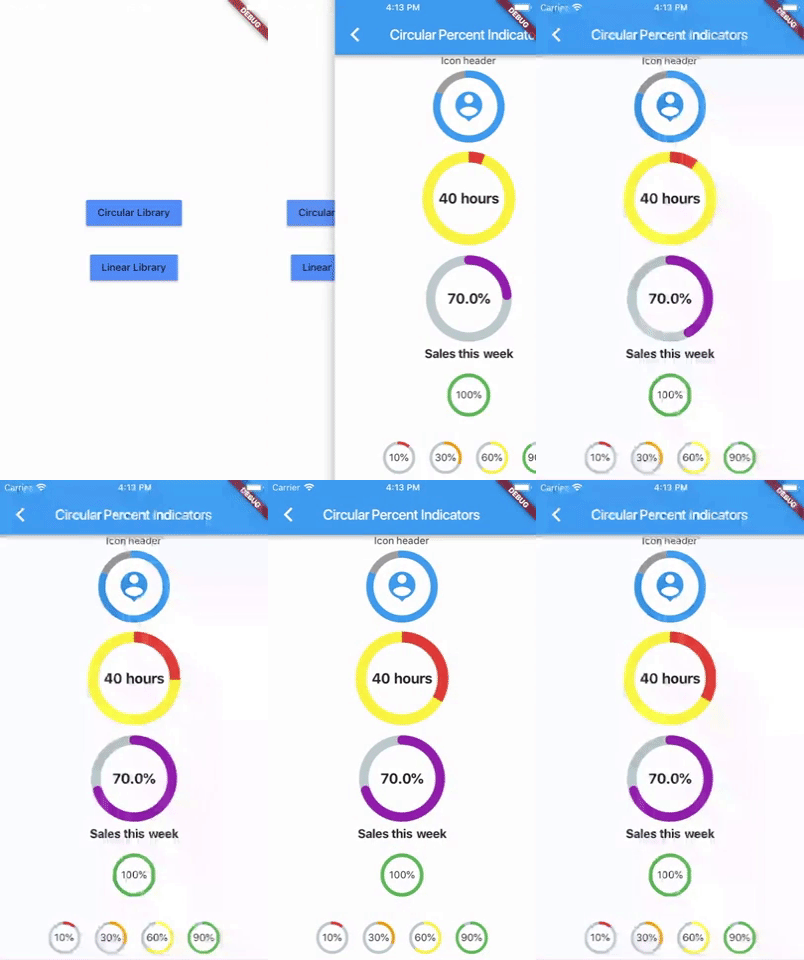
**Linear percent indicator**
Basic Widget
```dart
new LinearPercentIndicator(
width: 140.0,
lineHeight: 14.0,
percent: 0.5,
backgroundColor: Colors.grey,
progressColor: Colors.blue,
),
```
Complete example
```dart
@override
Widget build(BuildContext context) {
return Scaffold(
appBar: new AppBar(
title: new Text("Linear Percent Indicators"),
),
body: Center(
child: Column(
mainAxisAlignment: MainAxisAlignment.center,
children: [
Padding(
padding: EdgeInsets.all(15.0),
child: new LinearPercentIndicator(
width: 140.0,
lineHeight: 14.0,
percent: 0.5,
center: Text(
"50.0%",
style: new TextStyle(fontSize: 12.0),
),
trailing: Icon(Icons.mood),
linearStrokeCap: LinearStrokeCap.roundAll,
backgroundColor: Colors.grey,
progressColor: Colors.blue,
),
),
Padding(
padding: EdgeInsets.all(15.0),
child: new LinearPercentIndicator(
width: 170.0,
animation: true,
animationDuration: 1000,
lineHeight: 20.0,
leading: new Text("left content"),
trailing: new Text("right content"),
percent: 0.2,
center: Text("20.0%"),
linearStrokeCap: LinearStrokeCap.butt,
progressColor: Colors.red,
),
),
Padding(
padding: EdgeInsets.all(15.0),
child: new LinearPercentIndicator(
width: MediaQuery.of(context).size.width - 50,
animation: true,
lineHeight: 20.0,
animationDuration: 2000,
percent: 0.9,
center: Text("90.0%"),
linearStrokeCap: LinearStrokeCap.roundAll,
progressColor: Colors.greenAccent,
),
),
Padding(
padding: EdgeInsets.all(15.0),
child: new LinearPercentIndicator(
width: MediaQuery.of(context).size.width - 50,
animation: true,
lineHeight: 20.0,
animationDuration: 2500,
percent: 0.8,
center: Text("80.0%"),
linearStrokeCap: LinearStrokeCap.roundAll,
progressColor: Colors.green,
),
),
Padding(
padding: EdgeInsets.all(15.0),
child: Column(
children: [
new LinearPercentIndicator(
width: 100.0,
lineHeight: 8.0,
percent: 0.2,
progressColor: Colors.red,
),
new LinearPercentIndicator(
width: 100.0,
lineHeight: 8.0,
percent: 0.5,
progressColor: Colors.orange,
),
new LinearPercentIndicator(
width: 100.0,
lineHeight: 8.0,
percent: 0.9,
progressColor: Colors.blue,
)
],
),
),
],
),
),
);
}
```
**Multi-segment linear indicator**
Basic Widget
```dart
new MultiSegmentLinearIndicator(
width: MediaQuery.of(context).size.width - 64,
lineHeight: 30.0,
firstSegmentPercent: 0.25,
secondSegmentPercent: 0.4,
thirdSegmentPercent: 0.35,
firstSegmentColor: Color(0xFF4285F4),
secondSegmentColor: Color(0xFF6DD5F6),
thirdSegmentColor: Color(0xFFEFEFEF),
enableStripes: [1],
barRadius: Radius.circular(10.0),
animation: true,
animationDuration: 1000,
curve: Curves.easeInOut,
animateFromLastPercent: true,
onAnimationEnd: () {
ScaffoldMessenger.of(context).showSnackBar(
const SnackBar(
content: Text('Animation completed!'),
duration: Duration(seconds: 1),
),
);
},
),
```
Complete example
```dart
@override
Widget build(BuildContext context) {
return Scaffold(
appBar: AppBar(
title: Text('Multi Segment Progress'),
),
body: Center(
child: Padding(
padding: const EdgeInsets.all(20.0),
child: Column(
mainAxisAlignment: MainAxisAlignment.center,
children: [
MultiSegmentLinearIndicator(
width: MediaQuery.of(context).size.width - 64,
lineHeight: 30.0,
firstSegmentPercent: 0.25,
secondSegmentPercent: 0.4,
thirdSegmentPercent: 0.35,
firstSegmentColor: Color(0xFF4285F4),
secondSegmentColor: Color(0xFF6DD5F6),
thirdSegmentColor: Color(0xFFEFEFEF),
enableStripes: [1],
barRadius: Radius.circular(10.0),
animation: true,
animationDuration: 1000,
curve: Curves.easeInOut,
animateFromLastPercent: true,
onAnimationEnd: () {
ScaffoldMessenger.of(context).showSnackBar(
const SnackBar(
content: Text('Animation completed!'),
duration: Duration(seconds: 1),
),
);
},
),
SizedBox(height: 10),
Text(
'Static with easeInOut: 25% - 40% - 35%',
style: TextStyle(fontSize: 16),
),
SizedBox(height: 30),
MultiSegmentLinearIndicator(
width: MediaQuery.of(context).size.width - 40,
lineHeight: 20.0,
firstSegmentPercent: 0.3,
secondSegmentPercent: 0.4,
thirdSegmentPercent: 0.3,
firstSegmentColor: Color(0xFFBA0521),
secondSegmentColor: Color(0xFF071437),
thirdSegmentColor: Color(0xFFFF9205),
enableStripes: [2],
barRadius: Radius.circular(20),
),
SizedBox(height: 10),
Text(
'Static: 30% - 40% - 30%',
style: TextStyle(fontSize: 16),
),
SizedBox(height: 30),
MultiSegmentLinearIndicator(
width: MediaQuery.of(context).size.width - 40,
lineHeight: 20.0,
firstSegmentPercent: firstSegment,
secondSegmentPercent: secondSegment,
thirdSegmentPercent: thirdSegment,
firstSegmentColor: Colors.green,
secondSegmentColor: Colors.blue,
thirdSegmentColor: Colors.orange,
enableStripes: [1, 3],
animation: true,
animateFromLastPercent: true,
animationDuration: 1000,
curve: Curves.easeInOut,
barRadius: Radius.circular(10),
),
SizedBox(height: 10),
Text(
'Progress: ${(firstSegment * 100).toInt()}% - ${(secondSegment * 100).toInt()}% - ${(thirdSegment * 100).toInt()}%',
style: TextStyle(fontSize: 16),
),
SizedBox(height: 30),
MultiSegmentLinearIndicator(
width: MediaQuery.of(context).size.width - 64,
lineHeight: 30.0,
firstSegmentPercent: 0.15,
secondSegmentPercent: 0.4,
thirdSegmentPercent: 0.45,
firstSegmentColor: Color(0xFFBA0521),
secondSegmentColor: Color(0xFFAEFAB00),
thirdSegmentColor: Color(0xFFEFEFEF),
enableStripes: [1],
animation: true,
animationDuration: 1000,
curve: Curves.decelerate,
animateFromLastPercent: true,
),
SizedBox(height: 10),
Text(
'Static with decelerate: 25% - 40% - 35%',
style: TextStyle(fontSize: 16),
),
SizedBox(height: 30),
],
),
),
),
);
}
```
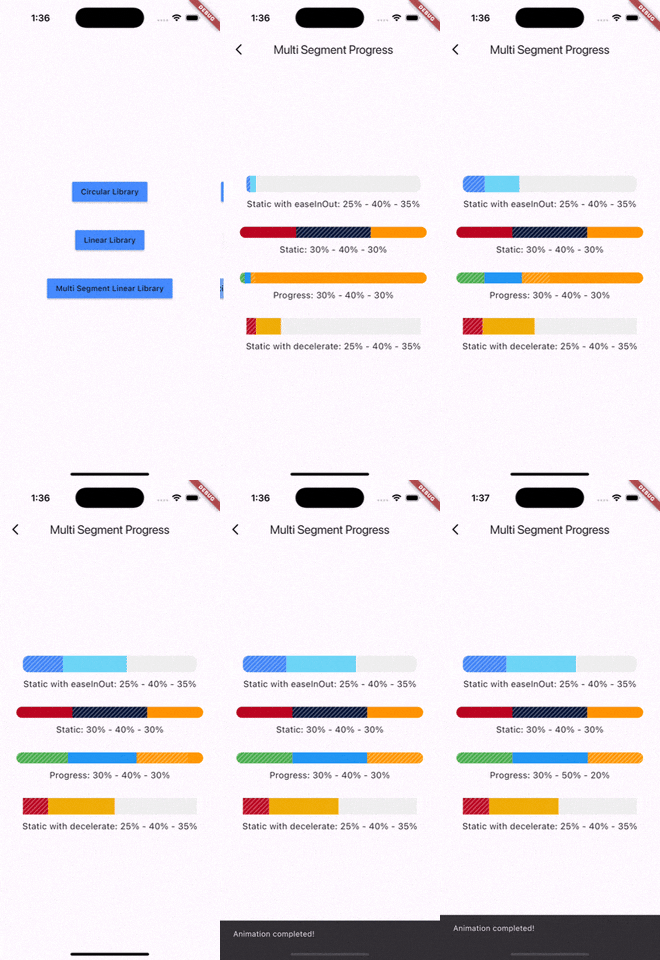
You can follow me on twitter [@diegoveloper](https://www.twitter.com/diegoveloper)
## Changelog
# [4.2.5]
- Added clipRotatedLinearGradient param, thanks kamil-matula
- Enabling multi-segment progress bar with animations and stripes, thanks naseerahmedaziz
- A lot of fixes.
# [4.2.4]
- A lot of fixes.
# [4.2.3]
- Screenshots added. Thanks FMorschel.
# [4.2.2]
- This version is for flutter 3.0 >=.
# [4.2.1]
- Add compatibility with lower versions of flutter.
# [4.2.0]
- Flutter 3.0 updated.
# [4.0.1]
- Fixed a bug: 1% progress should be inside. Thanks Gábor.
# [4.0.0]
- [BREAKING CHANGE] now `radius` is a real radius and not diameter. Thanks to `Nipun Shah`.
# [3.5.0]
- `linearStrokeCap` was deprecated. Use `barRadius` instead. Thanks to `martinkong0806`.
# [3.4.0]
- Null safety migration completed.
- Widget Indicator works when using Arc mode on `CircularPercentIndicator`.
# [3.0.1]
- `linearGradientBackgroundColor` was added for `LinearPercentIndicator`. Thanks Jeremiah Parrack.
# [3.3.0-nullsafety.1 - 3.0.0]
- Null safety migration.
# 2.1.9 - 2.1.9+1
- Users can stop `animation` after this was initialize.
- Added Half Arc for `CircularPercentIndicator` , added by Vivek
- Extra height was removed. Thanks Brayan Cantos.
# 2.1.8
- New field was added : `rotateLinearGradient` -> Enable rotation of linear gradient in circular percent indicator. Added by `ecokeco`.
# 2.1.7 - 2.1.7+4
- Added optional `widgetIndicator` for `CircularPercentIndicator` and `LinearPercentIndicator`, it's an indicator displayed at the end of the progress, it only works when the `animation` is `true`. Thanks to Brayan Cantos for the contribution
# 2.1.6
- Added optional `onAnimationEnd` for `CircularPercentIndicator` and `LinearPercentIndicator`, it's a callback when the animation ends. Thanks to Brayan Cantos for the contribution
# 2.1.5
- Added optional `backgroundWidth` for `CircularPercentIndicator`. Thanks to CircuitGuy for the contribution
# 2.1.4
- `restartAnimation` was added to restart the animation when reached the end. Thanks to superciccio for the contribution
# 2.1.3
- Added `StrokeCap` on background. Thanks @mifama
# 2.1.2
- `curve` was added in both indicators.
# 2.1.1
- `LinearPercentIndicator` now can display only part of linear gradient using `clipLinearGradient`.
# 2.1.0
- vertical padding removed from `LinearPercentIndicator`.
# 2.0.1
- `maskFilter` was added for `LinearPercentIndicator` and `CircularPercentIndicator`. Thanks to akdu12 for the contribution
# 2.0.0
- `linearGradient` was added for `LinearPercentIndicator` and `CircularPercentIndicator`.
- `reverse`, `arcType` and `arcBackgroundColor` were added to the `CircularPercentIndicator`.
# 1.0.16
- `width` is optional for `LinearPercentIndicator` widget,
# 1.0.15
- Added `addAutomaticKeepAlive` property to preserve the state of the widget.
- Added `isRTL` for `LinearPercentIndicator` widget.
# 1.0.14
- Fixed bug using animateFromLastPercent. Thanks joelbrostrom
# 1.0.13
- Padding removed from leading and trailing on LinearPercentIndicator, now you can use Expanded or Flexible.
- Fixed animation when refresh the widget with different duration
# 1.0.12
- animateFromLastPercent property was added for LinearPercentIndicator and CircularPercentIndicator
# 1.0.11
- startAngle for CircularPercentIndicator was added
# 1.0.10
- animation update bug fixed. Thanks @Tiagosito
# 1.0.9
- padding property was added for LinearPercentIndicator
# 1.0.7, 1.0.8
- alignment property was added for LinearPercentIndicator
# 1.0.5, 1.0.6
- fillColor property was added to LinearPercentIndicator
# 1.0.1 - 1.0.4
- Readme updated
# 1.0.0
Initial release of the multi_segment_linear_indicator package.
### Features
- Three independently animated segments
- Customizable colors for each segment
- Optional striped pattern for the middle segment
- Smooth animations with customizable duration and curve
- Configurable border radius
- RTL support
- Flexible sizing and padding options
### Documentation
- Added comprehensive README with usage examples
- Added API documentation
- Added example application